
Introduction
Thank you for purchasing the Polaroid Bluetooth Wireless Mini Speaker. This manual provides important information on how to set up, operate, and maintain your speaker for optimal performance. Please read this manual thoroughly before using the product and retain it for future reference.
What's in the Box
Carefully unpack your new speaker and ensure all items are present:
- Polaroid Bluetooth Wireless Mini Speaker
- 2-in-1 USB Charging Cable
- AUX Cable
- User Manual (this document)
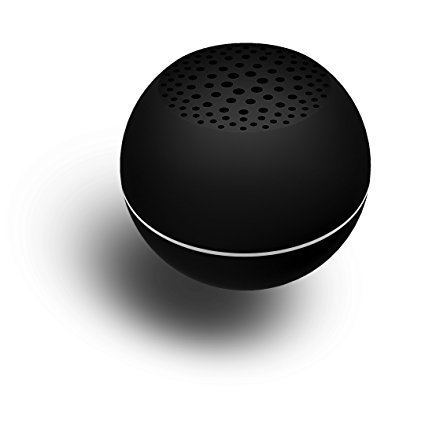
Image: Front view of the Polaroid Bluetooth Wireless Mini Speaker in white, showcasing its compact, spherical design with a speaker grille on top.
Key Features
- Superior Audio: Small speaker delivers rich, powerful sound.
- Bluetooth Connectivity: Connect any Bluetooth enabled device to wirelessly control music.
- Rechargeable Battery: Long-lasting lithium-ion battery provides hours of play.
- Portable Design: Compact and stylish design lets you place this speaker anywhere.
- Aux-in Option: 2-in-1 USB cable charges and connects for wired use.
Setup Guide
Charging the Speaker
Before first use, fully charge your speaker. Connect the small end of the included 2-in-1 USB charging cable to the speaker's charging port. Connect the large end to a USB power adapter (not included) or a computer's USB port. The charging indicator light will illuminate during charging and turn off when fully charged.
Powering On/Off
To power on the speaker, press and hold the Power button until you hear an audible tone. To power off, press and hold the Power button again.
Operating Instructions
Bluetooth Pairing
- Ensure the speaker is charged and powered on.
- The speaker will automatically enter Bluetooth pairing mode, indicated by a flashing LED light.
- On your Bluetooth-enabled device (smartphone, tablet, etc.), go to the Bluetooth settings and search for available devices.
- Select 'Polaroid PBT507WH' (or similar name) from the list. If prompted for a password, enter '0000'.
- Once paired, the speaker will emit an audible confirmation, and the LED light will become solid.
- You can now play audio wirelessly from your device through the speaker.
Using the AUX Input
For devices without Bluetooth, you can use the AUX input. Connect one end of the included AUX cable to the speaker's AUX port and the other end to the headphone jack or audio output of your device. The speaker will automatically switch to AUX mode.
Controlling Playback
Playback controls (play/pause, track skip, volume) are typically managed directly from your connected Bluetooth device or the audio source when using AUX.
Care and Maintenance
- Keep the speaker away from water, moisture, and extreme temperatures.
- Clean the speaker with a soft, dry cloth. Do not use abrasive cleaners or solvents.
- Store the speaker in a cool, dry place when not in use for extended periods.
- Avoid dropping or subjecting the speaker to strong impacts.
Troubleshooting
| Problem | Possible Solution |
|---|---|
| Speaker does not power on. | Ensure the speaker is fully charged. Connect it to a power source and allow it to charge for at least 30 minutes before attempting to power on again. |
| Cannot pair with Bluetooth device. | Ensure the speaker is in pairing mode (flashing LED). Make sure Bluetooth is enabled on your device and it is within range (up to 33 feet/10 meters). Try forgetting the device on your phone and re-pairing. Turn both devices off and on again. |
| No sound or low volume. | Check the volume levels on both the speaker and your connected device. Ensure the correct input source (Bluetooth or AUX) is selected. If using AUX, ensure the cable is fully inserted. |
| Sound distortion. | Reduce the volume on your device or the speaker. Ensure there are no obstructions between the speaker and the Bluetooth device. Move away from sources of interference (e.g., Wi-Fi routers, other Bluetooth devices). |
If the issue persists, please refer to the support section.
Technical Specifications
| Feature | Detail |
|---|---|
| Model Number | PBT507WH |
| Connectivity | Bluetooth, 3.5mm AUX, USB (charging) |
| Power Output | 3 Watts |
| Battery Type | Lithium-Ion |
| Battery Life | Up to 5 hours |
| Dimensions (L x W x H) | 3.75 x 3.75 x 4.75 inches |
| Weight | 7.2 ounces |
| Color | White |
| UPC | 680079705176 |
Warranty and Support
This Polaroid product is covered by a limited warranty. For detailed warranty information, technical support, or service inquiries, please visit the official Polaroid support website or contact their customer service.
You can find more information and support resources by visiting the Polaroid official store on Amazon: Polaroid Store.