Introduction
The FoodSaver FM2435 Vacuum Sealer Machine is designed to keep your food fresh for extended periods, preventing freezer burn and spoilage. This manual provides comprehensive instructions for setting up, operating, and maintaining your vacuum sealer system, including the main unit and the bonus handheld vacuum sealer.

Image: The FoodSaver FM2435 Vacuum Sealer Machine, a sleek silver and black appliance designed for efficient food preservation.
Safety Information
Please read all safety warnings and instructions before using this appliance to avoid personal injury or damage to the unit. Keep this manual for future reference.
- Do not operate the appliance with a damaged cord or plug.
- Do not immerse the appliance in water or other liquids.
- Keep out of reach of children.
- Use only FoodSaver brand bags, rolls, and accessories.
- Do not vacuum seal liquids without pre-freezing or using a moist setting to prevent liquid from entering the vacuum channel.
- Allow the appliance to cool down between consecutive seals if processing a large quantity of food.
What's Included
Your FoodSaver FM2435 Vacuum Sealer Machine package typically includes:
- FoodSaver FM2435 Vacuum Sealer Machine
- Bonus Handheld Vacuum Sealer
- Starter Kit (includes various bags and rolls)
Product Overview
The FoodSaver FM2435 features an intuitive control panel and integrated storage for convenience.
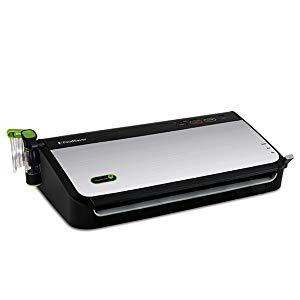
Image: Side view of the FoodSaver FM2435, highlighting its compact design and control panel.
Key Components:
- Control Panel: Features buttons for Power, Seal, Vacuum, Mode (Dry/Moist), Pulse, and Accessory.
- Vacuum Channel: Where the open end of the bag is placed for vacuuming and sealing.
- Sealing Strip: Heats to create an airtight seal.
- Removable Drip Tray: Collects any overflow liquid and is dishwasher safe.
- Built-in Roll Storage & Cutter: Allows for creating custom-sized bags directly from a roll.
- Handheld Vacuum Sealer: For use with FoodSaver zipper bags and containers.
Setup
- Unpack the Appliance: Remove the FoodSaver FM2435 and all accessories from the packaging.
- Initial Cleaning: Wipe down the exterior of the unit with a damp cloth. Ensure the drip tray and vacuum channel are clean and dry before first use.
- Load a FoodSaver Roll:
- Open the lid of the appliance.
- Place a FoodSaver roll into the built-in storage compartment.
- Pull the roll material through the cutter bar until it extends past the vacuum channel.
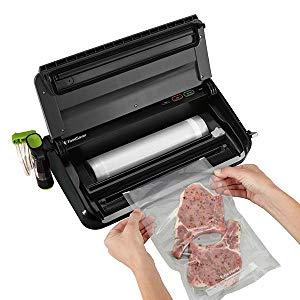
Image: The FoodSaver FM2435 with its lid open, showing the internal compartment for storing a roll of vacuum seal bags.
Video: A product overview demonstrating the features and components of the FoodSaver FM2435, including the roll storage and cutter.
- Plug In: Connect the power cord to an electrical outlet. The Power indicator light will illuminate.
Operating Instructions
1. Creating a Custom Bag from a Roll
- Pull the bag material to the desired length.
- Close the lid and slide the cutter bar across to create a clean cut.
- Place one end of the cut material into the vacuum channel, ensuring it is flat and smooth.
- Close the lid and press the 'Seal' button. The indicator light will show when sealing is complete.
2. Vacuum Sealing with Bags
- Place the food item into a FoodSaver bag, leaving at least 3 inches of space from the top seal area.
- Open the lid and place the open end of the bag into the vacuum channel. Ensure the bag is flat and smooth, without wrinkles.
- Close the lid firmly until it locks into place.
- Select the appropriate mode: 'Dry' for dry foods or 'Moist' for moist/juicy foods.
- Press the 'Vacuum' button. The machine will automatically remove air and then seal the bag. The indicator light will show progress.
- Once the process is complete, the lid will automatically release. Remove your sealed bag.

Image: The FoodSaver FM2435 in action, vacuum sealing a bag of food to preserve freshness.
Video: Demonstration of the FoodSaver FM2435 vacuum sealing process, showing how to place the bag and initiate sealing.
3. Using the Handheld Vacuum Sealer
The handheld vacuum sealer is ideal for FoodSaver zipper bags and containers.
- Ensure the handheld sealer is properly connected to the accessory port on the main unit.
- Place the handheld sealer firmly over the vacuum valve on the zipper bag or container.
- Press the 'Accessory' button (or similar button if available) on the main unit. The handheld sealer will remove air.
- The vacuum process will stop automatically when complete.

Image: The FoodSaver FM2435 with its handheld vacuum sealer attached, ready for use with compatible containers or zipper bags.
Modes and Settings
- Dry Mode: Ideal for vacuum sealing dry food items like grains, pasta, or crackers.
- Moist Mode: Designed for foods with moisture content, such as raw meats, marinated items, or fruits. This setting helps prevent liquid from being drawn into the vacuum channel.
- Pulse Vac: For delicate foods that could be crushed by a full vacuum. Allows manual control over the vacuum process.
- Seal Only: Creates a seal without vacuuming, useful for making custom-sized bags from rolls or resealing snack bags.
Care and Maintenance
- Cleaning the Drip Tray: The removable drip tray can be easily detached and is dishwasher safe for convenient cleaning.
- Cleaning the Sealing Strip: Wipe the sealing strip with a damp cloth after each use to ensure optimal performance.
- Exterior Cleaning: Clean the exterior of the appliance with a soft, damp cloth. Do not use abrasive cleaners.
- Storage: Store the appliance in a dry place. The compact design allows for vertical storage to save counter space.
Troubleshooting
| Problem | Possible Cause | Solution |
|---|---|---|
| Machine does not turn on. | Not plugged in; Power outlet not working. | Ensure power cord is securely plugged in; Test outlet with another appliance. |
| Bag is not vacuuming properly. | Bag not correctly placed in vacuum channel; Wrinkles in bag; Moisture in vacuum channel. | Reposition bag to be flat and smooth; Smooth out wrinkles; Clean and dry vacuum channel and drip tray. |
| Bag is not sealing. | Sealing strip is dirty or wet; Too many consecutive seals (overheating). | Clean and dry sealing strip; Allow machine to cool down for 20 minutes. |
| Liquid drawn into drip tray. | Sealing moist foods without 'Moist' mode; Overfilling bag. | Use 'Moist' mode for wet foods; Leave adequate space in the bag; Pre-freeze very wet foods. |
Specifications
| Feature | Detail |
|---|---|
| Brand | FoodSaver |
| Model Number | FM2435 |
| Material | Stainless Steel |
| Color | Black/Silver |
| Product Dimensions | 17"L x 4"W x 9.2"H |
| Item Weight | 5 Pounds |
| Power Source | Corded Electric (HandHeld for bonus unit) |
| Operation Mode | Automatic |
| Wattage | 120 watts |
| Voltage | 110-120 Volts |
Warranty and Support
The FoodSaver FM2435 Vacuum Sealer Machine is backed by a 5-year limited warranty. For warranty claims, troubleshooting assistance beyond this manual, or to purchase additional accessories, please contact FoodSaver Customer Service.
Visit the official FoodSaver website or refer to the contact information provided in your product packaging for detailed support options.