
Fitfiu Fitness MC-100
FITFIU Fitness MC-100 Treadmill User Manual
Model: MC-100 | Brand: Fitfiu Fitness
1. Introduction
This manual provides essential information for the safe and effective use of your FITFIU Fitness MC-100 foldable treadmill. Please read this manual thoroughly before assembly, operation, or maintenance to ensure proper function and longevity of your equipment.
2. Safety Information
Always follow basic safety precautions when using electrical appliances. This includes:
- Ensure the treadmill is placed on a flat, stable surface.
- Keep children and pets away from the treadmill during operation.
- Always attach the safety key to your clothing before starting the treadmill.
- Do not operate the treadmill if it is damaged or malfunctioning.
- Consult a physician before starting any new exercise program.
- Maximum user weight: 120 kg.
3. Package Contents
Verify that all components are present in the package:
- 1x FITFIU Fitness MC-100 Treadmill
- 1x User Manual (this document)
- 1x Assembly Kit
4. Assembly and Setup
Assembly is required and typically takes approximately 10 minutes. Follow these steps:
- Unpack all components from the box.
- Carefully lift the main frame and secure the uprights.
- Attach the console to the uprights using the provided screws from the assembly kit.
- Connect any necessary cables as indicated in the quick start guide (refer to included quick start guide for detailed diagrams).
- Ensure all screws are tightened securely before use.

Figure 4.1: Fully assembled FITFIU Fitness MC-100 Treadmill.
5. Operating Instructions
5.1. Console and Controls
The MC-100 features an interactive display and intuitive controls for a seamless workout experience.
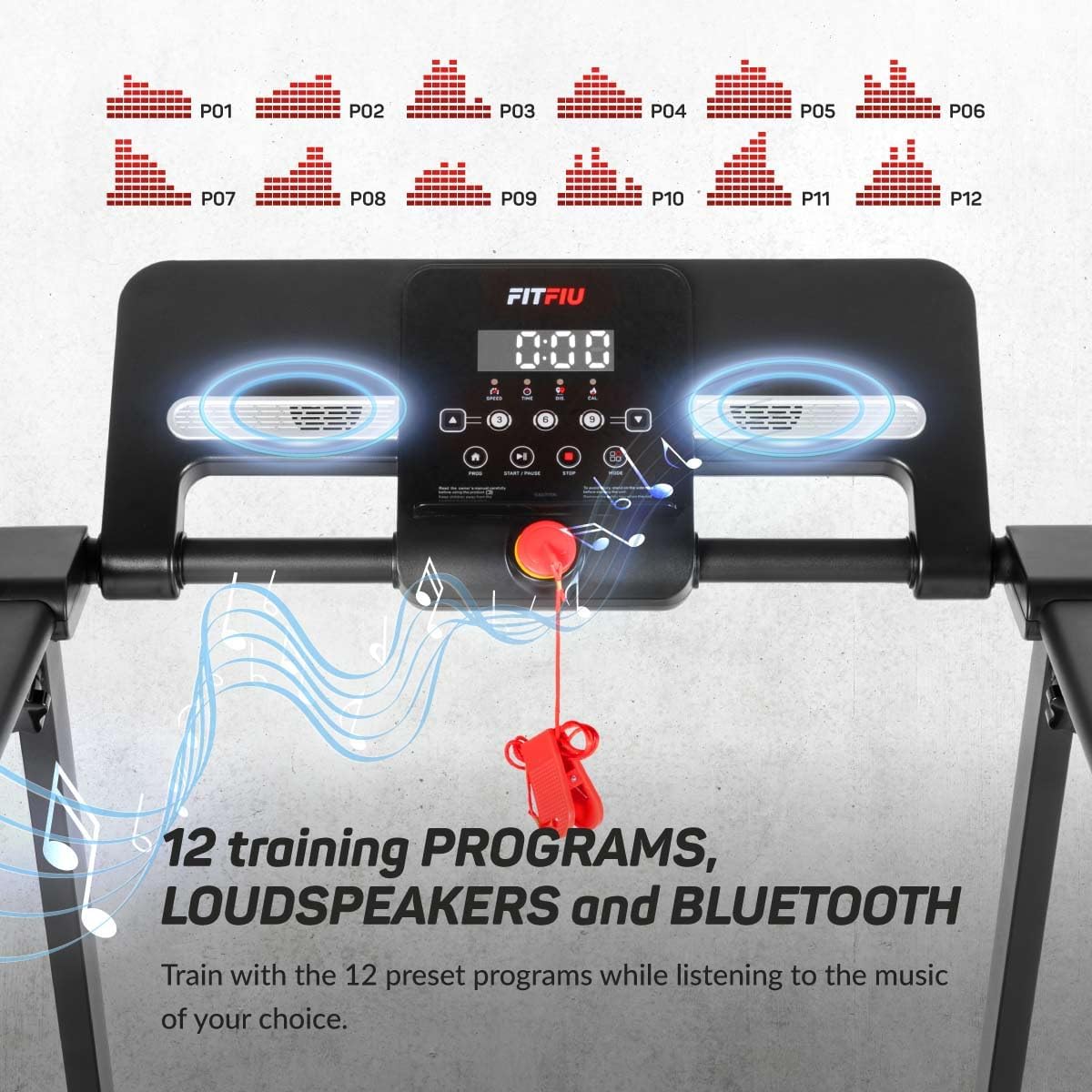
Figure 5.1: Treadmill console with display, control buttons, and safety key slot.
5.2. Starting a Workout
- Plug the treadmill into a power outlet.
- Attach the safety key to the designated slot on the console and clip the other end to your clothing.
- Press the 'START' button to begin. The belt will start moving at a low speed.
- Adjust the speed using the '+' and '-' buttons on the console or handlebars. The maximum speed is 12 km/h.
5.3. Pre-set Programs
The MC-100 includes 12 pre-set training programs (P01-P12) designed to vary intensity and duration. Select a program by pressing the 'PROGRAM' button and confirm with 'START'.
Figure 5.2: Visual representation of the 12 pre-set training programs.
5.4. Manual Incline
The treadmill offers a manual 2-stage incline adjustment (2.2 and 1.7 degrees) to increase workout intensity and target different muscle groups. Adjust the incline before starting your workout by manually setting the rear support legs.
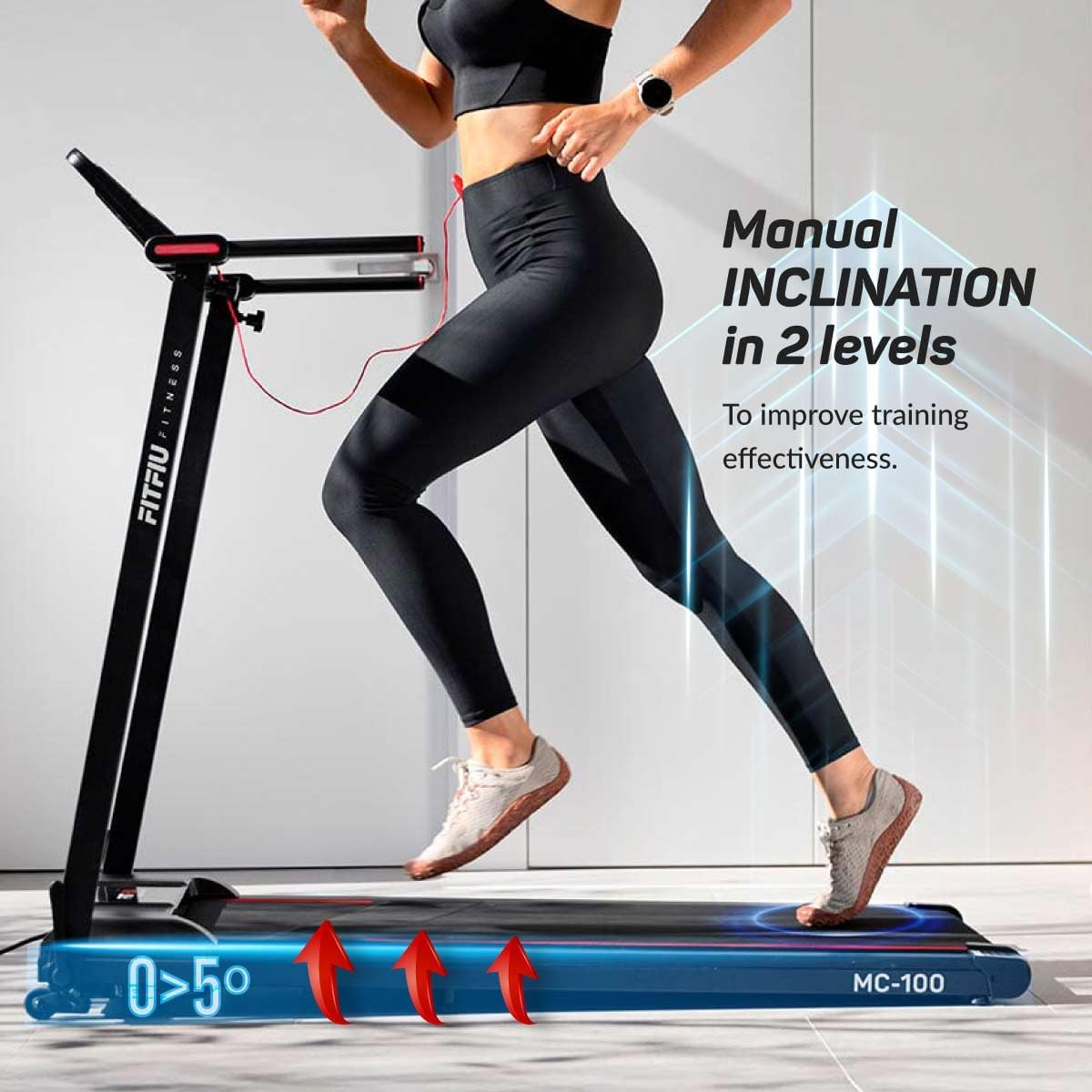
Figure 5.3: Manual incline adjustment points on the treadmill.
5.5. Bluetooth Connectivity and KINOMAP App
Connect your smartphone or tablet via Bluetooth to the treadmill's integrated speakers for audio playback. For interactive training, download the KINOMAP app and connect it to your treadmill to access virtual workouts and track your progress.

Figure 5.4: Treadmill console with tablet displaying KINOMAP and Zwift apps, highlighting Bluetooth connectivity.
Video 5.1: Demonstration of the MC-100 treadmill's folding mechanism and app connectivity.
5.6. Emergency Stop
The treadmill is equipped with a magnetic emergency stop system. Pulling the safety key from the console will immediately stop the running belt, ensuring user safety.
6. Maintenance
Regular maintenance ensures the longevity and optimal performance of your treadmill.
- Cleaning: Wipe down the treadmill with a damp cloth after each use to remove sweat and dust. Do not use abrasive cleaners.
- Belt Lubrication: Periodically lubricate the running belt according to the instructions in the detailed product manual (not provided here, but generally recommended for treadmills).
- Belt Alignment: Check and adjust the running belt alignment if it starts to drift to one side.
- Storage: When not in use, the treadmill can be folded for compact storage.

Figure 6.1: The treadmill features a horizontal folding system for easy storage.
7. Troubleshooting
If you encounter issues with your treadmill, refer to the following common problems and solutions:
| Problem | Possible Cause | Solution |
|---|---|---|
| Treadmill does not start. | Power cord not plugged in; Safety key not in place. | Ensure power cord is securely plugged in; Insert safety key fully into the console. |
| Running belt slips or hesitates. | Belt too loose; Insufficient lubrication. | Adjust belt tension; Lubricate the running belt. |
| Unusual noise during operation. | Loose components; Motor issue. | Check and tighten all visible screws; If noise persists, contact customer support. |
8. Specifications
| Feature | Detail |
|---|---|
| Model | MC-100 |
| Motor Power | 1500W |
| Maximum Speed | 12 km/h |
| Running Surface | 42 x 100 cm |
| Maximum User Weight | 120 kg |
| Incline Levels | 2 (Manual: 2.2 and 1.7 degrees) |
| Programs | 12 Pre-set Programs |
| Connectivity | Bluetooth, KINOMAP App compatible |
| Dimensions (Product) | 139 x 62 x 114 cm (L x W x H) |
| Weight (Product) | 26 kg |
| Material | 100% Steel |
9. Warranty and Support
The FITFIU Fitness MC-100 Treadmill comes with a 2-year manufacturer's warranty. For technical support, warranty claims, or spare parts, please contact your retailer or the official Fitfiu Fitness customer service.
For more information and personalized training routines, visit the official Fitfiu Fitness website or their YouTube channel.