
Introduction
This manual provides instructions for the proper setup, operation, and maintenance of your Fossil Men's CH3028 Sport 54 Chronograph Black Stainless Steel Watch. Please read this manual thoroughly to ensure correct usage and to maximize the lifespan of your timepiece.
Watch Components
Familiarize yourself with the main components of your watch:
- Crown: Used for setting time.
- Pushers (A & B): Used for operating the chronograph functions.
- Hour, Minute, Second Hands: Indicate the current time.
- Chronograph Second Hand: Large central hand for stopwatch function.
- Chronograph Minute Sub-dial: Records elapsed minutes (typically at 9 o'clock).
- 24-Hour Sub-dial: Indicates 24-hour time (typically at 3 o'clock).
- Small Second Sub-dial: Continuous running seconds for timekeeping (typically at 6 o'clock).

Image: Front view of the Fossil CH3028 watch, showing the dial, hands, sub-dials, crown, and pushers. This image helps identify the various functional parts of the watch.
Setup and Initial Adjustment
Setting the Time
- Pull the crown out to position 2 (the outermost position).
- Rotate the crown to move the hour and minute hands clockwise until the desired time is set. Ensure the 24-hour sub-dial also reflects the correct AM/PM period.
- Push the crown back into position 0 (normal operating position).
Resetting the Chronograph Hands
If the chronograph hands (large second hand, minute sub-dial) are not aligned to the 12 o'clock position when reset, they can be adjusted:
- Pull the crown out to position 2.
- Press Pusher A (top pusher) repeatedly to advance the chronograph second hand until it aligns with the 12 o'clock mark.
- Press Pusher B (bottom pusher) repeatedly to advance the chronograph minute sub-dial hand until it aligns with the 12 o'clock mark.
- Once all chronograph hands are aligned, push the crown back into position 0.
Operating the Chronograph
Starting and Stopping the Chronograph
- To start the chronograph, press Pusher A. The large central second hand will begin to move, along with the chronograph minute sub-dial.
- To stop the chronograph, press Pusher A again. The hands will stop, indicating the elapsed time.
Resetting the Chronograph
- After stopping the chronograph, press Pusher B. All chronograph hands will instantly return to their 12 o'clock (zero) positions.
Note: Do not operate the pushers while the watch is submerged in water.
Care and Maintenance
Cleaning Your Watch
To maintain the appearance of your watch:
- Wipe the case and stainless steel band with a soft, damp cloth.
- For stubborn dirt, a mild soap solution can be used, followed by thorough rinsing with clean water and drying.
- Avoid using harsh chemicals, abrasive cleaners, or solvents, as these can damage the watch finish.
Water Resistance
Your Fossil CH3028 watch is water resistant to 100 meters (10 ATM). This means it is suitable for swimming and snorkeling, but not for diving. To ensure water resistance:
- Always ensure the crown is fully pushed in to position 0 before any contact with water.
- Do not operate the crown or pushers while the watch is wet or submerged.
- Avoid exposing the watch to extreme temperature changes (e.g., hot showers followed by cold water), as this can compromise seals.
- If the watch is exposed to saltwater, rinse it thoroughly with fresh water and dry it with a soft cloth.
Battery Replacement
The watch is powered by a product-specific battery. When the battery runs low, the watch may stop or the chronograph functions may become erratic. Battery replacement should be performed by a qualified watch technician to ensure proper sealing and maintain water resistance.
Troubleshooting
Watch Not Running
- Check Crown Position: Ensure the crown is fully pushed in to position 0.
- Battery: The battery may need replacement. Consult a professional watch repair service.
Chronograph Hands Not Resetting to Zero
- Refer to the "Resetting the Chronograph Hands" section under Setup to manually align the hands.
Condensation Inside Watch
- If you notice condensation under the crystal, this indicates a breach in the water resistance. Take the watch to a qualified service center immediately to prevent further damage.
Specifications
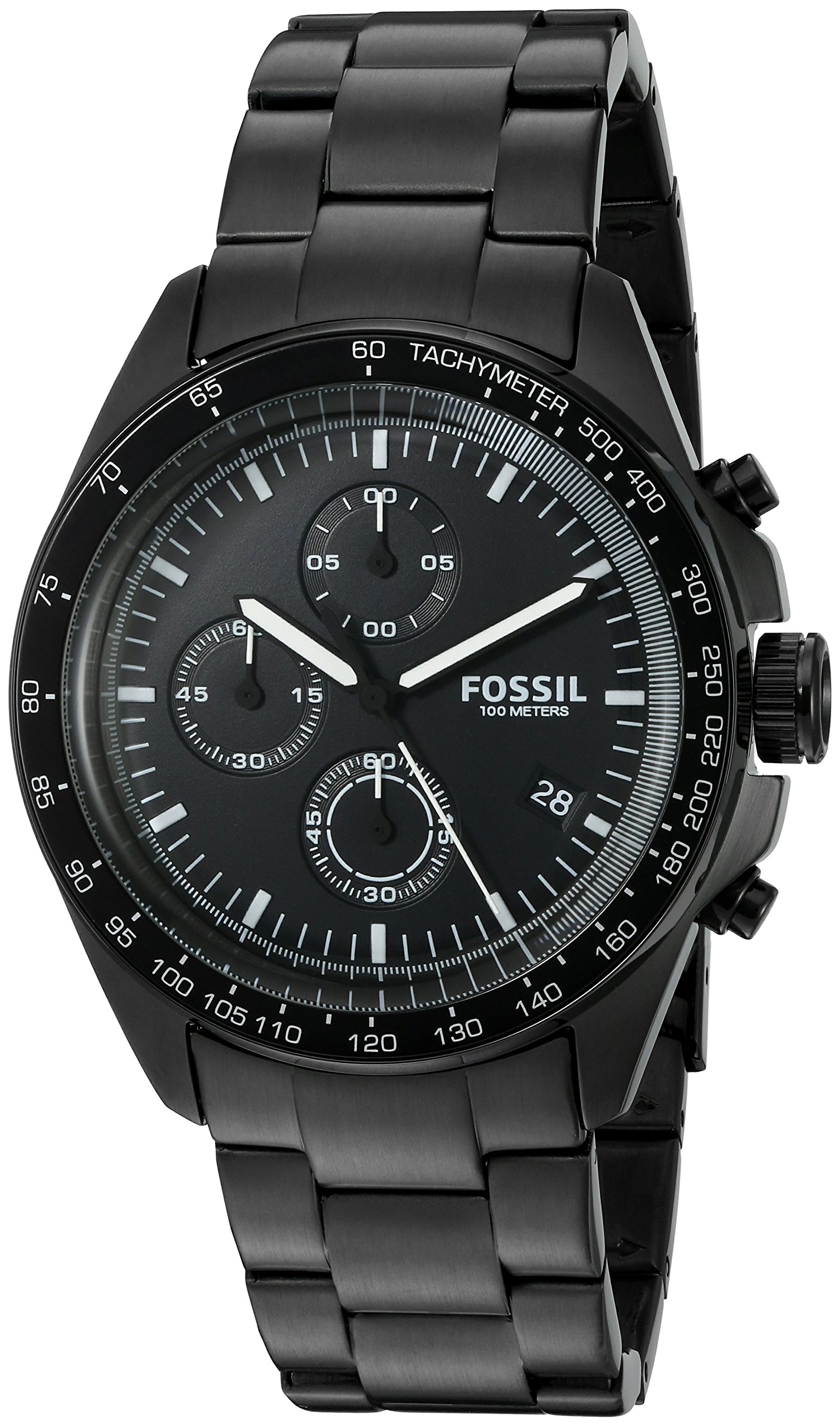
Image: The Fossil CH3028 watch displayed on a wrist, providing a visual reference for its size and appearance when worn.
| Feature | Detail |
|---|---|
| Model Number | CH3028 |
| Movement Type | Japanese Quartz Chronograph |
| Case Material | Stainless Steel |
| Case Diameter | 44 mm |
| Case Thickness | 14 mm |
| Band Material | Stainless Steel |
| Band Width | 20 mm |
| Crystal Material | Mineral |
| Water Resistance Depth | 100 Meters (10 ATM) |
| Display Type | Analog |
| Clasp Type | Deployment Clasp |
| Item Weight | 0.16 Kilograms (160 g) |

Image: A visual guide illustrating various watch case diameters, including 44mm, to help understand the size of the CH3028 model relative to other watches.
Warranty and Support
Fossil watches typically come with a limited warranty covering manufacturing defects. For specific warranty terms, duration, and conditions applicable to your CH3028 model, please refer to the warranty card included with your purchase or visit the official Fossil website.
For service, repairs, or further assistance, please contact Fossil customer support or visit an authorized Fossil service center. Keep your proof of purchase for warranty claims.
Official Fossil Website: www.fossil.com


