
1. Introduction
This user manual provides detailed instructions for the installation, operation, programming, and maintenance of your Chappee CFF 0000028 Digital Wired Programmable Room Thermostat. Please read this manual carefully before installation and use to ensure correct operation and to prevent damage to the device.
The Chappee CFF 0000028 is a wired digital thermostat designed for precise temperature control in your living space. It features weekly programming capabilities and is compatible with various boiler systems.
2. Safety Information
Important: Installation and wiring must be performed by a qualified electrician or heating engineer in accordance with local regulations and standards. Always disconnect the main power supply before performing any electrical work.
- Ensure the power supply is off before installation or maintenance.
- Do not expose the thermostat to water or excessive humidity.
- Do not attempt to repair the device yourself. Contact qualified personnel.
- Keep the device away from direct sunlight, heat sources, and drafts to ensure accurate temperature readings.
3. Product Overview
The Chappee CFF 0000028 thermostat features a clear digital display, intuitive control buttons, and a rotary dial for easy temperature adjustment and menu navigation.

Figure 3.1: Front view of the Chappee CFF 0000028 digital thermostat, showing the display, control buttons, and rotary dial.
Key Components:
- Digital Display: Shows current time, temperature, operating mode, and programming information.
- Control Buttons: Used for menu navigation, setting adjustments, and mode selection.
- Rotary Dial: Primarily used for quick temperature adjustments and confirming selections.
4. Installation and Setup
4.1 Mounting Location
Choose a central location in the main living area, away from direct sunlight, drafts, and heat sources (e.g., radiators, lamps). The recommended mounting height is approximately 1.5 meters (5 feet) from the floor.
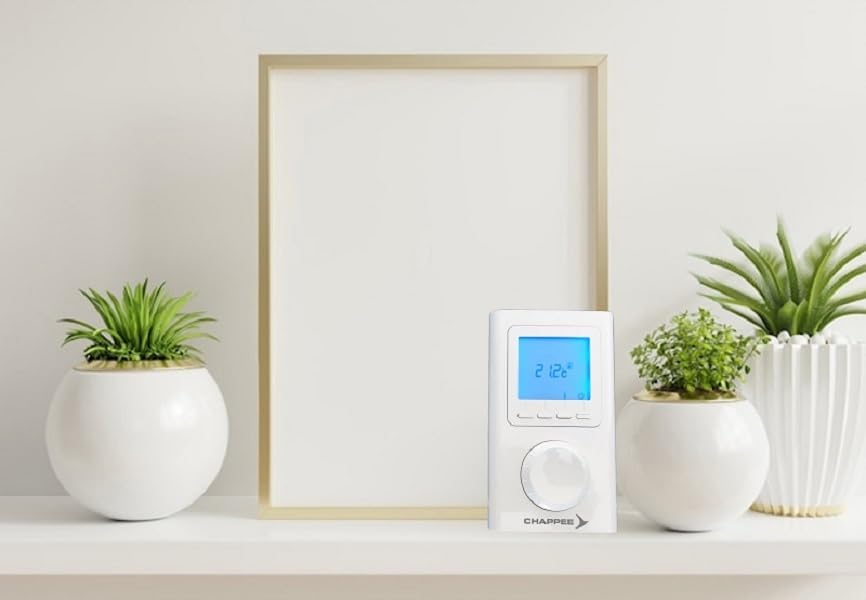
Figure 4.1: The Chappee CFF 0000028 thermostat positioned on a shelf in a room, demonstrating a typical installation environment.
4.2 Wiring Instructions
The Chappee CFF 0000028 is a wired thermostat compatible with all boiler types. Refer to your boiler's manual for specific wiring diagrams. Generally, the thermostat connects to the boiler's control terminals (usually marked as 'RT', 'COM', 'NO', or similar).
- Disconnect Power: Ensure the main power supply to the heating system is switched off at the fuse box or circuit breaker.
- Access Terminals: Open the thermostat casing to access the wiring terminals.
- Connect Wires: Connect the thermostat wires to the corresponding terminals on your boiler. Typically, two wires are used for switching the boiler on/off.
- Secure Casing: Close the thermostat casing securely.
- Restore Power: Switch the main power supply back on.
4.3 Initial Setup
Upon first power-up, the thermostat may require initial settings such as time, date, and basic operating parameters. Follow the on-screen prompts or refer to the "Setting Time and Date" section.
5. Operating Instructions
5.1 Adjusting Temperature
To manually adjust the desired temperature, rotate the dial. The new setpoint will be displayed, and the thermostat will maintain this temperature until the next programmed event or manual override.
5.2 Operating Modes
The thermostat typically offers several operating modes:
- Auto/Program Mode: Follows the pre-set weekly program.
- Manual Mode: Maintains a constant temperature set by the user, overriding the program.
- Comfort Mode: Maintains a higher, comfortable temperature.
- Economy Mode: Maintains a lower, energy-saving temperature.
- Frost Protection Mode: Maintains a minimum temperature (e.g., 5°C) to prevent pipes from freezing.
- Holiday Mode: Allows setting a specific temperature for a defined period (e.g., during vacation), after which it returns to the normal program.
Use the mode selection buttons to cycle through available modes.
6. Programming
The Chappee CFF 0000028 features weekly programming, allowing you to set different temperatures for various times of the day across the week.
6.1 Setting Time and Date
- Press the 'Menu' or 'Set' button.
- Navigate to 'Time/Date' settings using the arrow buttons or rotary dial.
- Adjust the hour, minute, day, month, and year as required.
- Confirm each setting to save.
6.2 Weekly Program Setup
To set up your weekly heating schedule:
- Enter the 'Program' menu (usually by pressing a dedicated 'Prog' button or navigating through the main menu).
- Select the day or group of days you wish to program (e.g., Mon-Fri, Sat-Sun, or individual days).
- For each time segment (e.g., morning, day, evening, night), set the desired temperature and start time.
- Repeat for all desired days and time segments.
- Save the program and exit the programming menu.
The thermostat will now automatically adjust the temperature according to your set schedule.
7. Maintenance
7.1 Cleaning
To clean the thermostat, gently wipe the surface with a soft, dry cloth. Do not use abrasive cleaners, solvents, or chemical sprays, as these can damage the casing or electronic components.
7.2 General Care
Ensure the thermostat is not obstructed by furniture or curtains, which could affect its ability to accurately sense room temperature. No user-serviceable parts are inside the unit beyond initial wiring.
8. Troubleshooting
| Problem | Possible Cause | Solution |
|---|---|---|
| No display/Thermostat not powering on | No power supply; incorrect wiring. | Check circuit breaker. Verify wiring connections (consult a qualified electrician). |
| Heating not turning on | Thermostat in incorrect mode (e.g., Frost Protection); setpoint too low; boiler issue. | Check operating mode. Increase setpoint temperature. Check boiler status. |
| Inaccurate temperature reading | Thermostat exposed to drafts, direct sunlight, or heat sources. | Relocate thermostat if possible, or shield it from external influences. |
| Program not running | Thermostat in Manual mode; program not saved correctly. | Switch to Auto/Program mode. Re-enter and save the program. |
If the problem persists after attempting these solutions, please contact customer support or a qualified technician.
9. Specifications
| Brand | Chappee |
| Model Number | CFF000028 |
| Color | White |
| Dimensions (Package) | 14 x 9.4 x 4 cm |
| Item Weight | 180 g |
| Voltage | 230 Volts |
| Material | Metal |
| Connectivity Technology | Wired |
| Special Feature | Programmable |
| Controller Type | Push-button |
| Temperature Control Type | Digital/Smart |
| Compatible Boilers | All types (as per product description) |
10. Warranty and Support
This Chappee product is covered by a standard manufacturer's warranty. Please refer to the warranty card included with your purchase for specific terms and conditions, or visit the official Chappee website for more information.
For technical assistance, troubleshooting not covered in this manual, or warranty claims, please contact your retailer or the Chappee customer support service. Ensure you have your model number (CFF000028) and proof of purchase available when contacting support.
Online Resources: For additional support and product information, you may visit the Chappee official website.