
1. Introduction
This manual provides essential information for the safe and effective installation, operation, and maintenance of your KMH Federal Signal AS920 200W Wireless Car Siren Amplifier system. Please read this manual thoroughly before attempting to install or operate the device. Retain this manual for future reference.
2. Safety Information
WARNING: Improper installation or use can lead to serious injury, property damage, or product failure. Professional installation is highly recommended.
- Ensure the vehicle's electrical system is disconnected before installation to prevent electrical shock or short circuits.
- Verify that the power supply voltage matches the product's specifications (12 Volts DC).
- Do not expose the amplifier or speaker to water, excessive moisture, or extreme temperatures.
- Mount all components securely to prevent detachment during vehicle operation.
- Route all wiring away from moving parts, heat sources, and sharp edges.
- Do not operate the siren in residential areas or where prohibited by law. Use responsibly and only for authorized purposes.
3. Package Contents
Carefully unpack the box and ensure all items are present and undamaged. If any items are missing or damaged, contact your retailer immediately.
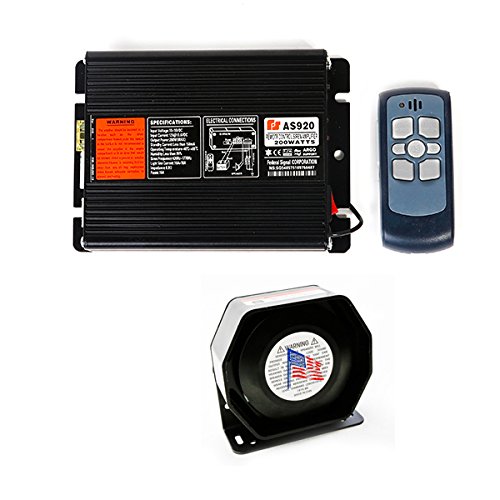
- 1 x KMH Federal Signal AS920 Siren Amplifier
- 1 x Slim Speaker Siren
- 1 x Wireless Remote Control
4. Product Overview
The KMH Federal Signal AS920 is a 200W wireless car siren amplifier system designed for emergency and warning applications. It features a compact amplifier, a powerful slim speaker, and a convenient wireless remote for operation.
4.1 Siren Amplifier
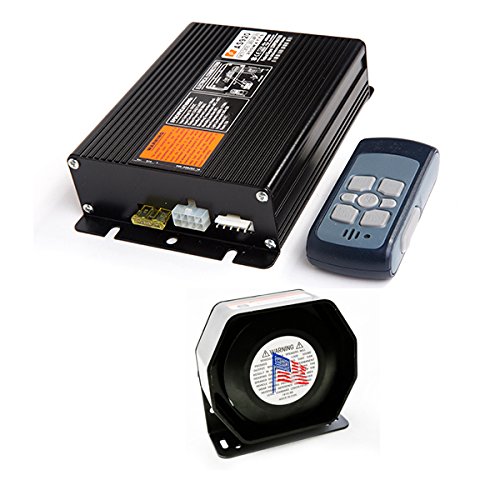
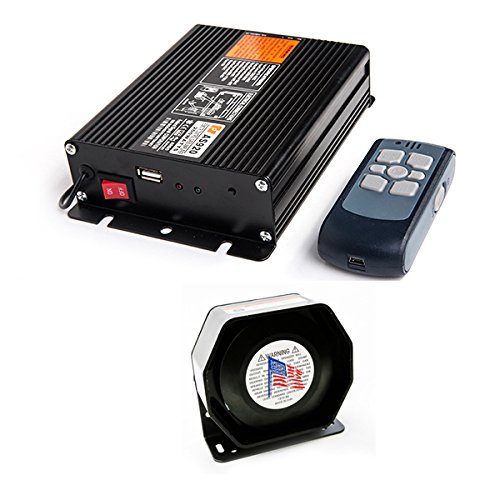
The amplifier unit processes audio signals and delivers power to the speaker. It includes various input/output ports and controls.
4.2 Slim Speaker Siren
The slim speaker is designed for efficient sound projection and compact mounting in various vehicle types.
4.3 Wireless Remote Control
The remote control allows for convenient activation and selection of siren tones from a distance, eliminating the need for direct access to the amplifier unit.
5. Setup and Installation
IMPORTANT: Professional installation by a qualified technician is strongly recommended to ensure proper functionality and safety.
- Mounting the Amplifier: Select a dry, secure location inside the vehicle, away from direct heat and moisture. Ensure adequate ventilation. Secure the amplifier using appropriate fasteners.
- Mounting the Speaker: Choose a location on the exterior of the vehicle that allows for clear sound projection and is protected from direct impact. Ensure the speaker is securely mounted and its opening is not obstructed.
- Wiring the Power: Connect the amplifier's positive (+) power wire to a fused 12V DC power source in the vehicle. Connect the negative (-) power wire to a suitable ground point on the vehicle chassis. Ensure the fuse rating matches the amplifier's requirements (refer to the label on the amplifier).
- Wiring the Speaker: Connect the speaker wires to the designated speaker output terminals on the amplifier. Observe correct polarity (+ to + and - to -) for optimal performance.
- Remote Control Pairing (if required): If the remote control does not operate the siren immediately, refer to the amplifier's label or specific instructions for pairing procedures. Typically, this involves a sequence of button presses or a pairing button on the amplifier.
- Final Check: Before restoring power, double-check all connections for security and correct polarity. Ensure no wires are pinched or exposed.
6. Operating Instructions
- Power On: After successful installation, switch on the power to the amplifier using the main power switch (refer to Figure 4.2). The amplifier may have an indicator light to confirm it is powered on.
- Using the Wireless Remote: The wireless remote control is used to activate and select siren tones. Familiarize yourself with the buttons on the remote. Typically, there are buttons for power, different siren tones (e.g., Wail, Yelp, Phaser), and possibly a horn button.
- Activating Siren Tones: Press the desired siren tone button on the remote control to activate the siren. Pressing the button again or a 'stop' button (if available) will typically deactivate the siren.
- Volume Control: If the amplifier or remote has volume controls, adjust the output level to a suitable and safe level.
7. Maintenance
Regular maintenance ensures the longevity and reliable operation of your siren system.
- Cleaning: Keep the amplifier and remote control clean and free from dust and debris. Use a soft, dry cloth. Do not use harsh chemicals or abrasive cleaners.
- Connection Checks: Periodically inspect all electrical connections for corrosion, looseness, or damage. Tighten any loose connections.
- Speaker Inspection: Ensure the speaker cone is free from obstructions and damage.
- Battery Replacement (Remote): If the wireless remote's range or responsiveness decreases, replace its battery (type not specified, typically small coin cell or AAA batteries).
8. Troubleshooting
If you encounter issues with your KMH Federal Signal AS920 system, refer to the following common problems and solutions:
- No Power to Amplifier:
- Check the vehicle's fuse connected to the amplifier's power line.
- Verify all power connections are secure and correctly wired.
- Ensure the amplifier's main power switch is in the 'ON' position.
- No Sound from Speaker:
- Check speaker wiring for correct polarity and secure connections.
- Ensure the amplifier is receiving power and is turned on.
- Verify the remote control is functioning and sending signals.
- Wireless Remote Not Responding:
- Replace the remote control's battery.
- Ensure the remote is within operational range of the amplifier.
- Re-pair the remote with the amplifier if necessary (refer to Section 5.5).
If problems persist after attempting these solutions, contact customer support or a qualified technician.
9. Specifications
| Feature | Specification |
|---|---|
| Model Name | AS920 |
| Part Number | SIRE00004 |
| Brand | KMH |
| Wattage | 200 Watts |
| Voltage | 12 Volts DC |
| Special Features | Wireless Remote Control |
| Item Weight | 20 kg (Approximate, includes packaging) |
10. Warranty and Support
For warranty information and technical support, please refer to the documentation provided at the time of purchase or contact your retailer. KMH is committed to providing reliable products and customer assistance.
For further inquiries, please visit the KMH Store on Amazon.