
1. Introduction
Thank you for choosing the Gala Twin Bucket Spin Mop Set. This manual provides essential information for the proper assembly, operation, maintenance, and care of your new mop set. Please read these instructions carefully before first use to ensure optimal performance and longevity of the product.
2. Product Components
The Gala Twin Bucket Spin Mop Set includes the following components:
- Twin Bucket System (separate clean and dirty water compartments)
- Adjustable Stainless Steel Mop Handle
- Microfiber Mop Head (x2, including 1 extra refill)
- Liquid Dispenser (integrated into bucket)
- Water Outlet Plug
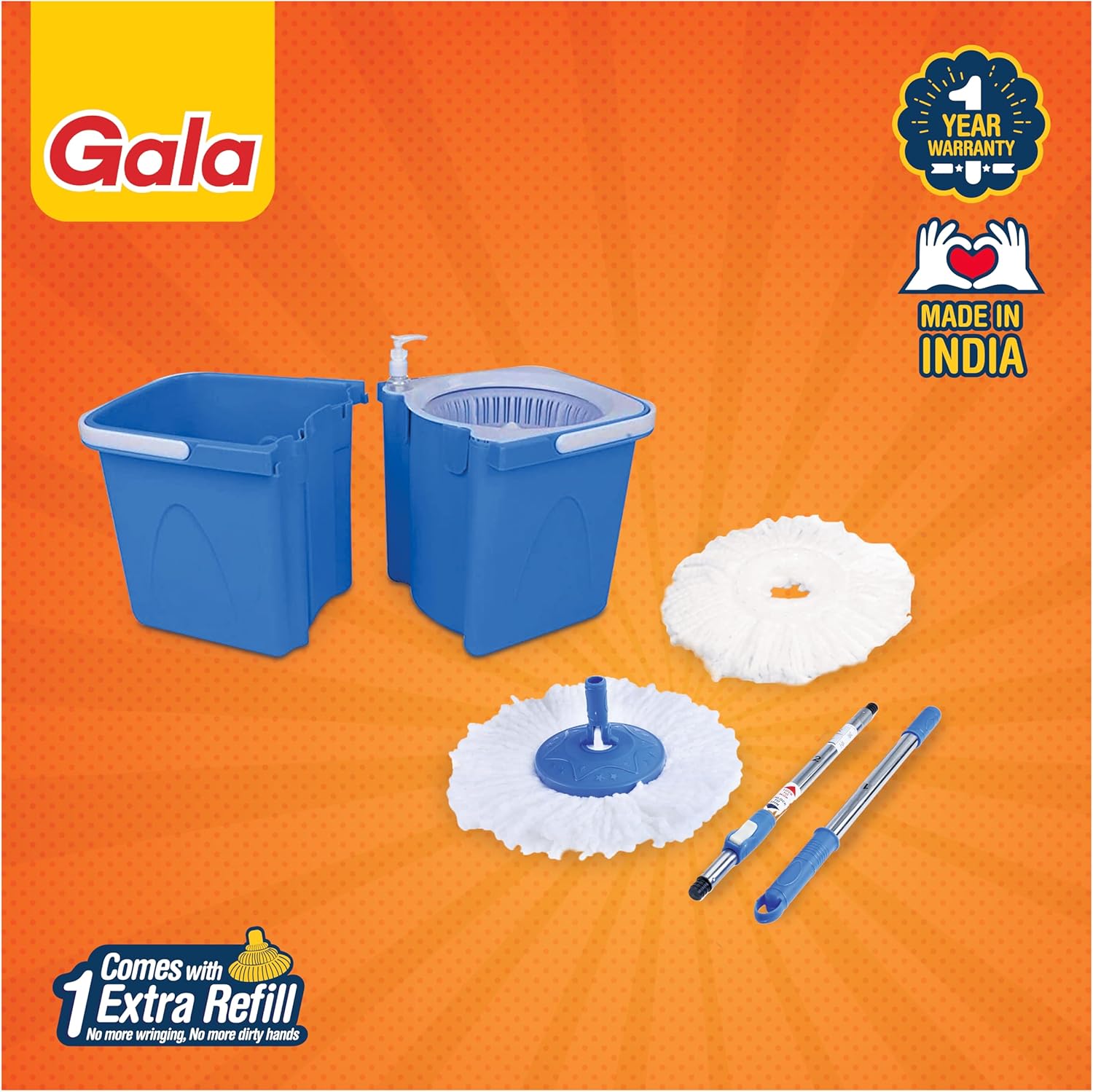
Figure 2.1: All components of the Gala Twin Bucket Spin Mop Set, including the twin buckets, adjustable mop handle, and two microfiber mop heads.
3. Setup Instructions
3.1 Unpacking
Carefully remove all components from the packaging. Inspect for any damage. Retain packaging for future storage or transport if needed.
3.2 Assembling the Mop Handle
- Connect the stainless steel handle sections by twisting them clockwise until securely fastened.
- Adjust the handle length to a comfortable height by twisting the locking mechanism on the handle, extending or retracting, then twisting to lock.
3.3 Attaching the Microfiber Mop Head
- Align the mop head with the mop plate at the end of the handle.
- Press the mop plate firmly onto the mop head until it clicks into place. Ensure it is securely attached.
3.4 Preparing the Twin Buckets
The twin buckets are designed to fit together for compact storage and separate for use. Ensure the two bucket sections are properly aligned and connected before filling.

Figure 3.1: The twin bucket system features separate compartments for clean and dirty water, ensuring a hygienic cleaning process.
4. Operating Instructions
4.1 Filling the Buckets
- Fill the designated 'Clean Water' compartment with water. Do not overfill.
- If desired, add a small amount of cleaning solution to the water through the integrated liquid dispenser.
4.2 Wetting and Wringing the Mop Head
- Place the mop head into the 'Clean Water' compartment to saturate it.
- Transfer the wet mop head to the spinning wringer basket in the other compartment.
- Push the mop handle down repeatedly to activate the spinning mechanism, wringing out excess water. Adjust the number of pushes to achieve desired mop dampness.
4.3 Mopping
- Begin mopping your floor surfaces. The 180-degree rotating mop handle allows for easy access under furniture and into corners.
- For optimal cleaning, rinse the mop head in the 'Clean Water' compartment and wring it out in the spinner as needed during your cleaning session.

Figure 4.1: The microfiber mop head provides deep cleaning, effectively picking up dirt and dust from various floor types.

Figure 4.2: The pivoting mop head allows for easy access and cleaning under furniture and in tight spaces.
4.4 Draining Dirty Water
Once cleaning is complete, pull out the water outlet plug located at the bottom of the 'Dirty Water' compartment to easily drain the dirty water without direct contact.

Figure 4.3: The convenient water outlet plug facilitates easy drainage of dirty water.
5. Maintenance and Care
5.1 Cleaning the Mop Head
The microfiber mop head is machine-washable. For best results, wash with similar colors and air dry. Do not use bleach or fabric softener.
5.2 Replacing the Mop Head
For optimal cleaning performance, it is recommended to replace the microfiber mop head every 3 months, or sooner depending on usage and wear. To replace, simply detach the old mop head from the mop plate and attach a new one as described in Section 3.3.
5.3 Cleaning the Buckets
Rinse the buckets thoroughly with clean water after each use. You may use a mild detergent for deeper cleaning. Ensure all parts are dry before storing to prevent mildew.
5.4 Storage
The twin buckets are designed to fit into each other for compact storage. Store the mop set in a dry place away from direct sunlight.

Figure 5.1: The compact design allows for easy storage of the mop set.
6. Troubleshooting
- Mop head not spinning effectively: Ensure the mop head is correctly seated in the wringer basket. Apply firm, consistent downward pressure on the handle. Check if the spinning mechanism is obstructed by debris.
- Water leakage from the outlet plug: Ensure the water outlet plug is fully and securely inserted. If leakage persists, inspect the plug for damage or wear and consider replacement.
- Mop handle feels loose: Tighten all handle sections by twisting clockwise. Ensure the adjustable locking mechanism is securely fastened after setting the desired length.
- Mop head not attaching securely: Ensure the mop head is properly aligned with the mop plate and pressed firmly until it clicks. Check for any damage to the mop plate or mop head attachment points.
7. Specifications
| Feature | Detail |
|---|---|
| Brand | GALA |
| Model Number | Twin Bucket |
| Material | Microfiber (Mop Head), Stainless Steel (Handle) |
| Color | Blue |
| Product Dimensions | 11.81 x 13.19 x 19.49 inches |
| Item Weight | 5.31 pounds |
| Handle Type | Telescopic, 180-degree rotating |
| Included Components | Mop Head (2), Twin Bucket, Handle |

Figure 7.1: Product dimensions and scale for reference.
8. Warranty Information
The Gala Twin Bucket Spin Mop Set comes with a 1-year warranty from the date of purchase. This warranty covers manufacturing defects under normal use. Please retain your proof of purchase for any warranty claims. The warranty does not cover damage resulting from misuse, accidents, or unauthorized modifications.
9. Customer Support
For any questions, concerns, or assistance with your Gala Twin Bucket Spin Mop Set, please contact the manufacturer's customer support. Refer to the product packaging or the official GALA website for contact details.