
BOSS BC-1X
BOSS BC-1X Bass Compressor Pedal Instruction Manual
Model: BC-1X
Product Overview
The BOSS BC-1X Bass Compressor is a premium stompbox designed to provide studio-quality multiband compression for bass guitars. Utilizing advanced BOSS technology, this pedal intelligently responds to different dynamics and registers, ensuring a natural and transparent compression without over-squeezing or muddying the tone. It is built for dynamic players seeking punch and precision in their sound.

Figure 1: Front view of the BOSS BC-1X Bass Compressor pedal. This image displays the pedal's overall design, including the four control knobs (LEVEL, RELEASE, RATIO, THRESHOLD), the CHECK indicator, the gain reduction meter, the input and output jacks, and the large footswitch.
Setup
Before connecting the BC-1X, ensure all audio equipment is turned off to prevent damage. The pedal can be powered by a 9V battery or an optional AC adapter (PSA series, sold separately).
Power Supply
- Battery Installation: To install a 9V battery, loosen the thumbscrew on the front of the pedal and open the pedal cover. Insert a new 9V alkaline battery, ensuring correct polarity. Close the cover and tighten the thumbscrew. Note that the battery is consumed even when the effect is off if a cable is connected to the INPUT jack. Remove the cable from the INPUT jack when not in use to conserve battery life.
- AC Adapter: For extended use, connect an optional BOSS PSA series AC adapter to the DC IN jack. This is recommended for stable performance and to avoid frequent battery replacement.
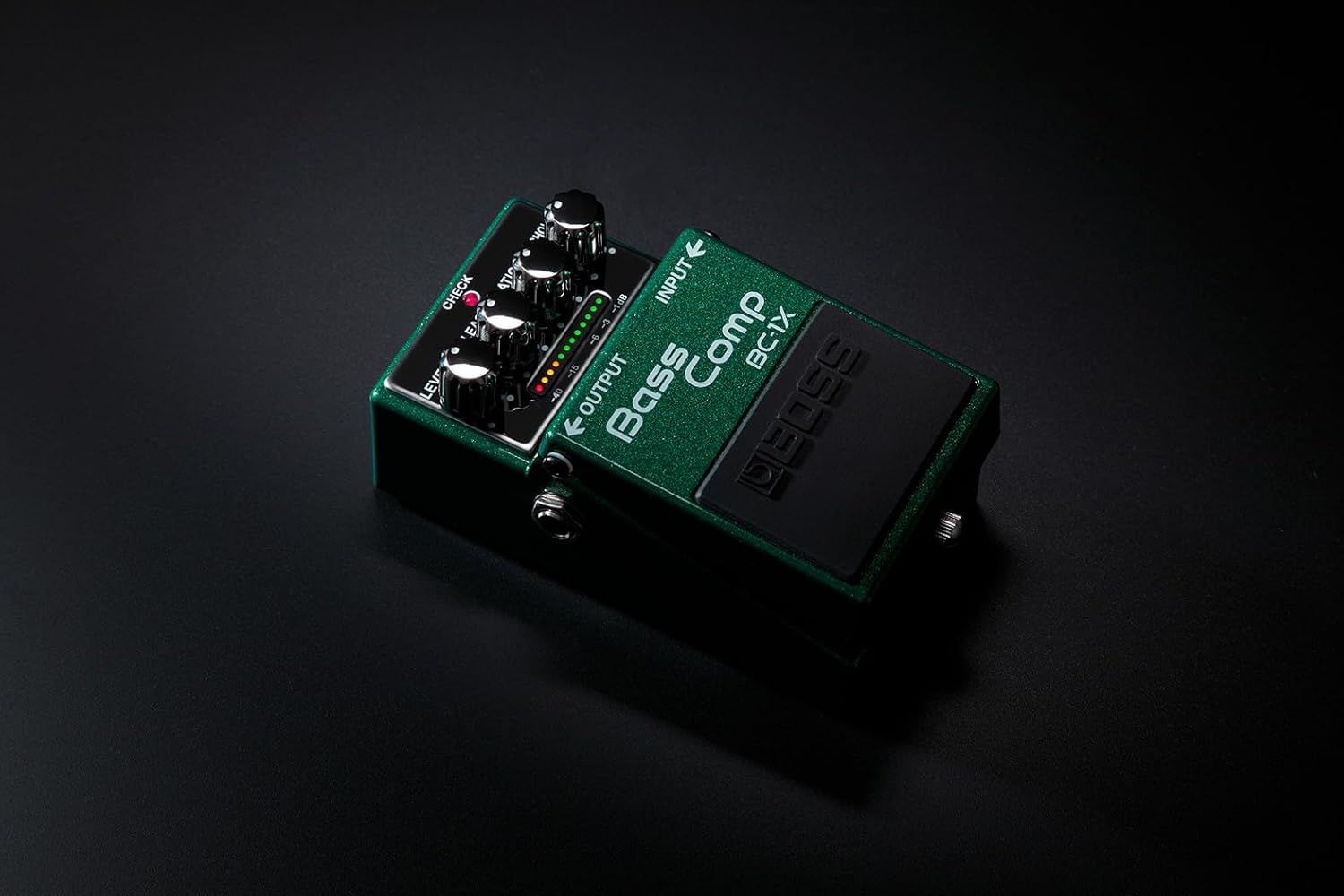
Figure 2: Rear view of the BOSS BC-1X Bass Compressor pedal. This image highlights the battery compartment area and the general construction of the pedal's rear.
Connections
- INPUT Jack: Connect your bass guitar to this jack.
- OUTPUT Jack: Connect this jack to your amplifier or the next pedal in your signal chain.
- DC IN Jack: Connect an optional AC adapter here.
- LINE OUT Jack: This balanced XLR output allows direct connection to a mixing console or audio interface, providing a clean, compressed signal for recording or live sound.

Figure 3: Side view of the BOSS BC-1X Bass Compressor pedal. This image clearly shows the 1/4-inch input and output jacks on the sides of the pedal, as well as the DC IN jack.
Operating the BC-1X
The BC-1X features intuitive controls for shaping your bass tone. Experiment with the settings to find the ideal compression for your playing style and musical context.
Controls and Indicators
- LEVEL Knob: Adjusts the overall output volume of the effect. Use this to match the volume of the compressed signal to your bypassed signal.
- RELEASE Knob: Controls how quickly the compressor returns to its uncompressed state after the signal drops below the threshold. Higher settings result in a longer release time, which can create a smoother, more sustained sound.
- RATIO Knob: Determines the amount of compression applied. A higher ratio means more compression, reducing the dynamic range more significantly.
- THRESHOLD Knob: Sets the level at which compression begins. Signals above this threshold will be compressed. Lowering the threshold means more of your signal will be compressed.
- CHECK Indicator: This LED indicates the pedal's on/off status and also serves as a battery check indicator. It lights up when the effect is active. If it dims or does not light up, the battery is low and needs replacement.
- GAIN REDUCTION METER: A series of LEDs that visually indicate the amount of gain reduction (compression) being applied in real-time. This helps in fine-tuning the THRESHOLD and RATIO settings.
Basic Operation
- Connect your bass to the INPUT jack and your amplifier (or next pedal) to the OUTPUT jack.
- If using battery power, ensure a cable is connected to the INPUT jack to turn the pedal on.
- Press the footswitch to activate the effect. The CHECK indicator will light up.
- Adjust the THRESHOLD, RATIO, RELEASE, and LEVEL knobs to achieve your desired compression effect. Observe the GAIN REDUCTION METER to understand how much compression is being applied.
- When finished, press the footswitch again to bypass the effect. If using battery power, disconnect the cable from the INPUT jack.
Maintenance
Proper maintenance ensures the longevity and optimal performance of your BC-1X pedal.
- Cleaning: Use a soft, dry cloth to wipe down the pedal. Avoid abrasive cleaners or solvents, as they may damage the finish or internal components.
- Battery Replacement: Replace the 9V battery when the CHECK indicator dims or fails to light up during operation. Always use a fresh alkaline battery.
- Storage: When not in use for extended periods, remove the battery to prevent leakage and store the pedal in a cool, dry place away from direct sunlight and extreme temperatures.
- Connections: Periodically check all cable connections for wear and tear. Ensure jacks are free of dust and debris.
Troubleshooting
If you encounter issues with your BC-1X, refer to the following common problems and solutions.
| Problem | Solution |
|---|---|
| No sound or very low sound. |
|
| CHECK indicator does not light up. |
|
| Unwanted noise or hiss. |
|
Specifications
| Feature | Detail |
|---|---|
| Model Number | BC-1X |
| Item Weight | 1 pounds (approx. 0.45 kg) |
| Product Dimensions | 6 x 3.7 x 2.65 inches (approx. 15.24 x 9.4 x 6.73 cm) |
| Body Material | Plastic and Metal |
| Color | Transparent Green |
| Connector Type | 1/4 inch (tool), XLR (LINE OUT) |
| Hardware Interface | 1/4-inch Audio, XLR |
| Signal Format | Analog |
| Power Source | Battery Powered (9V), AC Adapter (optional, PSA series) |
| Battery Type | 1 x 9V Alkaline battery (included) |
| Voltage | 9 Volts (DC) |
| Date First Available | March 2, 2016 |
Warranty and Support
For detailed warranty information, please refer to the warranty card included with your product or visit the official BOSS website. BOSS offers various protection plans for their products, which may be purchased separately.
For technical support, product registration, or further inquiries, please visit the official BOSS website or contact their customer service department. You can find more information and resources at the BOSS Store on Amazon or the official BOSS global website.
Related documentsBC-1X


Ask a question about this manual
Ask about setup, troubleshooting, compatibility, parts, safety, or missing instructions. Manuals+ will review the question and use this page’s manual context to help answer it.