
Pyle PDA5BU
Pyle PDA5BU Amplifier Receiver User Manual
Model: PDA5BU
Introduction
This manual provides detailed instructions for the operation and maintenance of your Pyle PDA5BU Amplifier Receiver. This unit is designed to deliver clear and accurate audio from various sources, including Bluetooth-enabled devices, USB flash drives, and traditional audio inputs. Please read this manual thoroughly before operating the device to ensure proper usage and to maximize its performance.

Image: Pyle PDA5BU Amplifier Receiver bundled with Enrock speaker wire.
Safety Information
- Do not expose this unit to rain or moisture to prevent fire or electric shock.
- Ensure proper ventilation. Do not block ventilation openings.
- Do not place the unit near heat sources such as radiators, heat registers, stoves, or other apparatus that produce heat.
- Use only attachments/accessories specified by the manufacturer.
- Unplug this apparatus during lightning storms or when unused for long periods of time.
- Refer all servicing to qualified service personnel. Servicing is required when the apparatus has been damaged in any way.
Package Contents
Please check the contents of the package carefully. If any items are missing or damaged, contact your retailer.
- Pyle PDA5BU Amplifier Receiver Unit
- Remote Control
- FM Antenna
- Auxiliary Input Cable (3.5mm)
- Enrock 50ft 16-Gauge Speaker Wire


Image: Included accessories (remote control, antenna) and the Enrock speaker wire spool.
Product Overview
Front Panel

Image: Front view of the Pyle PDA5BU Amplifier Receiver.
- Power Button: Turns the unit On/Off.
- USB Port: For connecting USB flash drives for MP3 playback and charging mobile devices.
- Headphone Jack: 3.5mm output for headphones.
- AUX Input (3.5mm): For connecting external audio devices.
- Microphone Inputs (1/4"): Two inputs for microphones.
- Music Volume Control: Adjusts the overall volume level.
- LCD Display: Shows current input, FM frequency, and MP3 track information.
- Input Selector Buttons: Selects between various audio sources (Bluetooth, USB, FM, AUX, DVD).
- Playback Controls: Previous, Next, Play/Pause for USB/SD playback.
Rear Panel
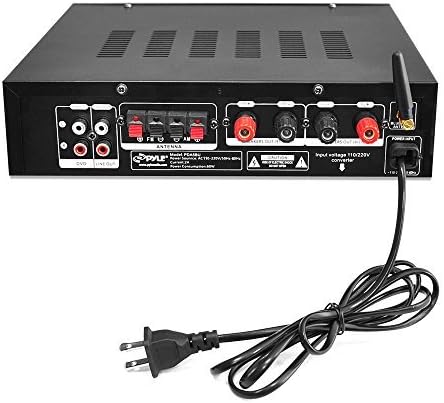
Image: Rear view of the Pyle PDA5BU Amplifier Receiver showing connection ports.
- DVD Input (RCA): Stereo RCA input for DVD players or other audio sources.
- Line Out (RCA): Stereo RCA output for connecting to another amplifier or recording device.
- FM Antenna Terminal: Connects the included FM antenna.
- Speaker Output Terminals: Connects to passive speakers (Left/Right, +/-).
- Bluetooth Antenna: For wireless Bluetooth connectivity.
- Power Input: Connects to the AC power cord.
Setup
1. Speaker Connection
Connect your passive speakers to the speaker output terminals on the rear panel. Ensure correct polarity (+ to + and - to -) for optimal sound quality. Use the included 16-gauge speaker wire for reliable connection.
- Strip approximately 1/2 inch of insulation from the ends of the speaker wire.
- Twist the bare wire strands tightly.
- Press down on the terminal clip, insert the wire, and release the clip to secure the connection.
- Repeat for all speaker connections.
2. Audio Source Connection
Connect your desired audio sources to the appropriate inputs:
- DVD Input (RCA): Use RCA cables to connect devices like DVD players, CD players, or other audio components.
- AUX Input (3.5mm): Use the included 3.5mm cable to connect smartphones, tablets, or MP3 players to the front panel AUX input.
- USB Input: Insert a USB flash drive into the front panel USB port for MP3 audio playback.
- Microphone Inputs: Connect 1/4" microphones to the front panel microphone inputs.
3. FM Antenna Connection
Connect the included FM antenna to the FM antenna terminal on the rear panel. Extend the antenna for better reception.
4. Power Connection
Once all audio and speaker connections are made, plug the power cord into a standard AC outlet.
Operating Instructions
Power On/Off
Press the Power button on the front panel to turn the unit on or off.
Input Selection
Press the corresponding Input buttons on the front panel or remote control to select your desired audio source (Bluetooth, USB, FM, AUX, DVD).
Volume Control
Rotate the Music Volume knob on the front panel or use the volume buttons on the remote control to adjust the overall sound level.
Bluetooth Pairing
- Turn on the PDA5BU Amplifier Receiver.
- Press the Bluetooth input button on the front panel or remote. The LCD display will show "Bluetooth".
- Enable Bluetooth on your smartphone, tablet, or other device.
- Search for Bluetooth devices and select "Pyle Audio" or "PDA5BU" from the list.
- Once paired, you can stream audio wirelessly to the amplifier.
USB/SD Playback
Insert a USB flash drive into the USB port. The unit will automatically switch to USB input and begin playing compatible MP3 files. Use the playback control buttons (Previous, Next, Play/Pause) on the front panel or remote to navigate tracks.
AM/FM Radio Operation
Press the FM input button. Use the tuning buttons on the remote or front panel to scan for radio stations. The unit supports auto-scan and can store up to 60 station presets.
Microphone Usage
Connect microphones to the 1/4" inputs. Adjust microphone volume using the dedicated controls (if available, otherwise use main volume). Note: This model has two 1/4" mic inputs.
Remote Control
The included remote control provides full functionality for power, input selection, volume, playback controls, and radio tuning. Ensure line of sight to the amplifier's IR receiver for proper operation.
Maintenance
- Cleaning: Use a soft, dry cloth to clean the exterior of the unit. Do not use liquid cleaners or aerosol sprays.
- Ventilation: Ensure that the ventilation openings are not blocked to prevent overheating.
- Storage: If storing the unit for an extended period, unplug it from the power outlet and store it in a cool, dry place.
Troubleshooting
| Problem | Possible Cause | Solution |
|---|---|---|
| No power | Power cord not connected; Power outlet not active. | Check power cord connection; Try a different outlet. |
| No sound | Incorrect input selected; Volume too low; Speaker wires loose or incorrectly connected. | Select correct input; Increase volume; Check speaker wire connections and polarity. |
| Bluetooth connection unstable or drops | Device too far from amplifier; Interference; Other Bluetooth devices nearby. | Move device closer to amplifier (within 65 feet); Reduce interference from other electronics; Re-pair the device. |
| USB playback not working | USB drive not formatted correctly; Incompatible file types; USB drive damaged. | Ensure USB drive is FAT32 formatted; Use MP3 files; Try a different USB drive. |
| Poor FM reception | Antenna not connected or poorly positioned; Weak signal. | Connect and extend FM antenna; Reposition antenna for better signal. |
Specifications
| Feature | Specification |
|---|---|
| Output Power | 200 Watts Peak Power @ 4 ohm |
| THD | Less than 0.1% |
| Bluetooth Version | Wireless Music Streaming |
| Bluetooth Range | Up to 65 feet (20 meters) |
| FM Radio | Auto Scan, 60 Station Memory Presets |
| USB/SD Compatibility | Flash Drive Memory Compatible (MP3 files) |
| Inputs | 1/8" AUX Input, Two 1/4" Mic Inputs, RCA Input (DVD) |
| Outputs | RCA Line Out, Speaker Terminals |
| Display | LED Screen (FM Frequency, MP3 Song Number/Play Time) |
| Dimensions (L x W x H) | 10.5" x 8.8" x 2.8" inches (approx.) |
| Weight | 5.5 lbs (approx.) |
Warranty and Support
This product comes with a manufacturer's warranty. For specific warranty terms and conditions, please refer to the warranty card included with your purchase or contact the manufacturer directly. For technical support or service inquiries, please visit the Pyle Audio website or contact their customer service department.
Please retain your proof of purchase for warranty claims.
Related documentsPDA5BU


Ask a question about this manual
Ask about setup, troubleshooting, compatibility, parts, safety, or missing instructions. Manuals+ will review the question and use this page’s manual context to help answer it.