Introduction
This manual provides comprehensive instructions for the VINABTY RM-YD025 replacement remote control. This remote is designed to function with various Sony TV models without requiring any programming. Simply insert the batteries, and the remote is ready for use.

Image: The VINABTY RM-YD025 remote control positioned near a television, illustrating its intended use.
Setup
Battery Installation
The RM-YD025 remote control requires two (2) AA batteries for operation. Batteries are not included with the remote control.
- Locate the battery compartment cover on the back of the remote control.
- Slide the cover downwards or press the latch and lift to open the compartment.
- Insert two AA batteries, ensuring the positive (+) and negative (-) terminals align correctly with the markings inside the compartment.
- Replace the battery compartment cover by sliding it back into place until it clicks securely.
Once batteries are installed, the remote control is ready for immediate use with compatible Sony TV models without any additional programming.
Operating Instructions
The VINABTY RM-YD025 remote control provides full functionality for your compatible Sony TV. Below is a guide to the primary buttons and their functions.
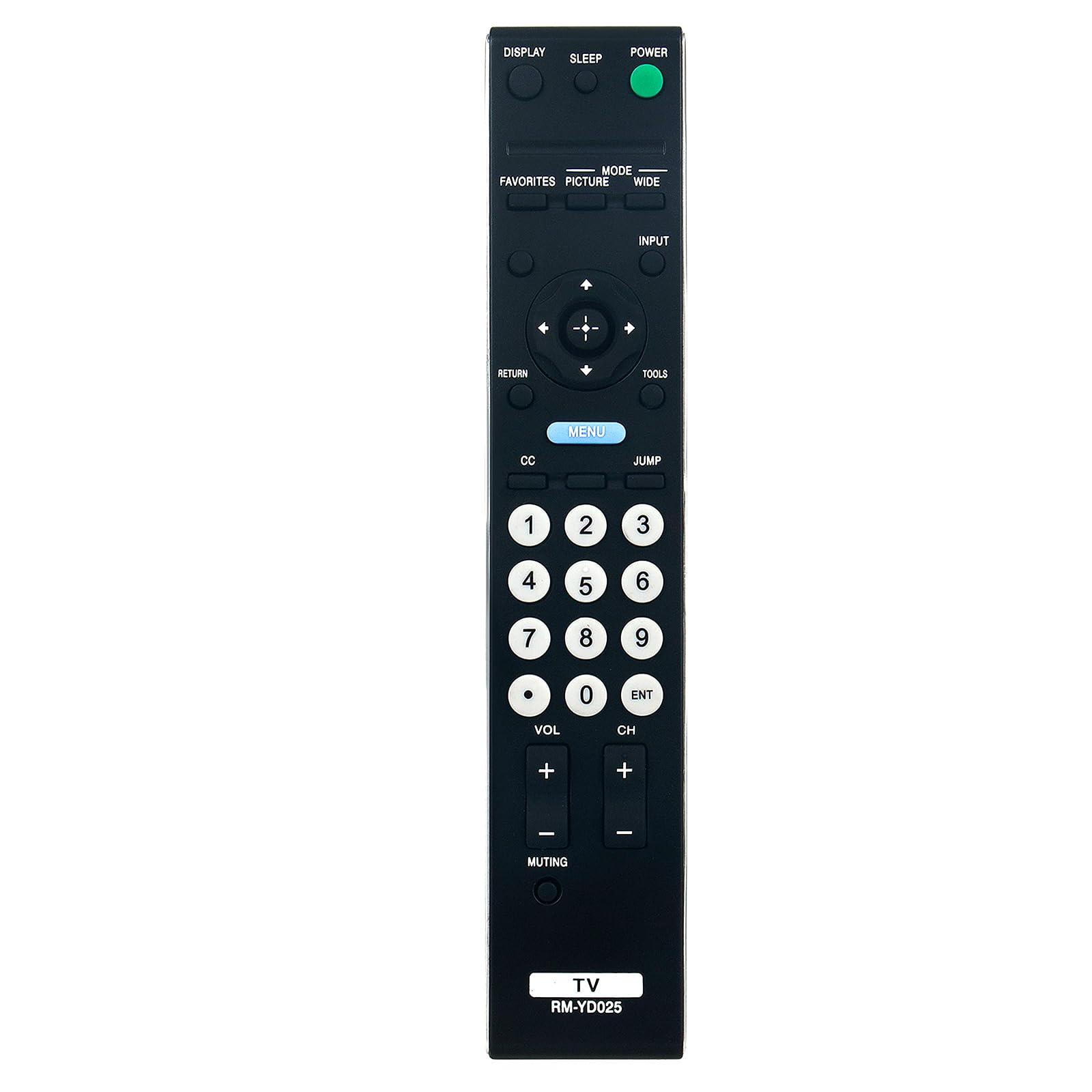
Image: Front view of the VINABTY RM-YD025 remote control, displaying all control buttons.
Button Functions
| Button | Function |
|---|---|
| POWER | Turns the TV on or off. |
| DISPLAY | Displays on-screen information such as channel number, time, and input source. |
| SLEEP | Sets the sleep timer for automatic TV shutdown. |
| FAVORITES | Accesses favorite channels or content. |
| PICTURE | Adjusts picture settings (e.g., brightness, contrast). |
| MODE | Switches between different display modes. |
| WIDE | Changes the screen aspect ratio. |
| INPUT | Selects the input source (e.g., HDMI, AV). |
| Directional Pad (Up, Down, Left, Right) | Navigates menus and options. |
| ENTER (Center Button) | Confirms selections. |
| RETURN | Goes back to the previous screen or menu. |
| TOOLS | Accesses quick settings or tools menu. |
| MENU | Opens the main TV menu. |
| CC (Closed Caption) | Activates or deactivates closed captions. |
| JUMP | Switches between the current and previously viewed channel. |
| Number Buttons (0-9) | Direct channel selection. |
| VOL +/- | Adjusts the volume level. |
| CH +/- | Changes the channel up or down. |
| MUTING | Mutes or unmutes the TV audio. |
| ENT | Confirms channel entry or other selections. |
Compatibility
The VINABTY RM-YD025 remote control is compatible with a wide range of Sony TV models. A partial list of compatible models includes:
- KDL-46S4100, KDL-40S4100, KDL-52S4100
- KDL-22L4000, KDL-40S504, KDL-19M4000
- KDL-40S5100, KDL-40SL150, KDL-40V5100, KDL-40VE5
- KDL-46S504, KDL-46S5100, KDL-46V5100, KDL-46VE5, KDL-46VL150
- KDL-52S5100, KDL-52V5100, KDL-52VE5, KDL-52VL150, KDL-55V5100
- RM-YD028, SUWL500, 148718031
- KDL-22L5000, KDL-26L5000, KDL-32L504, KDL-32LL150
- KDL-32S5100, KDL-32XBR9, KDL-37L5000
- KDL-40V4150, KDL-40W4100, KDL-42V4100
- KDL-46V4100, KDL-46W4100, KDL-46W4150
- KDL-52W4100, 148072211, KDL32BX310, KDL19M4000B
This remote is designed as a direct replacement and should work with these models without any additional setup.
Maintenance
Cleaning
To maintain the remote control's appearance and functionality, clean it regularly:
- Use a soft, dry cloth to wipe the surface of the remote.
- For stubborn dirt, slightly dampen the cloth with water or a mild, non-abrasive cleaner. Avoid excessive moisture.
- Do not use harsh chemicals, solvents, or abrasive cleaning pads, as these can damage the remote's finish or internal components.
Battery Care
Proper battery care ensures optimal performance and longevity:
- Replace both batteries simultaneously when they are depleted. Do not mix old and new batteries, or different types of batteries.
- If the remote control will not be used for an extended period (e.g., one month or more), remove the batteries to prevent leakage and potential damage to the remote.
- Dispose of used batteries according to local regulations.
Troubleshooting
If you encounter issues with your VINABTY RM-YD025 remote control, try the following troubleshooting steps:
- Remote Not Responding: Ensure the batteries are inserted correctly with the correct polarity (+/-). Replace old batteries with new AA batteries.
- Intermittent Functionality: Check for any obstructions between the remote control and the TV's infrared receiver. Ensure you are within the effective range of the TV.
- Specific Buttons Not Working: If only certain buttons are unresponsive, try cleaning the remote control, especially around the buttons, to remove any dirt or debris that might be interfering with their operation.
- TV Not Responding to Any Remote: If your TV does not respond to this remote or any other remote, there might be an issue with the TV's infrared receiver. Consult your TV's user manual for troubleshooting TV-specific issues.
This remote control does not require programming. If it does not function after installing new batteries and verifying compatibility, please refer to the support section.
Specifications
Key specifications for the VINABTY RM-YD025 remote control:
| Feature | Detail |
|---|---|
| Model Number | RM-YD025 |
| Compatible Devices | Sony Televisions |
| Battery Type | 2 x AA batteries (not included) |
| Product Dimensions | 5 x 1.9 x 0.5 inches (approximately 12.7 x 4.8 x 1.3 cm) |
| Item Weight | 2.39 ounces (approximately 67.7 grams) |
| Color | Black |
| Special Feature | Ergonomic design |

Image: The VINABTY RM-YD025 remote control displaying its physical dimensions.
Warranty Information
Warranty details for the VINABTY RM-YD025 remote control are typically provided by the seller or manufacturer at the time of purchase. Please refer to your purchase documentation or contact the seller directly for specific warranty terms and conditions.
Support
For further assistance, technical support, or inquiries regarding your VINABTY RM-YD025 remote control, please contact the seller through your purchase platform. Provide your order details and a clear description of the issue for efficient support.


