
1. Introduction
This manual provides detailed instructions for the safe and efficient operation of your Audiocenter MX3200 Multi-channel Amplifier. Please read this manual thoroughly before using the product to ensure proper setup, optimal performance, and to prevent damage.
2. Important Safety Instructions
- Power Source: Connect the amplifier only to the specified voltage and frequency as indicated on the unit.
- Ventilation: Ensure adequate airflow around the amplifier. Do not block ventilation openings. Maintain at least 10 cm (4 inches) of clear space around the unit.
- Moisture: Do not expose the amplifier to rain, moisture, dripping, or splashing liquids. Do not place objects filled with liquids, such as vases, on the apparatus.
- Heat: Keep the amplifier away from heat sources such as radiators, heat registers, stoves, or other apparatus (including amplifiers) that produce heat.
- Grounding: Ensure the power cord is properly grounded. Do not defeat the safety purpose of the polarized or grounding-type plug.
- Servicing: Refer all servicing to qualified service personnel. Do not attempt to service this product yourself.
- Cleaning: Unplug the unit from the power outlet before cleaning. Use a dry cloth only.
3. Package Contents
Verify that all items are present in the package:
- Audiocenter MX3200 Multi-channel Amplifier
- Power Cable
- User Manual (this document)
4. Product Overview
4.1 Rear Panel Layout
The rear panel of the MX3200 amplifier features all essential input, output, and control connections. Refer to the image below for a visual guide.
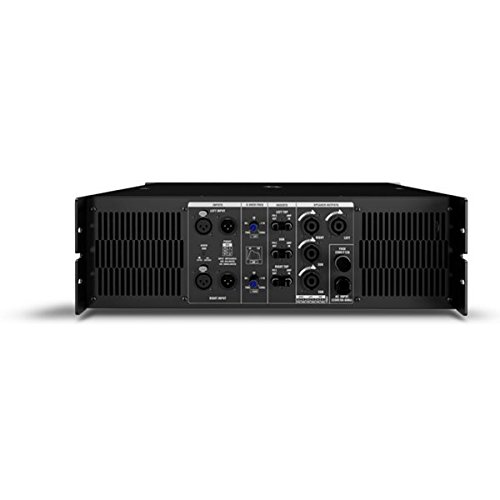
Figure 1: Rear Panel of Audiocenter MX3200 Amplifier. This image displays the various connection points and controls on the back of the amplifier, including XLR inputs, speaker outputs, and configuration switches.
- LEFT INPUT / RIGHT INPUT: XLR input connectors for audio signals.
- 2-WAY / 3-WAY Switch: Selects the crossover mode for the amplifier. Use 2-WAY for two-way speaker systems and 3-WAY for three-way speaker systems.
- MASTER Controls: Adjusts the overall output level for the respective channels.
- SPEAKER OUTPUTS (LEFT / RIGHT): SpeakON connectors for connecting to passive speakers.
- AC INPUT: Standard IEC power inlet for connecting the power cable.
- POWER CONNECTOR: Main power switch for turning the unit on or off.
5. Setup
5.1 Placement
Place the amplifier on a stable, flat surface or mount it in a standard equipment rack. Ensure there is sufficient space around the unit for proper ventilation to prevent overheating.
5.2 Connecting Audio Inputs
- Connect your audio source (e.g., mixer, preamplifier) to the LEFT INPUT and RIGHT INPUT XLR connectors on the rear panel.
- Ensure all connections are secure.
5.3 Connecting Speaker Outputs
- Connect your passive speakers to the SPEAKER OUTPUTS (LEFT / RIGHT) using appropriate SpeakON cables.
- Verify that the speaker impedance matches the amplifier's specifications to prevent damage.
5.4 Power Connection
- Ensure the amplifier's power switch is in the OFF position.
- Connect the supplied power cable to the AC INPUT on the rear panel and then to a suitable grounded electrical outlet.
6. Operating Instructions
6.1 Powering On/Off
- To power on, ensure all connections are secure and turn the POWER CONNECTOR switch to the ON position.
- To power off, turn the POWER CONNECTOR switch to the OFF position.
6.2 Adjusting Output Levels
Use the MASTER Controls on the rear panel to adjust the output volume for the left and right channels independently. Start with the controls at a low setting and gradually increase to the desired listening level.
6.3 Crossover Mode Selection
The 2-WAY / 3-WAY Switch allows you to configure the amplifier's internal crossover. Select 2-WAY for systems with two frequency bands (e.g., woofer and tweeter) or 3-WAY for systems with three frequency bands (e.g., woofer, midrange, tweeter). Refer to your speaker system's specifications for the appropriate setting.
7. Maintenance
- Cleaning: Regularly wipe the exterior of the amplifier with a soft, dry cloth. Do not use liquid cleaners or solvents.
- Ventilation: Periodically check that the ventilation grilles are free from dust and obstructions. Use a soft brush or vacuum cleaner to remove any buildup.
- Storage: If storing the amplifier for an extended period, disconnect it from power, clean it, and store it in a cool, dry place away from direct sunlight and extreme temperatures.
8. Troubleshooting
| Problem | Possible Cause | Solution |
|---|---|---|
| No power | Power cable disconnected; Power outlet faulty; Amplifier power switch off. | Check power cable connection; Test power outlet with another device; Ensure power switch is ON. |
| No sound output | Input cables disconnected; Speaker cables disconnected; Master controls set too low; Source device not playing. | Verify all input and speaker cable connections; Increase Master controls gradually; Check audio source. |
| Distorted sound | Input signal too high (clipping); Speaker impedance mismatch; Faulty cables. | Reduce input signal level from source; Verify speaker impedance; Replace suspect cables. |
| Overheating | Blocked ventilation; Excessive load. | Ensure clear ventilation paths; Reduce output level or check speaker impedance. |
9. Specifications
| Feature | Detail |
|---|---|
| Model | MX3200 |
| Brand | Audiocenter |
| Manufacturer | Audiocenter |
| Body Material | Plastic |
| Package Dimensions | 48.3 x 39 x 13.2 cm |
| Item Weight | 25 kg |
10. Warranty and Support
For warranty information and technical support, please refer to the documentation provided with your purchase or visit the official Audiocenter website. Do not attempt to repair the unit yourself, as this may void your warranty.