
Farenheit CM-103D
Fahrenheit CM-103D Ceiling Mount DVD Entertainment System
User Instruction Manual
1. Introduction
This manual provides detailed instructions for the installation, operation, and maintenance of your Fahrenheit CM-103D Ceiling Mount DVD Entertainment System. This unit is designed to provide in-vehicle entertainment with its integrated DVD player and 10.3-inch LCD screen, offering a rich multimedia experience for passengers. Please read this manual thoroughly before using the product to ensure proper function and safety.
2. Setup and Installation
Proper installation is crucial for the optimal performance and longevity of your CM-103D system. It is highly recommended that installation be performed by a qualified professional to ensure correct wiring and mounting.
2.1 Package Contents
Before beginning installation, verify that all components are present:
- Fahrenheit CM-103D Main Unit
- Remote Control
- Wiring Harness
- Mounting Hardware
- User Manual (this document)
2.2 Mounting the Unit
The CM-103D is designed for ceiling mount installation. Select a central location in your vehicle's ceiling that allows for clear viewing by passengers and does not obstruct the driver's view or vehicle safety features. Ensure the mounting surface is strong enough to support the unit's weight.
- Carefully remove the vehicle's headliner in the chosen area.
- Secure the mounting bracket (if supplied) or directly mount the unit using appropriate screws and reinforcement plates to the vehicle's roof structure.
- Ensure the unit is level and securely fastened to prevent vibration and movement during vehicle operation.
2.3 Wiring Connections
Connect the wiring harness to the vehicle's electrical system. Refer to the wiring diagram provided with your unit for specific connections. Key connections include:
- Power (12V Constant): Connect to a constant 12V power source.
- Accessory (12V Switched): Connect to a 12V power source that turns on/off with the vehicle's ignition.
- Ground: Connect to a solid chassis ground point.
- Audio Output: Connect to your vehicle's audio system (e.g., AUX input, FM modulator, or wireless headphones).
- Video Input/Output: For connecting external video sources or outputting video to additional monitors.
- Mobile Link Input: For connecting compatible mobile devices.
After all connections are made, carefully re-install the headliner and trim pieces.
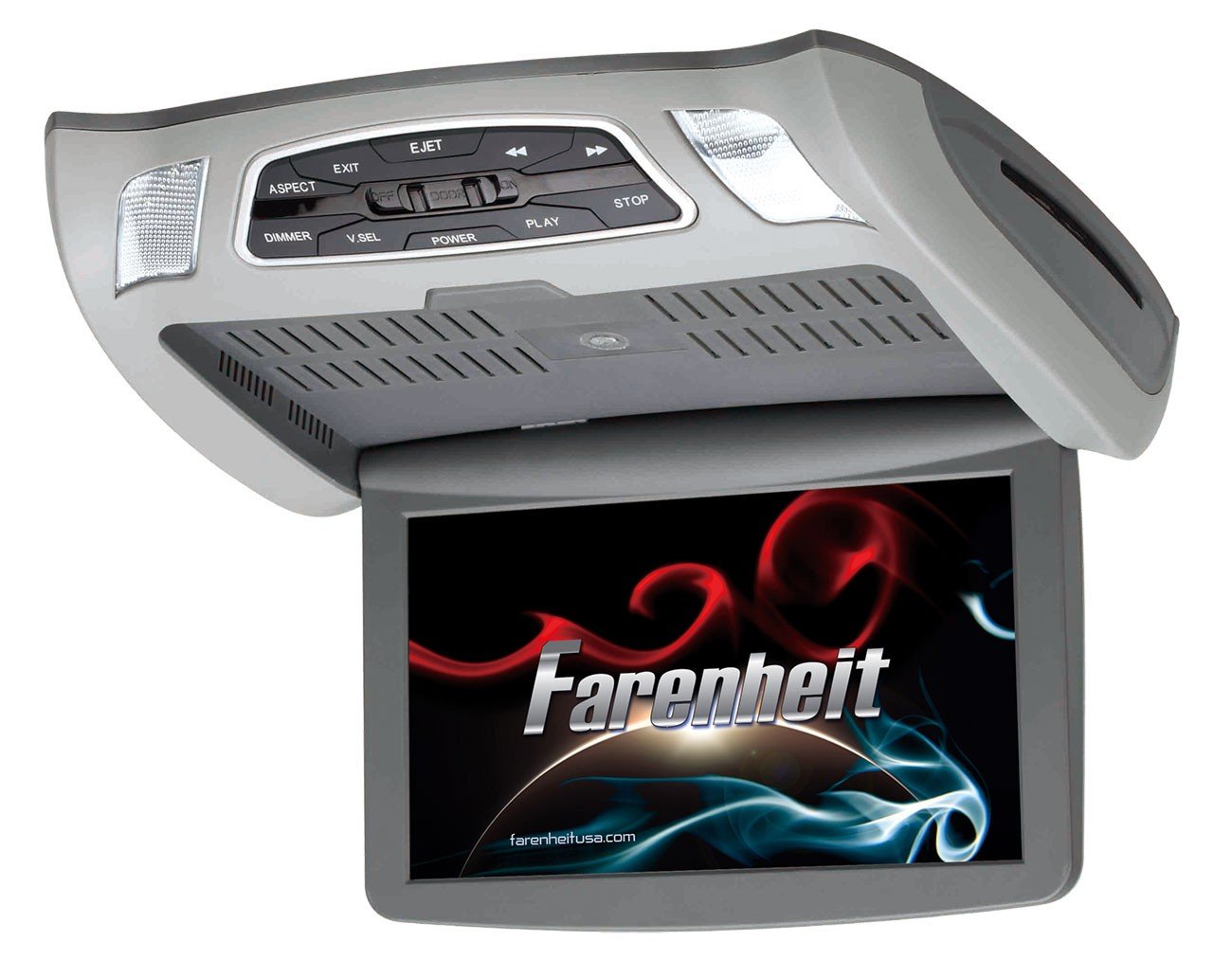
Figure 2.3.1: The Fahrenheit CM-103D ceiling mount DVD entertainment system. It features a gray housing with a flip-down 10.3-inch LCD screen. The top panel includes control buttons for EJECT, EXIT, ASPECT, DIMMER, V.SEL, POWER, PLAY, STOP, and track navigation. Two dome lights are integrated into the front corners of the unit. The screen displays the 'Farenheit' logo.
3. Operating Instructions
This section details the basic operation of your CM-103D system.
3.1 Powering On/Off
- To power on the unit, press the POWER button located on the control panel or the remote control.
- To power off, press and hold the POWER button until the unit shuts down.
3.2 DVD Playback
- Ensure the unit is powered on and the screen is flipped down.
- Gently insert a DVD or CD into the disc slot until the mechanism pulls it in.
- The system should automatically begin playback. If not, press the PLAY button.
- Use the PLAY/PAUSE, STOP, FAST FORWARD (>>), and REWIND (<<) buttons on the unit or remote for control.
- To eject a disc, press the EJECT button.
3.3 Mobile Link Input
The Mobile Link input allows you to connect compatible external devices (e.g., smartphones, tablets) to display their content on the CM-103D screen.
- Connect your mobile device to the Mobile Link input port using the appropriate cable (not included).
- Press the V.SEL (Video Select) button on the unit or remote until the Mobile Link input is selected.
- The content from your connected device should now be displayed on the screen.
3.4 Screen and Display Controls
- ASPECT: Press this button to cycle through different aspect ratios (e.g., 4:3, 16:9) to best fit the content being displayed.
- DIMMER: Adjusts the brightness of the LCD screen. Press to cycle through different brightness levels.
- EXIT: Used to exit menus or return to the previous screen.
3.5 Dome Lights
The unit includes integrated dome lights. These lights can be controlled via a switch on the unit, typically labeled 'DOOR' or 'ON/OFF'.
- DOOR: Lights turn on when vehicle doors are opened (requires proper wiring to vehicle's door trigger).
- ON: Lights remain on.
- OFF: Lights remain off.
4. Maintenance
Regular maintenance ensures the longevity and optimal performance of your entertainment system.
4.1 Cleaning the Unit
- Screen: Use a soft, lint-free cloth specifically designed for LCD screens. Do not use abrasive cleaners or solvents. Lightly dampen the cloth with water if necessary.
- Exterior: Wipe the exterior casing with a soft, dry cloth. For stubborn dirt, a slightly damp cloth can be used, followed by a dry cloth.
- Disc Slot: Avoid inserting foreign objects into the disc slot. If dust or debris accumulates, use a specialized DVD/CD lens cleaning disc.
4.2 Disc Handling
- Always handle discs by their edges to avoid fingerprints and scratches.
- Store discs in their cases when not in use.
- Do not use cracked, warped, or severely scratched discs, as they can damage the player's mechanism.
5. Troubleshooting
If you encounter issues with your CM-103D system, refer to the following common problems and solutions before contacting customer support.
| Problem | Possible Cause | Solution |
|---|---|---|
| No power to the unit. | Loose power connection, blown fuse, vehicle ignition off. | Check power and ground wiring connections. Inspect vehicle's fuse box for blown fuses. Ensure vehicle ignition is on if wired to accessory power. |
| No picture on screen. | Screen not flipped down, incorrect video input selected, faulty video cable. | Ensure screen is fully open. Press V.SEL to cycle through inputs. Check video cable connections. |
| Disc won't play or skips. | Dirty or scratched disc, incorrect disc format, foreign object in disc slot. | Clean the disc. Try a different disc. Ensure disc format is supported (DVD, CD). Do not force discs into the slot. |
| No audio. | Volume too low, audio output not connected, incorrect audio source selected on vehicle's stereo. | Increase volume on the unit and vehicle stereo. Check audio output connections to vehicle stereo. Select correct AUX input or FM frequency on vehicle stereo. |
| Remote control not working. | Dead batteries, obstructed sensor, remote out of range. | Replace batteries. Ensure no objects are blocking the remote sensor on the unit. Point remote directly at the unit. |
6. Specifications
Below are the technical specifications for the Fahrenheit CM-103D Ceiling Mount DVD Entertainment System:
- Brand: Farenheit
- Model Number: CM-103D
- Screen Size: 10.3 Inches
- Display Type: LCD
- Product Dimensions: 7.5 x 11 x 1.5 inches (approx. 19.05 x 27.94 x 3.81 cm)
- Package Dimensions: 15.7 Cms L X 34.0 Cms W X 37.5 Cms H (approx. 6.18 x 13.39 x 14.76 inches)
- Item Weight: 7 pounds (approx. 3.18 kg)
- Package Weight: 3.55 Kg (approx. 7.83 pounds)
- Power Requirement: 12V DC (Vehicle Electrical System)
- Disc Compatibility: DVD, CD (specific formats may vary, refer to full product sheet)
- Inputs: Mobile Link, Video Input
- Outputs: Audio Output, Video Output
- Country of Origin: China
- First Available Date: January 15, 2016
7. Warranty and Support
For specific warranty information, including coverage period and terms, please refer to the warranty card included with your product or visit the official Farenheit website. Keep your proof of purchase for warranty claims.
7.1 Customer Support
If you require technical assistance or have questions not covered in this manual, please contact Farenheit customer support. Contact details can typically be found on the manufacturer's website or on the product packaging.
For the latest information and support resources, please visit the official Farenheit website: www.farenheitusa.com