
1. Product Overview
The EDSYN LONER SMD Quadra-Flow Hot Air Tip is a precision accessory designed for use with compatible hot air rework stations, specifically requiring the EDSYN PD529 system. This tip is engineered to provide a concentrated and evenly distributed flow of hot air, essential for the safe and efficient removal and placement of Surface Mount Devices (SMD) components. Its unique quadra-flow design ensures optimal heat transfer to the component leads while minimizing thermal stress on surrounding areas.
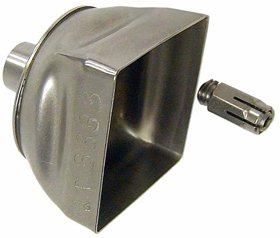
Image 1.1: EDSYN LONER SMD Quadra-Flow Hot Air Tip. This image displays the EDSYN LONER SMD Quadra-Flow Hot Air Tip, a specialized nozzle designed for hot air rework stations. The tip features a square, flared opening for precise heat distribution and is shown alongside a separate collet for attachment to a compatible hot air handpiece.
2. Safety Information
Always adhere to the following safety guidelines when using hot air rework equipment and accessories:
- High Temperatures: Hot air tips operate at extremely high temperatures. Avoid direct contact with the tip and the heated air stream to prevent severe burns.
- Ventilation: Use hot air equipment in a well-ventilated area to dissipate fumes generated during soldering or desoldering processes.
- Eye Protection: Always wear appropriate eye protection to shield against splashes of molten solder or other debris.
- Power Off: Disconnect power to the hot air station before installing, removing, or cleaning the tip.
- Flammable Materials: Keep flammable materials away from the work area.
- Proper Handling: Allow the tip to cool completely before handling or storing.
3. Setup
- Ensure Compatibility: Verify that your hot air rework station is the EDSYN PD529 model, as this tip is specifically designed for it.
- Power Off: Turn off and unplug the hot air rework station from the power source. Allow the handpiece to cool down if it was recently in use.
- Remove Existing Tip (if any): Carefully remove any previously installed tip from the hot air handpiece. Refer to your PD529 manual for specific instructions on tip removal.
- Install Quadra-Flow Tip: Align the EDSYN LONER SMD Quadra-Flow Hot Air Tip with the handpiece nozzle. Gently push and twist the tip until it is securely seated. Ensure it is firmly attached to prevent air leaks and ensure stable operation.
- Inspect Connection: Visually inspect the connection to ensure the tip is properly seated and there are no gaps.
- Power On: Plug in and power on the hot air rework station.
4. Operating Instructions
Using the Quadra-Flow Hot Air Tip effectively requires practice and adherence to proper techniques:
- Temperature and Airflow Settings: Consult the component manufacturer's datasheet for recommended reflow temperatures. Start with lower airflow settings and gradually increase as needed to prevent component displacement.
- Preheating: For larger components or multi-layer boards, consider preheating the PCB to reduce thermal shock.
- Positioning: Position the Quadra-Flow tip directly over the component to be worked on, ensuring the hot air stream covers all leads evenly. Maintain a consistent distance between the tip and the component.
- Component Removal: Apply hot air until the solder reflows. Use appropriate tweezers or vacuum pick-up tools to gently lift the component once the solder is molten. Avoid excessive force.
- Component Placement: Apply solder paste to the pads, carefully place the new component, and then apply hot air until the solder reflows and forms proper joints. Ensure the component self-aligns during reflow.
- Cool Down: After rework, allow the PCB and component to cool naturally before handling.
5. Maintenance
Regular maintenance ensures optimal performance and extends the lifespan of your hot air tip:
- Cleaning: After each use, especially after the tip has cooled, gently wipe the interior and exterior of the tip with a lint-free cloth to remove any solder residue or flux buildup. A brass brush or specialized tip cleaner can be used for stubborn residue, but avoid abrasive materials that could damage the tip's finish.
- Inspection: Periodically inspect the tip for any signs of damage, deformation, or excessive wear. A damaged tip can lead to uneven heating or poor airflow.
- Storage: Store the tip in a clean, dry place when not in use, preferably in its original packaging or a dedicated storage container to protect it from dust and physical damage.
6. Troubleshooting
| Problem | Possible Cause | Solution |
|---|---|---|
| Uneven heat distribution | Tip partially clogged with residue; Tip not seated correctly; Damaged tip. | Clean the tip thoroughly; Re-seat the tip firmly; Replace the tip if damaged. |
| Insufficient airflow | Tip clogged; Airflow setting too low on PD529; Handpiece or station issue. | Clean the tip; Increase airflow setting on the PD529; Refer to the PD529 manual for troubleshooting the station. |
| Tip difficult to install/remove | Residue buildup on handpiece nozzle; Incorrect alignment. | Clean the handpiece nozzle; Ensure proper alignment during installation/removal. |
For issues related to the hot air station (PD529) itself, please refer to its dedicated user manual or contact EDSYN customer support.
7. Specifications
- Product Type: SMD Quadra-Flow Hot Air Tip
- Brand: EDSYN
- Model: LONER SMD Quadra-Flow Hot Air Tip
- Compatibility: Requires EDSYN PD529 Hot Air Rework Station
- Dimensions (Approximate):
- Width: 1.31 in. (33.3 mm)
- Length: 1.31 in. (33.3 mm)
- Material: High-grade metal alloy (typically stainless steel)
8. Warranty Information
Warranty coverage for the EDSYN LONER SMD Quadra-Flow Hot Air Tip is typically provided by the manufacturer or the point of purchase. As this is an accessory item, its warranty may be limited. Please retain your proof of purchase and refer to the warranty documentation provided with your EDSYN PD529 hot air rework station or contact EDSYN customer service directly for specific warranty terms and conditions.
9. Support
For technical assistance, product inquiries, or to purchase replacement parts, please contact EDSYN customer support:
- Manufacturer Website: Visit the official EDSYN website for product information and support resources.
- Customer Service: Refer to your PD529 manual or the EDSYN website for contact details (phone, email).
- Authorized Dealers: Contact the authorized dealer from whom you purchased the product for local support.
You can also visit the EDSYN Store on Amazon for more information.