Introduction
Thank you for purchasing the Accuweight AW-KS003BB Digital Kitchen Scale. This manual provides detailed instructions for the proper setup, operation, maintenance, and troubleshooting of your new kitchen scale. Please read this manual thoroughly before use to ensure accurate measurements and prolong the life of your device.
Product Overview
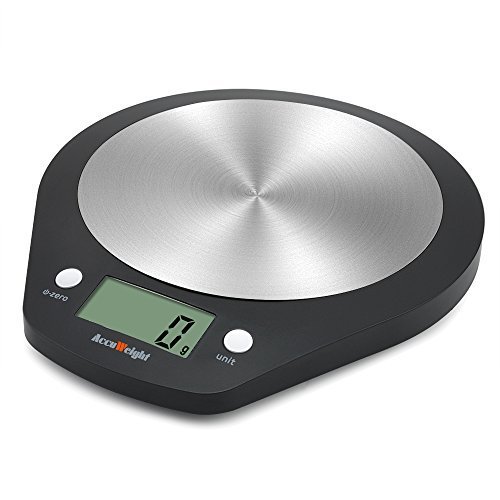
Image: Accuweight AW-KS003BB Digital Kitchen Scale. This image shows the top view of the black digital kitchen scale with a round stainless steel weighing platform. The display screen shows "0 g" and there are two white buttons, one labeled "o-zero" and the other "unit".
The Accuweight AW-KS003BB is a high-precision digital kitchen scale designed for accurate measurement of food ingredients. It features a durable stainless steel weighing platform and an easy-to-read LCD display. Its compact design makes it suitable for any kitchen environment.
Setup
- Unpacking: Carefully remove the scale from its packaging. Retain the packaging for future storage or transport.
- Battery Installation:
- Locate the battery compartment on the underside of the scale.
- Open the battery compartment cover.
- Insert the required batteries (typically AAA, check the compartment for specific type) ensuring correct polarity (+/-).
- Close the battery compartment cover securely.
- Placement: Place the scale on a hard, flat, and stable surface to ensure accurate readings. Avoid placing it on soft or uneven surfaces, or near strong electromagnetic fields.
Operating Instructions
Turning On/Off
- To Turn On: Press the "o-zero" button. The display will light up and show "0 g" or "0.0 oz".
- To Turn Off: Press and hold the "o-zero" button for a few seconds, or the scale will automatically shut off after a period of inactivity (auto-off feature).
Changing Units
- Press the "unit" button to cycle through available measurement units (e.g., grams (g), ounces (oz), pounds (lb), milliliters (ml)). The current unit will be displayed on the screen.
Tare Function (Zeroing)
- The tare function allows you to weigh items in a container by subtracting the container's weight.
- Place an empty container on the weighing platform. The display will show its weight.
- Press the "o-zero" button. The display will reset to "0 g" (or current unit).
- Add the item you wish to weigh into the container. The display will show only the net weight of the item.
Weighing Items
- Ensure the scale is on and displaying "0 g".
- Gently place the item to be weighed onto the center of the stainless steel platform.
- Read the weight displayed on the LCD screen.
Maintenance and Care
- Cleaning: Wipe the scale surface with a soft, damp cloth. Do not immerse the scale in water or use abrasive cleaners. The stainless steel platform can be cleaned with a mild detergent.
- Storage: Store the scale in a cool, dry place. If not in use for an extended period, remove the batteries to prevent leakage.
- Handling: Handle the scale with care. Avoid dropping it or subjecting it to strong impacts, as this can damage the internal sensors.
- Battery Replacement: Replace batteries when the low battery indicator appears on the display.
Troubleshooting
| Problem | Possible Cause | Solution |
|---|---|---|
| Scale does not turn on. | Dead or incorrectly installed batteries. | Check battery polarity or replace batteries. |
| Inaccurate readings. | Scale on uneven surface; Overload; Strong air currents; Dirty platform. | Place on a flat, stable surface; Do not exceed maximum capacity; Avoid drafts; Clean the platform. |
| "Lo" or "Err" displayed. | Low battery; Overload. | Replace batteries; Remove item exceeding capacity. |
Specifications
- Model: AW-KS003BB
- Capacity: Up to 11 lbs (5 kg)
- Accuracy: 0.1 oz (1 g)
- Units: g, oz, lb, ml (water/milk)
- Material: Stainless Steel weighing platform, ABS plastic body
- Power: AAA Batteries (not specified in input, common for scales)
- Auto-Off: Yes (time not specified, common feature)
Warranty and Support
Accuweight provides a limited warranty for this product against defects in material and workmanship under normal use. For specific warranty terms, duration, and support inquiries, please refer to the warranty card included with your purchase or visit the official Accuweight website. Please have your model number (AW-KS003BB) and purchase information ready when contacting support.
For further assistance, please contact Accuweight customer service.