
Introduction
The Aspectek 20W Electric Insect Killer is designed to attract and eliminate flying insects such as mosquitoes, flies, gnats, and moths using UV light and a high-voltage electric grid. Suitable for indoor and covered outdoor environments, this device offers a practical solution for insect control.

Image: The Aspectek Electric Insect Killer targets common flying pests including mosquitoes, wasps, flies, gnats, crane flies, and moths.
Important Safety Instructions
Read all instructions before using this appliance. Failure to follow these instructions may result in electric shock, fire, or serious injury.
- High Voltage: The internal electric grid operates at high voltage. Do not touch the grid with hands or any metal objects.
- Indoor/Covered Outdoor Use: This appliance is designed for indoor use and covered outdoor areas only. Do not expose to rain or moisture.
- Children and Pets: Keep the device out of reach of children and pets. The protective outer mesh helps prevent accidental contact, but supervision is advised.
- Power Source: Only connect the device to a suitable power outlet as indicated on the product label.
- Cleaning: Always unplug the device before cleaning or performing any maintenance.
- Damaged Cord/Plug: Do not operate the device if the cord or plug is damaged. Contact customer support for assistance.
- Flammable Materials: Do not use near flammable liquids, gases, or materials.
- Ventilation: Ensure adequate ventilation around the device. Do not cover.

Image: The device features a safe protective grid design to prevent accidental contact with the electric grid, shown here with children and a pet nearby.
Package Contents
Verify that all items are present in the package:
- Aspectek 20W Electric Insect Killer Unit
- Removable Collection Tray
- Hanging Chain
- User Manual (this document)

Image: Advanced insect control design highlighting the hanging lanyard, high voltage grid, dual UV light bulbs, and removable tray.
Setup and Placement
The Aspectek Electric Insect Killer can be placed on a flat surface or hung using the included chain.
- Choose a Location: Select a location where flying insects are prevalent, away from direct sunlight and strong air currents. Ensure it is within reach of a power outlet. The device is suitable for bedrooms, kitchens, patios, and covered outdoor areas.
- Placement Options:
- Tabletop Placement: Place the unit on a stable, flat surface.
- Hanging Installation: Attach the provided chain to the hooks on top of the unit. Hang the unit from a secure fixture, ensuring it is out of reach of children and pets.
- Power Connection: Plug the power cord into a standard electrical outlet.

Image: Unit placed on a table.

Image: Unit hanging from a chain.

Image: The insect killer is suitable for various usage locations including bedrooms, kitchens, patios, and camping areas.
Operating Instructions
Using your Aspectek Electric Insect Killer is straightforward:
- Power On: Once plugged in, press the power switch located on the side or top of the unit to turn it on. The UV lights will illuminate.
- Operation: The UV lights will attract flying insects to the electric grid, where they are eliminated.
- Continuous Use: For best results, operate the device continuously during periods of high insect activity.
- Power Off: To turn off the device, press the power switch again. Unplug the unit from the power outlet when not in use for extended periods or during maintenance.

Image: A hand pressing the power button to operate the device.
Maintenance
Regular maintenance ensures optimal performance and longevity of your insect killer.
- Cleaning the Collection Tray:
- Ensure the unit is unplugged and turned off.
- Gently pull out the removable collection tray located at the bottom of the unit.
- Dispose of collected insects. The tray can be washed with mild soap and water. Ensure it is completely dry before reinserting.
- Slide the clean tray back into position.
- Cleaning the Electric Grid:
- Always unplug the unit and allow it to sit for a few minutes to discharge any residual electricity.
- Use a small, non-metallic brush (like a paintbrush or the brush often included with similar products) to gently remove any insect debris from the electric grid. Do not use water or liquid cleaners on the grid.
- Replacing UV Bulbs:
- Unplug the unit and allow it to cool.
- Carefully remove the protective outer mesh (refer to the product diagram for securing clips or screws).
- Gently twist and pull out the old UV bulbs from their sockets.
- Insert new compatible 20W UV bulbs, ensuring they are securely seated.
- Reattach the protective outer mesh.

Image: Removable cleaning tray for easy maintenance.

Image: Cleaning the electric grid (ensure power is off).

Image: Replacing UV bulbs.
Troubleshooting
If you encounter issues with your Aspectek Electric Insect Killer, refer to the following common problems and solutions:
| Problem | Possible Cause | Solution |
|---|---|---|
| Unit does not turn on. | Not plugged in; Power switch off; Faulty outlet; Damaged bulb. | Ensure power cord is securely plugged in. Check if the power switch is in the "ON" position. Test the outlet with another appliance. Inspect bulbs for damage and replace if necessary. |
| Insects are not being zapped. | UV bulbs are old or ineffective; Electric grid is dirty; Device placement is suboptimal. | UV bulbs lose effectiveness over time; replace them every 2500-3000 hours of use. Clean the electric grid as per maintenance instructions. Relocate the device to a darker area where insects are more active. |
| Loud "clack" sound when insects are zapped. | Normal operation. | This sound is normal and indicates the device is effectively eliminating insects. If the sound is excessively loud or continuous without insects, contact support. |
| Device emits an odor. | Accumulated insect debris on the grid. | Unplug the unit and clean the electric grid thoroughly. |
Specifications
| Feature | Detail |
|---|---|
| Brand | ASPECTEK |
| Model Number | HR2833 |
| Power | 20W (compatible UV bulbs) |
| Voltage Grid | High Voltage (e.g., 2800V) |
| Material | Aluminum |
| Dimensions (L x W x H) | 38.2L x 8.6W x 28.2H cm (15.04L x 3.39W x 11.1H inches) |
| Item Weight | 1.4 Kilograms (3.09 lbs) |
| Recommended Use | Indoor, Covered Outdoor (Home, Garage, Patio) |
| Target Species | Flies, Mosquitoes, Gnats, Moths |
| Power Source | Corded Electric |
| UPC | 878312003343 |
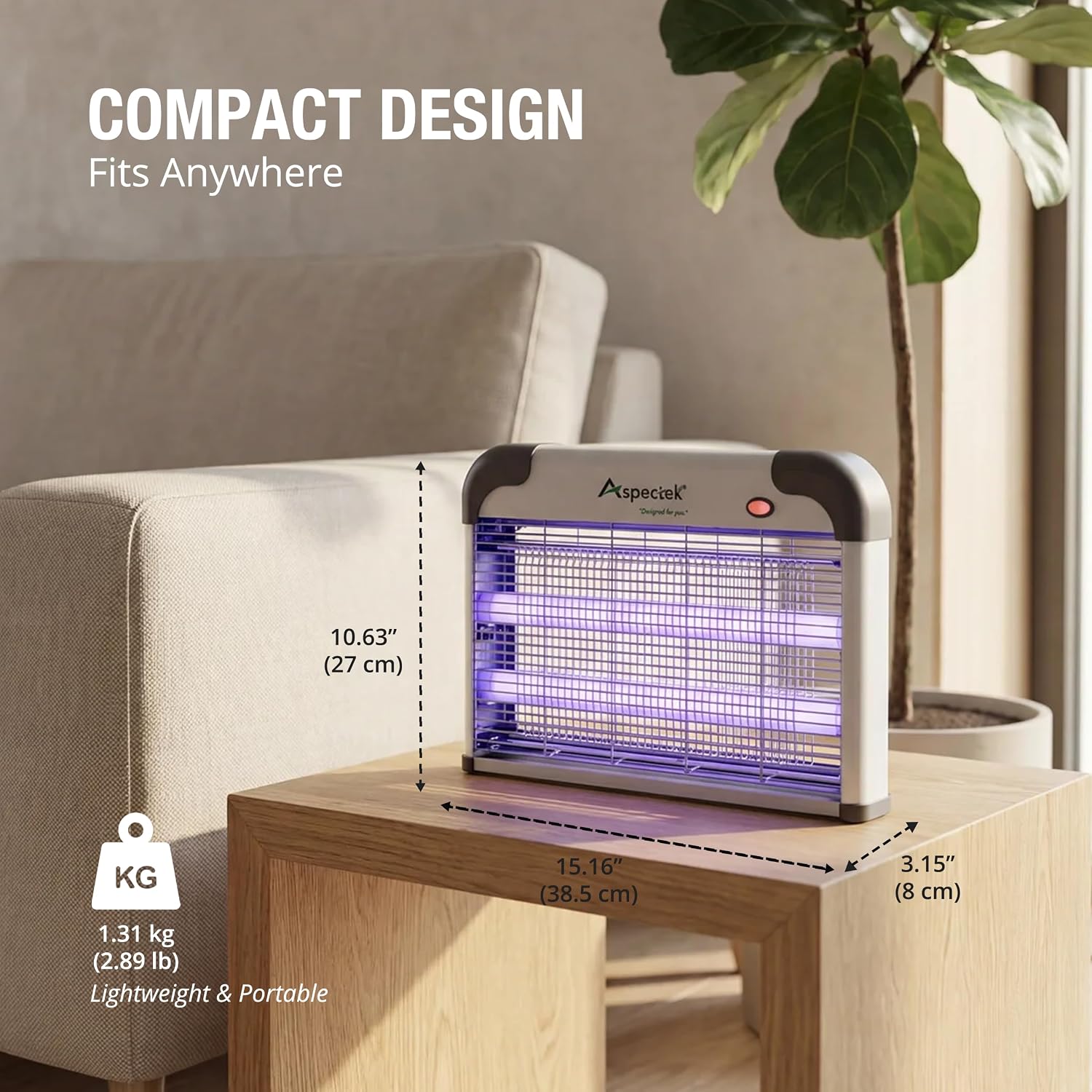
Image: Compact design with labeled dimensions and weight for easy placement.
Warranty and Customer Support
Aspectek products are designed for reliable long-term use. For warranty information, technical assistance, or to purchase replacement parts (such as UV bulbs), please contact Aspectek customer support directly. Refer to the product packaging or the official Aspectek website for the most current contact details.
Online Resources: For additional information and FAQs, visit the official Aspectek website or the product page on Amazon.