1. Introduction
This instruction manual provides essential information for the safe and efficient operation, setup, and maintenance of your TROTEC TTK 127 E Dehumidifier. Please read this manual thoroughly before using the device for the first time and keep it for future reference. The TTK 127 E is designed to effectively reduce humidity in rooms up to 150 m², featuring a maximum dehumidification capacity of 50 liters per 24 hours.
2. Safety Instructions
Always observe the following safety precautions to prevent injury or damage to the device:
- Ensure the power supply matches the specifications on the rating plate.
- Do not operate the device with a damaged power cord or plug.
- Keep the device away from water and do not immerse it in liquids.
- Do not block the air inlet or outlet openings. Maintain adequate clearance around the unit for proper airflow.
- Unplug the device before cleaning, maintenance, or when not in use.
- This appliance is not intended for use by persons (including children) with reduced physical, sensory or mental capabilities, or lack of experience and knowledge, unless they have been given supervision or instruction concerning use of the appliance by a person responsible for their safety.
- Do not use the device in explosive atmospheres or near flammable materials.
- Always transport the device in an upright position.
3. Product Overview
The TROTEC TTK 127 E is a high-performance dehumidifier designed for efficient humidity control. It features a robust construction and user-friendly controls.

Figure 1: Front view of the TROTEC TTK 127 E Dehumidifier, showing its compact design and integrated water tank window.
Key Features:
- Maximum dehumidification capacity: 50 liters per 24 hours.
- Airflow rate: 345 m³/h.
- Hygrostat control with pre-selection of humidity levels.
- Automatic overflow protection with automatic shutdown.
- Option for external condensation drainage.
- Selectable operation modes: fully automatic or permanent.
- Flashing fill level indicator when the water tank is full.
- Integrated cable winder for tidy storage.
- Comfort function and timer.
- Two-speed fan.
- GS certified safety seal.
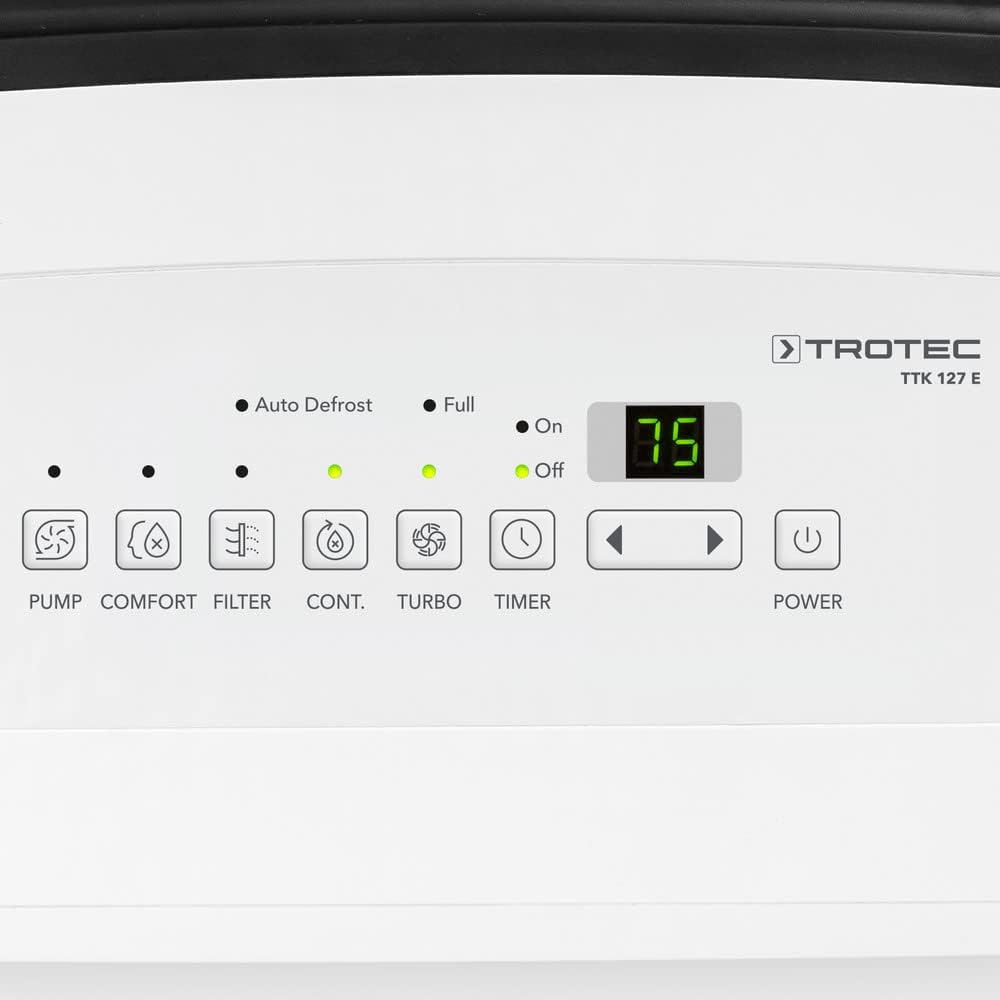
Figure 2: Close-up of the control panel, displaying buttons for various functions like pump, comfort, filter, continuous operation, turbo, timer, and power, along with indicator lights and a digital display.
4. Setup
4.1 Unpacking and Placement
- Carefully remove the dehumidifier from its packaging.
- Place the unit on a firm, level surface. Ensure there is at least 20 cm (8 inches) of space around the air inlet and outlet for optimal airflow.
- Avoid placing the unit near heat sources, in direct sunlight, or in areas with excessive dust or vibrations.
- Allow the unit to stand upright for at least 2 hours before plugging it in, especially if it was transported horizontally. This allows the refrigerant to settle.

Figure 3: The dehumidifier shown with its dimensions: 28.2 cm (depth), 39.2 cm (width), and 61.6 cm (height), illustrating its compact size for placement.
4.2 Power Connection
Connect the power plug to a properly grounded electrical outlet. Ensure the voltage and frequency of the power supply match the specifications on the device's rating label.
4.3 Continuous Drainage (Optional)
For continuous operation without needing to empty the water tank, you can connect a drainage hose.
- Locate the drainage port at the rear of the unit.
- Remove the rubber stopper from the drainage port.
- Attach a suitable hose (not included) to the drainage port. Ensure the hose is securely fastened to prevent leaks.
- Direct the other end of the hose to a floor drain or a larger container, ensuring a continuous downward slope for gravity drainage.

Figure 4: Close-up of the continuous drainage port at the rear of the unit, showing the connection point for an external hose.
5. Operating Instructions
5.1 Power On/Off
Press the POWER button on the control panel to turn the unit on or off.
5.2 Setting Desired Humidity Level
When the unit is on, use the UP and DOWN arrow buttons to set the desired relative humidity (RH) level. The display will show the target humidity. The unit will operate until the room humidity reaches the set level, then it will cycle off. It will restart automatically if the humidity rises above the set point.
5.3 Operating Modes
- Automatic Mode: The unit automatically adjusts its operation to maintain a comfortable humidity level.
- Permanent Operation (CONT.): Press the CONT. button. The unit will continuously dehumidify regardless of the set humidity level. This mode is ideal for drying laundry or in very damp conditions.
- Comfort Mode: Press the COMFORT button. The unit will aim to maintain an optimal humidity level (e.g., 50-55% RH) at a comfortable temperature.
- Turbo Mode: Press the TURBO button to activate the highest fan speed for rapid dehumidification.
5.4 Timer Function
Press the TIMER button to set a delay for turning the unit on or off. Use the UP and DOWN arrow buttons to adjust the desired time in hours.
5.5 Water Tank Management
When the water tank is full, the FULL indicator light will flash, and the unit will automatically shut off. Empty the water tank and reinsert it correctly for the unit to resume operation.

Figure 5: The water tank being removed from the front of the dehumidifier for emptying or cleaning.
6. Maintenance
Regular maintenance ensures optimal performance and extends the lifespan of your dehumidifier.
6.1 Cleaning the Air Filter
The TTK 127 E features a washable air filter. A dirty filter can reduce efficiency and airflow.
- Turn off the unit and unplug it from the power outlet.
- Locate the air filter, typically at the rear or side air intake.
- Remove the filter.
- Clean the filter with a vacuum cleaner or wash it gently with warm, soapy water. Rinse thoroughly.
- Allow the filter to air dry completely before reinserting it into the unit.
- Reinsert the dry filter and close the cover.
6.2 Cleaning the Water Tank
Clean the water tank regularly to prevent mold and mildew growth.
- Turn off the unit and unplug it.
- Remove the water tank.
- Empty any remaining water.
- Wash the tank with warm water and a mild detergent. Rinse thoroughly.
- Dry the tank completely before placing it back into the unit.
6.3 Exterior Cleaning
Wipe the exterior of the unit with a soft, damp cloth. Do not use abrasive cleaners or solvents.
6.4 Storage
If storing the unit for an extended period:
- Empty and clean the water tank.
- Clean the air filter.
- Unplug the unit and coil the power cord using the integrated winder.
- Store the unit in an upright position in a cool, dry place, away from direct sunlight and extreme temperatures.
7. Troubleshooting
If you encounter issues with your dehumidifier, refer to the following table before contacting customer support.
| Problem | Possible Cause | Solution |
|---|---|---|
| Unit does not turn on | No power supply; Power cord not plugged in; Water tank full or incorrectly inserted. | Check power connection; Empty and reinsert water tank correctly. |
| Unit is running but not dehumidifying | Air filter clogged; Room temperature too low; Humidity setting too high; Doors/windows open. | Clean air filter; Ensure room temperature is above 5°C (41°F); Lower humidity setting; Close doors and windows. |
| Water tank full indicator flashes, but tank is not full | Water tank incorrectly inserted; Float switch stuck. | Reinsert water tank correctly; Check float switch for obstructions. |
| Unit is noisy | Unit not on a level surface; Air filter clogged; Internal components loose. | Place unit on a level surface; Clean air filter; If noise persists, contact support. |
8. Specifications
Detailed technical specifications for the TROTEC TTK 127 E Dehumidifier:
| Specification | Value |
|---|---|
| Brand | TROTEC |
| Model Number | 1120000126 |
| Dehumidification Capacity (max.) | 50 Liters/24h |
| Airflow Rate | 345 m³/h |
| Recommended Room Size | Up to 150 m² |
| Power | 1.06 KW |
| Voltage | 1 V (Note: This value seems unusually low and might be a data entry error. Please refer to the product label for actual voltage requirements.) |
| Noise Level | 50 dB |
| Dimensions (L x W x H) | 28.2 x 39.2 x 61.6 cm |
| Weight | 21.16 kg |
| Material | Alloy Steel |
| Number of Speeds | 2 |
| Special Feature | Automatic Humidity Removal |
9. Warranty and Support
For warranty information, technical support, or spare parts, please refer to the documentation provided with your purchase or visit the official TROTEC website. Keep your proof of purchase for warranty claims.


