
Product Overview
The Master Flow GAF 1600 CFM Power Gable Mount Fan is designed to provide efficient exhaust ventilation for attic spaces up to 3000 square feet. This fan helps remove hot and humid air from your attic, contributing to reduced heating and cooling costs and enhanced home comfort. It features a durable galvanized steel blade and includes an adjustable thermostat for automatic operation.
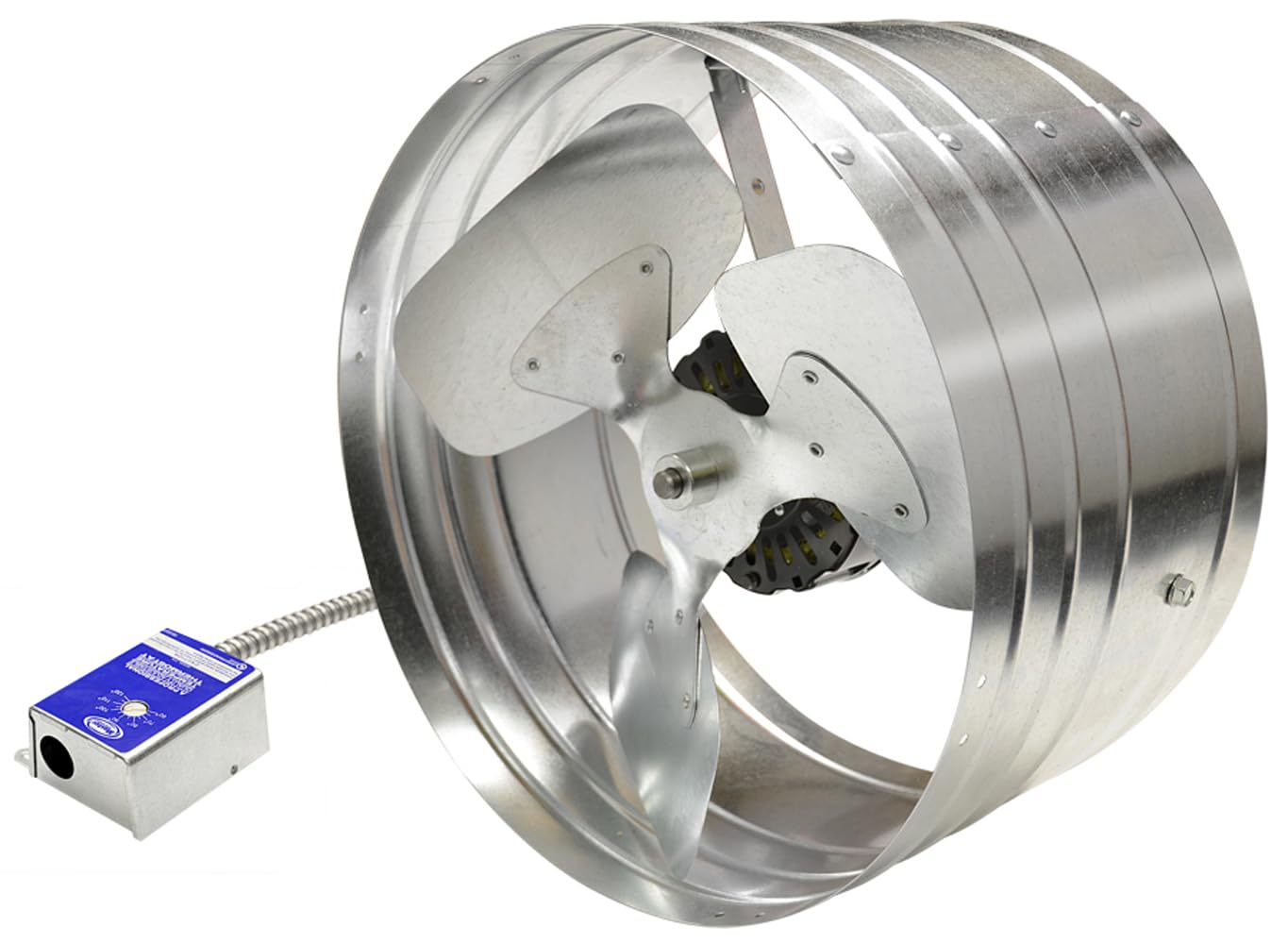
Figure 1: Master Flow GAF 1600 CFM Power Gable Mount Fan, showing its circular housing and fan blades.
Safety Information
Before beginning installation or operation, read and understand all instructions. Failure to follow these instructions may result in electric shock, fire, or serious injury.
- Always wear proper personal safety equipment, including safety eyewear, work gloves, and fall-restraint equipment (if working at heights).
- Electrical work must always be done by a qualified person and in accordance with all applicable building codes and the National Electrical Code (U.S. only).
- Contact a qualified electrician if you are not familiar with electrical codes and/or installations.
- Ensure power is disconnected at the circuit breaker before performing any installation, maintenance, or servicing. Verify power is off using a voltage meter.
- Do not operate the fan if any part is damaged or missing.
Setup & Installation
This section provides detailed steps for assembling and installing your Master Flow Gable Mount Fan. For a visual guide, please refer to the installation video below.
Installation Video Guide
Video 1: GAF Master Flow Gable Fan Installation Video. This video demonstrates the step-by-step process for assembling the fan brackets, mounting the fan in the attic, installing the thermostat, and performing the necessary electrical wiring.
Step-by-Step Installation
- Assemble Mounting Brackets:
Attach the provided mounting brackets to the fan housing. Ensure the concave section of the bracket aligns with the two holes on the fan housing. Use the supplied screws, inserting the Phillips head side into the housing, and secure with the locking nut on the outside of the housing and bracket. Repeat for all brackets.

Figure 2: Close-up view of the fan motor and blades, showing the bracket attachment points on the housing.
- Mount the Fan:
Position the fan in the gable vent opening within the attic. Ensure proper distance and depth for optimal airflow. Secure the fan's assembled brackets to the attic framing using appropriate fasteners (not included, typically screws or nails suitable for wood framing).
- Mount the Thermostat:
Mount the thermostat box to a suitable wooden support near the fan. Ensure it is easily accessible for adjustment.

Figure 3: Detailed view of the Master Flow adjustable thermostat, showing temperature settings and wiring entry point.
- Electrical Wiring (IMPORTANT: Ensure power is OFF):
Before proceeding, go to your breaker box and turn off the power to the circuit you will be wiring. Use a voltage meter to confirm that the power is completely shut off at the wiring location.
The Master Flow thermostat comes partially pre-wired (indicated by a blue wire nut). You will need to supply a Romex cable (purchased separately) to connect to the thermostat box.
- Feed the Romex cable into the thermostat box and secure it with a cable nut.
- Connect the white wire from the Romex cable to the white wire of the thermostat using a yellow wire nut. Twist tightly and gently pull to ensure a secure connection.
- Connect the black wire from the Romex cable to the black wire of the thermostat using a yellow wire nut. Twist tightly and gently pull to ensure a secure connection.
- Attach the ground wire from the Romex cable to the green ground screw within the thermostat box. Loosen the screw, wrap the bare copper wire around it, and tighten securely.
Carefully tuck all wiring back into the box to avoid interference with the thermostat mechanism. Secure the thermostat cover.
- Restore Power and Test:
Once all connections are secure and the cover is in place, return to the breaker box and restore power to the circuit. The fan should now be operational according to the thermostat settings.

Figure 4: Exterior view of a home's gable vent with the Master Flow fan installed, providing discreet and effective attic ventilation.
Operation
The Master Flow Gable Mount Fan operates automatically based on the integrated adjustable thermostat. The thermostat is designed to activate the fan when the attic temperature reaches a set point, and deactivate it when the temperature drops below that point.
- Adjusting the Thermostat: The thermostat features a dial that allows you to set the desired activation temperature. Common settings range from 60°F to 120°F. For optimal energy efficiency and attic ventilation, it is generally recommended to set the thermostat between 90°F and 100°F.
- Automatic Function: Once the temperature is set, the fan will automatically turn on when the attic temperature exceeds the set point and turn off when it falls below the set point.
Maintenance
Regular maintenance ensures the longevity and efficient operation of your Master Flow Gable Mount Fan.
- Annual Inspection: Annually, inspect the fan for any signs of wear, damage, or loose connections. Check the fan blades for debris accumulation.
- Cleaning: Periodically, and especially during annual inspection, ensure the fan blades and motor housing are free from dust, dirt, and insect nests. Use a soft brush or cloth to clean. Always disconnect power before cleaning.
- Lubrication: The fan motor is typically sealed and does not require lubrication. Refer to the motor's specific instructions if unsure.
- Gable Vent Clearance: Ensure the exterior gable vent opening remains clear of obstructions (e.g., overgrown vegetation, debris) to allow for proper airflow.
Troubleshooting
If your Master Flow Gable Mount Fan is not operating as expected, consider the following common issues and solutions:
- Fan Not Turning On:
- Check the circuit breaker to ensure power is supplied to the fan.
- Verify the thermostat setting. If the attic temperature is below the set point, the fan will not activate. Try lowering the set point temporarily to test.
- Inspect wiring connections for looseness or damage (ensure power is off before inspection).
- Fan Running Continuously:
- Check the thermostat setting. If the set point is too low, the fan may run longer than necessary.
- Ensure the thermostat sensor is not obstructed or exposed to external heat sources that could cause it to misread the attic temperature.
- If the attic temperature consistently remains above the set point, consider if additional ventilation or insulation is needed.
- Excessive Noise or Vibration:
- Disconnect power and inspect fan blades for debris, damage, or imbalance. Clean or replace as necessary.
- Check mounting brackets and fasteners to ensure they are tight and secure.
If issues persist after attempting these troubleshooting steps, contact customer support.
Specifications
| Feature | Detail |
|---|---|
| Brand | Master Flow |
| Model | 1600 CFM With Thermostat |
| Power Connector Type | 3-Pin |
| Cooling Method | Forced Air |
| Material | Galvanized Steel |
| Maximum Rotational Speed | 1600 RPM |
| Air Flow Capacity | 1600 Cubic Feet Per Minute |
| Item Weight | 13 Pounds |
| UPC | 050206035986 |
| Manufacturer | GAF Master Flow |
Warranty & Support
For warranty information or technical support, please refer to the product packaging or contact Master Flow customer service directly. Keep your purchase receipt for warranty claims.
You can typically find contact information on the manufacturer's official website or through the retailer where the product was purchased.