
1. Introduction
This manual provides essential information for the installation, operation, and maintenance of the ALEKO Circuit Control Board for AC/AR 1400/2000 series gate openers. Please read these instructions carefully before proceeding with installation or use to ensure proper function and safety.
2. Product Overview
The ALEKO Circuit Control Board is a replacement component designed for specific ALEKO sliding gate openers. It serves as the central control unit, managing the gate's movement and various functions.

Figure 2.1: ALEKO Circuit Control Board (Model AC/AR 1400/2000)
This image displays the ALEKO Circuit Control Board, showing its various electronic components, connectors, and relays. It is a green printed circuit board with a prominent yellow transformer and blue relays.
3. Compatibility
This control circuit board is compatible with the following ALEKO sliding gate opener models:
- AC1400, AR1400, AR1450
- AC2000, AR2000, AR2050
- DKL400UY, KC400UY
- L110C, L110H
- L200Y
- Other similar gate openers (consult your gate opener's manual for specific compatibility)
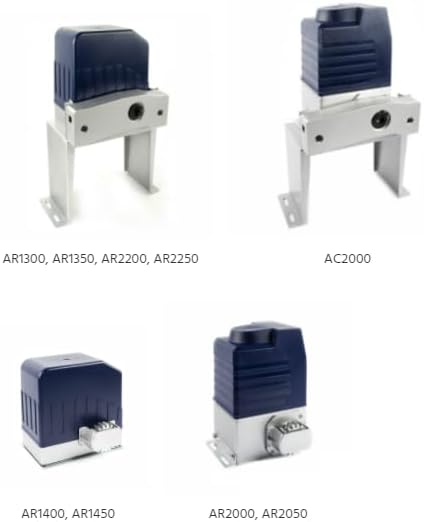
Figure 3.1: Examples of Compatible ALEKO Gate Openers
This image illustrates various ALEKO gate opener models, including AR1300, AR1350, AR2200, AR2250, AC2000, AR1400, AR1450, AR2000, and AR2050, demonstrating the range of compatible units for this control board.
4. Features
- Direct replacement for original circuit boards in compatible ALEKO gate openers.
- Designed for easy installation and setup.
- Constructed with quality components for reliable performance.
- Manages gate opening and closing cycles.
5. Installation Instructions
Safety First: Before beginning any installation or replacement procedure, ensure that the gate opener system is completely disconnected from its power source. Failure to do so may result in electric shock or damage to the unit.
- Power Disconnection: Locate the main power switch or circuit breaker for your gate opener and turn it OFF. Verify that no power is reaching the unit.
- Access the Control Box: Open the housing of your gate opener to access the existing circuit board. This usually involves unscrewing a few fasteners.
- Document Connections: Before disconnecting any wires, take clear photographs or make detailed diagrams of all existing wire connections to the old circuit board. Pay close attention to the color and position of each wire.
- Remove Old Board: Carefully disconnect all wires from the old circuit board. Then, unmount the old board from its standoffs or clips.
- Install New Board: Mount the new ALEKO Circuit Control Board in the same position as the old one. Ensure it is securely fastened.
- Reconnect Wires: Using your photographs or diagrams as a guide, reconnect all wires to the corresponding terminals on the new circuit board. Double-check each connection for accuracy and tightness.
- Close Control Box: Once all connections are verified, close and secure the gate opener housing.
- Restore Power: Reconnect the gate opener to its power source by turning the main power switch or circuit breaker ON.
- Test Functionality: Perform initial tests of the gate opener's functions, including opening, closing, and safety features, according to your gate opener's specific manual.
Note: If you are unsure about any step, it is recommended to consult a qualified technician.
6. Operation
The ALEKO Circuit Control Board operates as the brain of your gate opener system. Once installed and configured, it will manage the gate's movement based on inputs from remote controls, safety sensors, and other connected accessories. Refer to your specific ALEKO gate opener model's user manual for detailed instructions on programming remote controls, adjusting limits, and utilizing advanced features.
7. Maintenance
The circuit board itself requires minimal maintenance. However, regular inspection of the gate opener system is recommended:
- Visual Inspection: Periodically check the circuit board for any signs of damage, corrosion, or loose connections.
- Cleanliness: Ensure the control box remains free of dust, debris, and moisture, which can affect electronic components.
- Wiring: Verify that all wires connected to the board are secure and free from fraying or damage.
- Environmental Protection: Ensure the gate opener's housing is properly sealed to protect the circuit board from environmental elements.
8. Troubleshooting
If your gate opener is not functioning correctly after installing the new circuit board, consider the following:
- No Power: Check if the gate opener is receiving power. Verify the circuit breaker and all power connections.
- Incorrect Wiring: Double-check all wire connections against your diagrams or the gate opener's manual. Ensure no wires are swapped or loose.
- Remote Control Issues: If remote controls are not working, they may need to be reprogrammed with the new board. Refer to your gate opener's manual for programming instructions.
- Safety Sensor Malfunction: Ensure safety sensors (e.g., photocells) are correctly aligned and free from obstructions. A fault in these sensors can prevent the gate from operating.
- Limit Switch Adjustment: If the gate is not opening or closing fully, the limit switches may need adjustment. Consult your gate opener's manual.
For persistent issues, contact ALEKO customer support or a qualified technician.
9. Specifications
| Attribute | Detail |
|---|---|
| Brand | ALEKO |
| Model | AC/AR 1400/2000 (Control Board) |
| Compatible Gate Openers | AC1400, AR1400, AR1450; AC2000, AR2000, AR2050; DKL400UY, KC400UY; L110C, L110H; L200Y |
| Item Dimensions (L x W x H) | 4 x 7 x 2 inches |
| Item Weight | 1 Pound |
| Manufacturer | ALEKO |
10. Customer Support
For technical assistance, warranty information, or to purchase replacement parts, please contact ALEKO customer support. You can find contact details on the official ALEKO website or through your product's original packaging.
Website: Visit the ALEKO Store on Amazon


