
Introduction
This manual provides comprehensive instructions for the proper installation, operation, and maintenance of your Hotpoint FFM91 Left Hand Salad Bin. Designed specifically for the Hotpoint FFM91 refrigerator model, this salad bin is a genuine replacement part ensuring optimal performance and fit. Please read this manual thoroughly before use to ensure safe and efficient operation.
Key features of this product include:
- Designed for use exclusively with the Hotpoint FFM91 refrigerator model.
- Left-hand orientation for specific refrigerator configurations.
- Genuine Hotpoint replacement part.
Setup and Installation
Follow these steps to correctly install the salad bin into your Hotpoint FFM91 refrigerator:
- Preparation: Ensure your refrigerator is unplugged from the power outlet before attempting any installation or removal of parts. This is a safety precaution.
- Locate the Compartment: Open the refrigerator door and identify the designated compartment for the salad bin, typically at the bottom of the fresh food section.
- Insert the Bin: Carefully slide the new Hotpoint FFM91 Left Hand Salad Bin into the designated runners or slots within the refrigerator compartment. Ensure it slides smoothly and sits securely. The left-hand orientation means the handle or opening mechanism is designed to be on the left side when facing the refrigerator.
- Check Fit: Gently push and pull the bin to confirm it is properly seated and moves without obstruction.
- Power On: Once the bin is securely in place, you may plug your refrigerator back into the power outlet.
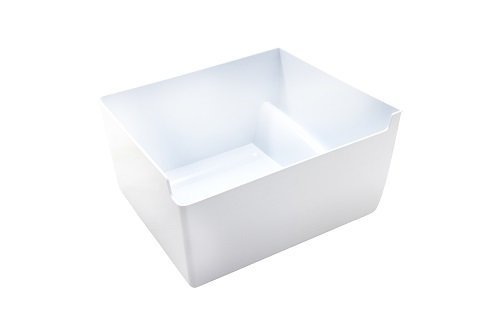
Image 1: The Hotpoint FFM91 Left Hand Salad Bin. This image shows the clear plastic construction and the specific left-hand design for integration into the refrigerator.
Operating Instructions
The Hotpoint FFM91 Left Hand Salad Bin is designed to store fresh produce, helping to maintain its freshness and extend its shelf life. Follow these guidelines for optimal use:
- Loading Produce: Place fruits and vegetables directly into the bin. Avoid overcrowding to allow for proper air circulation.
- Humidity Control: If your refrigerator model features a humidity control slider on the crisper drawer, adjust it according to the type of produce stored. High humidity is generally suitable for leafy greens, while low humidity is better for fruits. Refer to your main refrigerator manual for specific humidity settings.
- Regular Checks: Periodically check the contents of the bin and remove any spoiled items to prevent contamination of other produce.
- Avoid Heavy Items: Do not place excessively heavy items on top of the salad bin, as this may cause damage to the bin or its runners.
Care and Maintenance
Proper cleaning and maintenance will ensure the longevity and hygiene of your salad bin:
- Removal for Cleaning: Gently pull the salad bin out of its runners until it detaches.
- Cleaning Solution: Wash the bin with warm water and a mild dish soap. Avoid abrasive cleaners, scouring pads, or harsh chemicals, as these can scratch or damage the plastic.
- Rinsing: Rinse thoroughly with clean water to remove all soap residue.
- Drying: Dry the bin completely with a soft cloth or allow it to air dry before returning it to the refrigerator.
- Frequency: Clean the salad bin regularly, ideally once a week or whenever spills occur, to maintain hygiene and prevent odors.
Troubleshooting
If you encounter issues with your Hotpoint FFM91 Left Hand Salad Bin, refer to the following common problems and solutions:
| Problem | Possible Cause | Solution |
|---|---|---|
| Bin does not fit or slides poorly. | Incorrect model or orientation; obstruction in runners. | Ensure you have the correct Hotpoint FFM91 Left Hand Salad Bin. Check for any debris or food particles in the refrigerator's runners and clear them. Re-insert the bin carefully, ensuring it aligns with the tracks. |
| Unpleasant odors from the bin. | Spoiled produce; insufficient cleaning. | Remove all contents and thoroughly clean the bin as per the "Care and Maintenance" section. Dispose of any spoiled food immediately. |
| Produce spoiling quickly. | Overcrowding; incorrect humidity setting (if applicable); bin not closing properly. | Avoid overfilling the bin. Adjust humidity control if available. Ensure the bin is fully closed and sealed within its compartment. Check the refrigerator's overall temperature settings. |
If the problem persists, please refer to your main Hotpoint FFM91 refrigerator manual or contact Hotpoint customer support for further assistance.
Specifications
- Brand: Hotpoint
- Model: FFM91 (Salad Bin)
- Compatibility: Hotpoint FFM91 Refrigerator
- Orientation: Left Hand
- Material: Transparent Plastic
- Part Type: Replacement Salad Bin / Crisper Drawer
Warranty and Support
For information regarding the warranty of this product, please refer to the documentation provided with your original Hotpoint FFM91 refrigerator or visit the official Hotpoint website. For technical support or to purchase additional replacement parts, please contact Hotpoint customer service directly.
Note: This salad bin is a component of a larger appliance. Its warranty may be covered under the main refrigerator's warranty terms.