
NEEWER Universal Piano-style Sustain Foot Pedal
Neewer® Universal Piano-style Sustain Foot Pedal User Manual
Model: Universal Piano-style Sustain Foot Pedal
Introduction
Thank you for purchasing the Neewer® Universal Piano-style Sustain Foot Pedal. This manual provides essential information for the proper setup, operation, and maintenance of your new sustain pedal. Please read this manual thoroughly before use to ensure optimal performance and longevity of the product.
This pedal is designed to replicate the feel and function of an acoustic piano's sustain pedal, offering universal compatibility with electronic keyboards, digital pianos, and MIDI keyboards equipped with a 1/4-inch input jack.
Safety Information
- Ensure the pedal is placed on a stable, flat surface to prevent slipping during use. The anti-slip rubber base is designed for stability, but extreme conditions may require additional precautions.
- Do not expose the pedal to excessive moisture or liquids.
- Avoid dropping the pedal or subjecting it to strong impacts.
- Keep out of reach of small children.
- Only use with compatible electronic keyboards and devices featuring a 1/4-inch input jack.
Package Contents
Verify that all items are present in your package:
- 1 x Neewer® Universal Piano-style Sustain Foot Pedal

Image: The Neewer Universal Piano-style Sustain Foot Pedal, showcasing its sleek black design, chrome-plated pedal, and attached 1/4-inch input jack cable.
Setup
- Locate the Sustain Pedal Input: Identify the 1/4-inch sustain pedal input jack on your electronic keyboard, digital piano, or MIDI keyboard. This is typically labeled "Sustain," "Damper," or "Pedal."
- Connect the Pedal: Insert the 1/4-inch plug of the Neewer sustain pedal firmly into the sustain pedal input jack of your instrument.

Image: A Neewer sustain pedal connected to an electronic keyboard, demonstrating proper placement and connection.
- Adjust Polarity (if necessary): The pedal features a polarity switch to ensure compatibility with various keyboard brands and models.

Image: Close-up view of the polarity switch located on the side of the pedal, with an inset showing the switch in detail.
If the sustain function operates inversely (e.g., sustains when released and stops when pressed), flip the polarity switch to the opposite position. It is recommended to connect the pedal before powering on your keyboard for optimal recognition.
- Position the Pedal: Place the pedal on the floor in a comfortable position for your foot. The anti-slip rubber pads on the bottom will help keep it in place during performance.
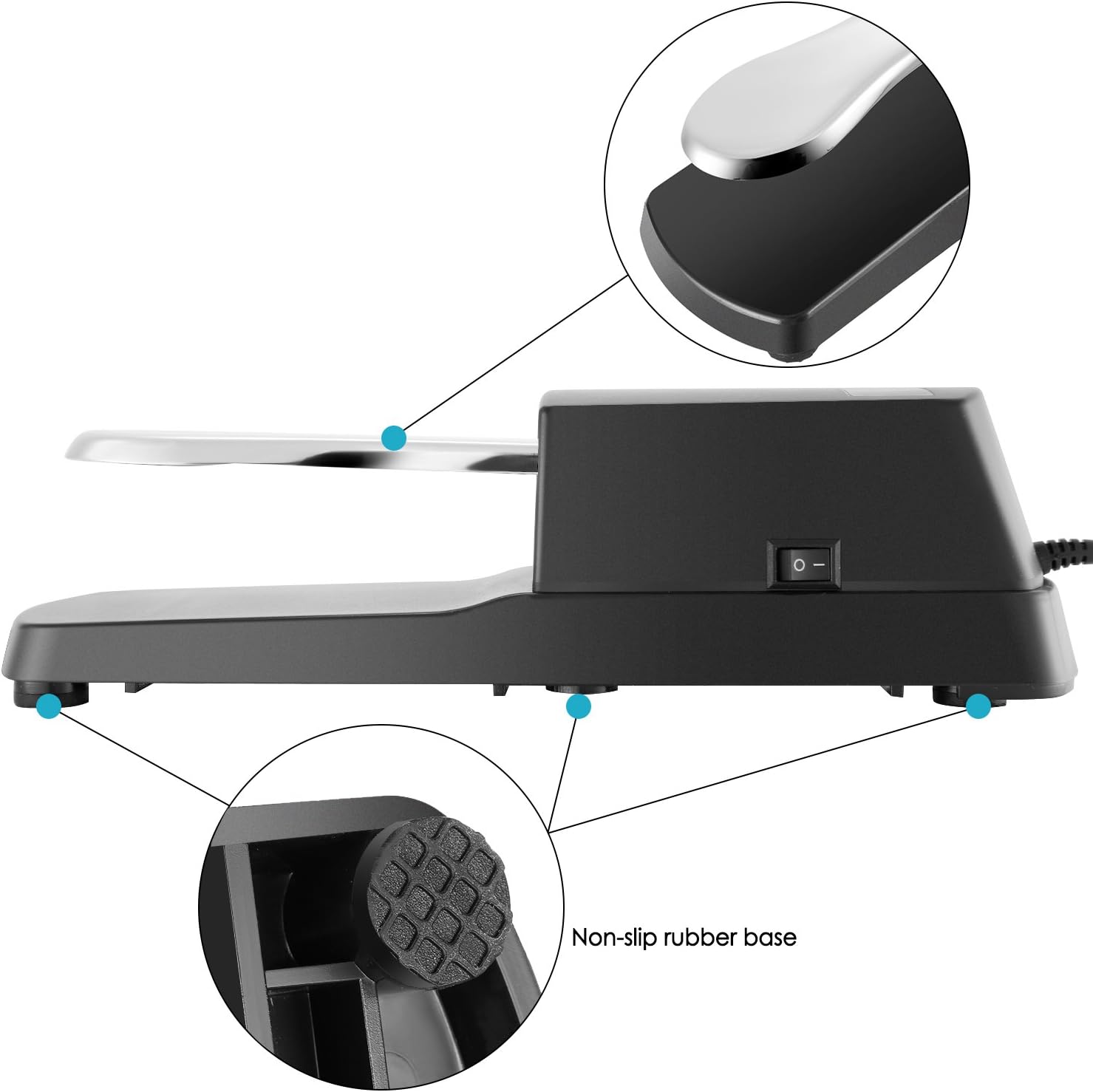
Image: An underside view of the pedal highlighting the non-slip rubber bases designed to prevent movement during use.
Operation
Using the Neewer sustain pedal is straightforward:
- Sustain Function: Press and hold the pedal down with your foot to sustain the notes played on your keyboard.
- Release Function: Release the pedal to stop the sustain effect.
- The pedal is designed to provide a natural, piano-like feel, enhancing your playing experience.

Image: An illustration showing the pedal's compatibility with digital pianos, electronic keyboards, and MIDI keyboards.
Maintenance
- Cleaning: Wipe the pedal with a soft, dry cloth to remove dust and dirt. Do not use abrasive cleaners or solvents.
- Storage: When not in use, store the pedal in a dry place away from direct sunlight and extreme temperatures.
- Cable Care: Avoid kinking or sharply bending the cable to prevent internal damage.
Troubleshooting
| Problem | Possible Cause | Solution |
|---|---|---|
| Pedal does not sustain or sustains inversely. | Incorrect polarity setting. | Flip the polarity switch on the side of the pedal. Ensure the pedal is connected before powering on your keyboard. |
| Pedal slips during use. | Unstable surface or excessive force. | Ensure the pedal is on a flat, non-slippery surface. The rubber pads are designed to prevent slipping. Consider placing it on a mat if the floor is very smooth. |
| No response from pedal. | Loose connection or incompatible input. | Check that the 1/4-inch plug is fully inserted into the keyboard's sustain input. Verify your keyboard has a compatible 1/4-inch sustain input. |
Specifications
| Feature | Detail |
|---|---|
| Color | Black |
| Cord Length | 5ft / 152cm |
| Connector | 1/4" Input Jack |
| Weight | 15.6oz / 442g |
| Material | Chrome plated metal pedal, high strength plastic shell |
| Design Features | Piano-style, Polarity Switch, Anti-slip rubber base |
| Compatibility | Any electronic keyboard with 1/4" input jack (Digital piano, Electronic Keyboard, MIDI Keyboard) |

Image: Diagram illustrating the dimensions of the sustain pedal, showing its length and width.
Warranty and Support
For warranty information and technical support, please refer to the official NEEWER website or contact their customer service directly. Keep your purchase receipt as proof of purchase.
NEEWER Official Website: www.neewer.com
Ask a question about this manual
Ask about setup, troubleshooting, compatibility, parts, safety, or missing instructions. Manuals+ will review the question and use this page’s manual context to help answer it.