
Maxtor 51369U3
Maxtor Internal 3.5 Inch Hard Drive 13.5GB ATA IDE 7200 RPM (Model 51369U3) User Manual
Model: 51369U3
Introduction
This manual provides essential information for the installation, operation, and maintenance of your Maxtor Internal 3.5 Inch Hard Drive, Model 51369U3. Please read these instructions carefully before proceeding with installation or use.
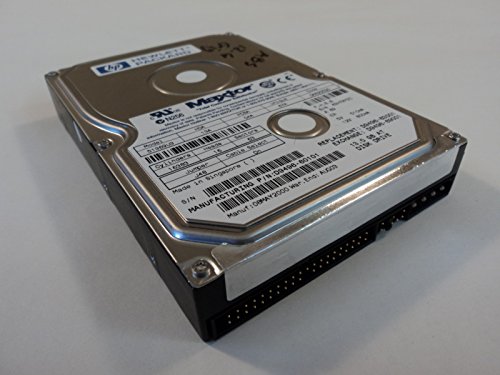
Figure 1: Angled view of the Maxtor 51369U3 Internal Hard Drive.
Setup and Installation
Before installation, ensure your system is powered off and disconnected from the power source. Handle the hard drive by its edges to avoid static discharge.
1. Jumper Settings
The Maxtor 51369U3 hard drive uses an IDE interface and requires proper jumper configuration for master, slave, or cable select operation. Refer to the label on the drive for specific jumper settings.
- Jumper J48: Set to 'On' for Cable Select mode.

Figure 2: Close-up of the hard drive label, detailing model number, serial number, and jumper settings. Note the Jumper J48 and Cable Select 'On' indication.
2. Physical Installation
- Mount the hard drive securely into an available 3.5-inch drive bay within your computer case.
- Connect the 40-pin IDE data cable to the drive's IDE connector and to the motherboard's IDE controller.
- Connect the 4-pin Molex power connector from your power supply to the drive's power input. The drive requires 12V and 5V power.

Figure 3: Front view of the hard drive, illustrating the 40-pin IDE data interface and the 4-pin Molex power connector.
3. Initial System Configuration
After physical installation, power on your computer. Access the system's BIOS/UEFI settings to ensure the hard drive is detected. You may need to configure the drive in the operating system for partitioning and formatting before use.
Operating Instructions
Once installed and configured, the Maxtor 51369U3 hard drive operates as a standard storage device. Data access and management are handled by your operating system.
- Data Transfer: Utilize your operating system's file management tools to transfer, store, and retrieve data.
- Performance: The drive operates at 7200 RPM, providing efficient data access speeds for its class.
Maintenance
Hard drives are sensitive components. Proper maintenance ensures longevity and data integrity.
- Environmental Control: Operate the drive within recommended temperature and humidity ranges. Avoid extreme temperatures and direct sunlight.
- Physical Handling: Avoid dropping or subjecting the drive to physical shocks, especially when in operation.
- Data Backup: Regularly back up important data to prevent loss in case of drive failure.
- Dust Removal: Ensure adequate airflow around the drive and periodically clean dust from inside the computer case to prevent overheating.
Troubleshooting
If you encounter issues with your hard drive, consider the following common troubleshooting steps:
- Drive Not Detected:
- Verify all power and data cables are securely connected.
- Check jumper settings for proper master/slave/cable select configuration.
- Ensure the drive is enabled in the system's BIOS/UEFI settings.
- Operating System Not Booting:
- Confirm the boot order in BIOS/UEFI is set correctly.
- Attempt to repair the operating system installation using installation media.
- Unusual Noises:
- Clicking or grinding noises may indicate a mechanical failure. Back up data immediately if possible and consider replacing the drive.
Specifications
| Feature | Detail |
|---|---|
| Model Number | 51369U3 |
| Capacity | 13.5 GB |
| Interface | ATA IDE |
| Rotational Speed | 7200 RPM |
| Form Factor | 3.5-inch |
| Cylinders | 16383 |
| Heads | 16 |
| Sectors | 63 |
| Power Requirements | 12V & 5V |
| Dimensions (LxWxH) | 5.75 x 4 x 1 inches |
| Weight | 1.13 pounds |
| Manufacturing P/N | D9496-60101 |
| Serial Number | K3H7XYZC |
| UPC | 685248606582 |
Warranty Information
This Maxtor hard drive was manufactured on 06MAY2000 with a warranty ending in AUG03. For specific warranty terms and conditions, please refer to the original purchase documentation or contact Maxtor customer support. Warranty coverage typically applies to defects in materials and workmanship under normal use.
Note: The warranty period for this specific unit has expired based on the manufacturing label.
Support and Contact
For technical assistance or further inquiries regarding your Maxtor hard drive, please refer to the following:
- Maxtor Customer Support: Refer to the official Maxtor website or documentation for current contact information.
- Hewlett Packard Part Number: This drive is associated with Hewlett Packard Part Number D9496-60101. For HP-specific system compatibility or support, consult HP documentation.
- Online Resources: Search for "Maxtor 51369U3 support" or "ATA IDE hard drive installation" for additional community and technical resources.