
Introduction
The NHT CS-10 is a 10-inch long throw powered subwoofer designed to deliver deep, musical bass for home audio systems. This manual provides essential information for the safe and optimal installation, operation, and maintenance of your subwoofer. Please read these instructions thoroughly before use and retain them for future reference.
Safety Information
Important Safety Instructions:
- Read these instructions.
- Keep these instructions.
- Heed all warnings.
- Follow all instructions.
- Do not use this apparatus near water.
- Clean only with a dry cloth.
- Do not block any ventilation openings. Install in accordance with the manufacturer's instructions.
- Do not install near any heat sources such as radiators, heat registers, stoves, or other apparatus (including amplifiers) that produce heat.
- Do not defeat the safety purpose of the polarized or grounding-type plug. A polarized plug has two blades with one wider than the other. A grounding type plug has two blades and a third grounding prong. The wide blade or the third prong are provided for your safety. If the provided plug does not fit into your outlet, consult an electrician for replacement of the obsolete outlet.
- Protect the power cord from being walked on or pinched, particularly at plugs, convenience receptacles, and the point where they exit from the apparatus.
- Only use attachments/accessories specified by the manufacturer.
- Use only with the cart, stand, tripod, bracket, or table specified by the manufacturer, or sold with the apparatus. When a cart is used, use caution when moving the cart/apparatus combination to avoid injury from tip-over.
- Unplug this apparatus during lightning storms or when unused for long periods of time.
- Refer all servicing to qualified service personnel. Servicing is required when the apparatus has been damaged in any way, such as power-supply cord or plug is damaged, liquid has been spilled or objects have fallen into the apparatus, the apparatus has been exposed to rain or moisture, does not operate normally, or has been dropped.
Proposition 65 Warning: This product may contain chemicals known to the State of California to cause cancer and birth defects or other reproductive harm.
Package Contents
Carefully unpack your NHT CS-10 subwoofer and ensure all items are present:
- NHT CS-10 Long Throw Powered Subwoofer
- Power Cord
- Instruction Manual (this document)
Product Overview
The NHT CS-10 subwoofer features a 10-inch long throw driver housed in a compact 14-inch square cabinet. It is powered by a 300-watt amplifier and is designed to reproduce frequencies down to 22Hz. The rigid construction, lined with a 1-millimeter thick sheet of aluminum, minimizes cabinet vibrations for clear sound reproduction. The unit includes analog inputs, a crossover control, volume trim, and a phase switch for precise sound adjustment.

Figure 1: Front view of the NHT CS-10 Subwoofer without the grille, showcasing the 10-inch driver.

Figure 2: Front view of the NHT CS-10 Subwoofer with the recessed grille installed.
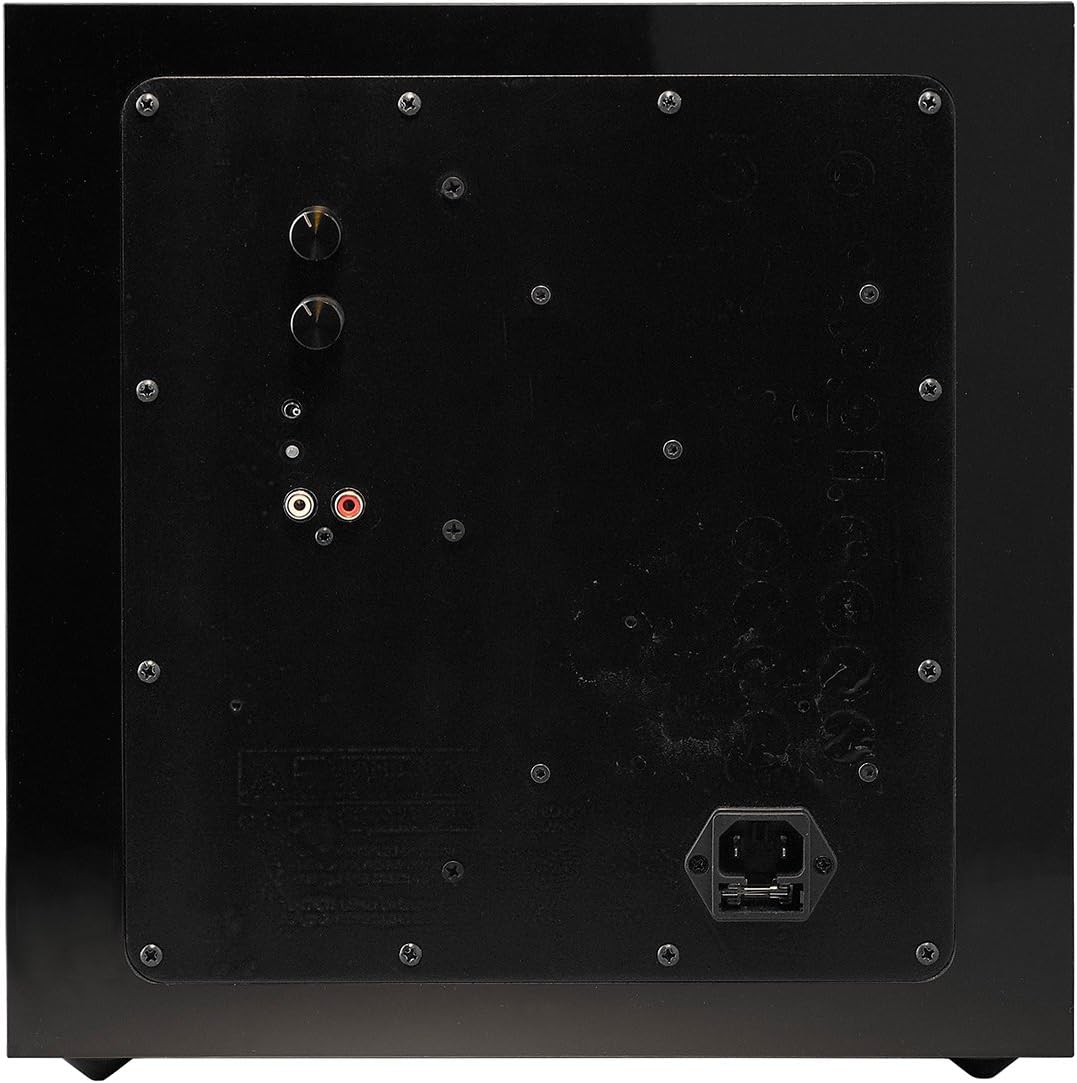
Figure 3: Rear panel of the NHT CS-10 Subwoofer, showing the controls and input/power connections.

Figure 4: Diagram illustrating the dimensions of the NHT CS-10 Subwoofer (13.8 inches x 13.8 inches x 13.8 inches).
Setup
1. Placement
The placement of your subwoofer significantly impacts its performance. Experiment with different locations to find the best sound for your room. Generally, placing the subwoofer in a corner can enhance bass output, while placing it near your main speakers can improve integration. Ensure adequate ventilation around the unit.
2. Connections
Before making any connections, ensure all audio equipment is turned off and unplugged from the power outlet.
- Audio Input: Connect the RCA output from your receiver or pre-amplifier to the analog RCA inputs on the rear panel of the CS-10 subwoofer. Use a high-quality RCA cable for optimal signal transfer.
- Power: Once audio connections are made, connect the supplied power cord to the power inlet on the subwoofer's rear panel, then plug the other end into a suitable AC power outlet.
3. Initial Power On
After all connections are secure, turn on your audio receiver/pre-amplifier first, then power on the NHT CS-10 subwoofer. The subwoofer typically has an auto-on feature that activates when an audio signal is detected.
Operating Instructions
The NHT CS-10 features controls on its rear panel to fine-tune its performance to your listening environment and preferences.
Controls:
- Volume Trim Control: Adjusts the overall output level of the subwoofer. Start with a low setting and gradually increase until the bass blends seamlessly with your main speakers.
- Crossover Control: This knob sets the upper frequency limit at which the subwoofer operates. If your receiver has a dedicated subwoofer output with its own crossover settings (LFE mode), set the subwoofer's crossover control to LFE. Otherwise, adjust it to blend with the low-frequency rolloff of your main speakers (typically between 80Hz and 120Hz).
- Phase Switch: This switch (0° or 180°) helps to ensure that the subwoofer's sound waves are in phase with your main speakers. Experiment with both settings while listening from your primary seating position. Choose the setting that provides the most impactful and coherent bass.
Adjustments:
After initial setup, play various types of music and movie content to fine-tune the subwoofer's settings. Small adjustments to the volume, crossover, and phase can significantly improve the overall sound quality and integration with your system.
Maintenance
Cleaning:
To clean the cabinet, use a soft, dry cloth. Avoid using abrasive cleaners, waxes, or solvents, as these can damage the finish. Do not spray cleaning liquids directly onto the subwoofer.
Care:
Keep the subwoofer away from direct sunlight, excessive heat, and moisture. Ensure proper ventilation to prevent overheating. If the unit will be unused for an extended period, it is advisable to unplug it from the power outlet.
Troubleshooting
If you experience issues with your NHT CS-10 subwoofer, refer to the following common troubleshooting steps:
- No Sound:
- Check if the subwoofer is plugged into a working power outlet and turned on.
- Verify that the RCA audio cables are securely connected to both the subwoofer and your receiver/pre-amplifier.
- Ensure the volume trim control on the subwoofer is not set to minimum.
- Check your receiver's settings to ensure the subwoofer output is enabled and the volume is adequate.
- Distorted Sound:
- Reduce the volume trim control on the subwoofer.
- Check your receiver's volume level.
- Ensure the subwoofer is not placed in a location that causes excessive resonance or vibrations.
- Weak Bass:
- Increase the volume trim control on the subwoofer.
- Adjust the crossover control to a higher frequency if your main speakers have limited bass response.
- Experiment with the phase switch (0° or 180°) to find the setting that provides the strongest bass output.
- Try repositioning the subwoofer, such as closer to a corner or wall.
If these steps do not resolve the issue, please contact NHT customer support for further assistance.
Specifications
| Feature | Specification |
|---|---|
| Brand | NHT |
| Model Number | CS-10 |
| Model Name | N-CS 10B |
| Speaker Maximum Output Power | 300 Watts |
| Frequency Response | 22 Hz |
| Connectivity Technology | RCA (Wired) |
| Audio Output Mode | Surround |
| Mounting Type | Floor Standing |
| Enclosure Material | Aluminum |
| Subwoofer Diameter | 10 Inches |
| Color | Piano Black High Gloss Paint |
| Item Weight | 32.7 Pounds |
| Control Method | Touch (for controls) |
| Power Source | Corded Electric |
| UPC | 898349001464 |
Warranty Information
NHT warrants that for a period of 12 months parts and labor from the date this product is first purchased (or, if the product(s) is discontinued, from the date of manufacture) from NHTHIFI.com or an authorized NHT dealer in North America, if it fails to function properly due to a manufacturing defect, despite its being installed and operated according to these instructions and used under normal conditions, it will be either replaced or repaired with new or rebuilt parts (both at NHT's option) with a unit of comparable value without charge to you.
Support
For further assistance, technical support, or warranty claims, please visit the official NHT website or contact their customer service department. You can find more information and contact details by visiting the NHT Store on Amazon.
