
Important Safety Information
Please read all instructions carefully before operating this machine. Keep this manual for future reference.
- Always consult with a healthcare professional before starting any new exercise program.
- Ensure the machine is placed on a flat, stable surface.
- Keep children and pets away from the machine during operation.
- Maximum user weight capacity: 330 lbs (150 kg). Do not exceed this limit.
- Do not use the machine if you are pregnant, have a pacemaker, or any serious medical conditions without medical advice.
- Always hold onto the handrails for stability, especially when starting or stopping the machine.
Product Overview
The ZELUS 2000W Whole Body Vibration Platform is designed to provide an effective and versatile workout experience. It features a powerful motor, multiple speed levels, and preset programs to cater to various fitness needs.
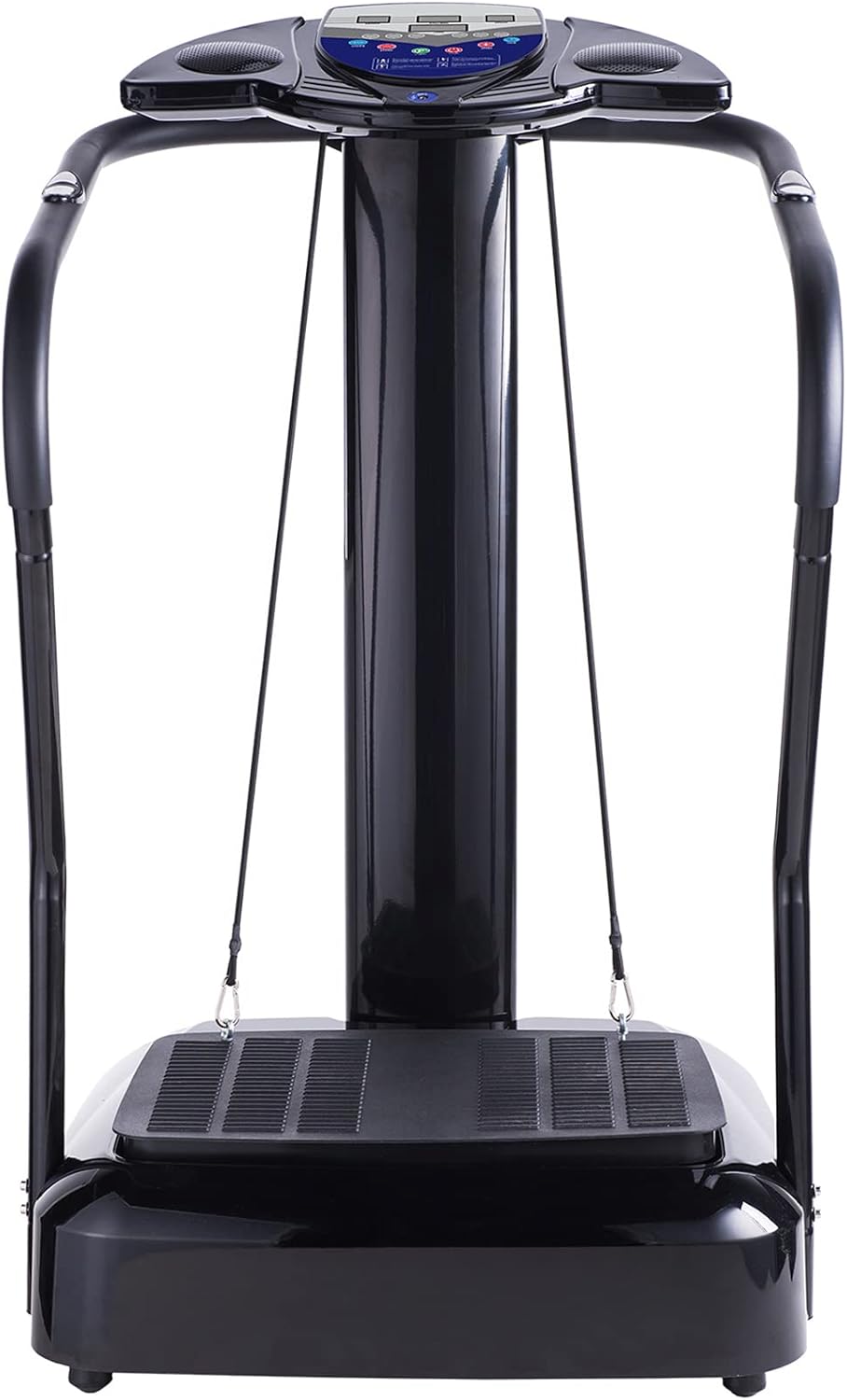
Figure 1: ZELUS 2000W Whole Body Vibration Platform Exercise Machine

Figure 2: Intuitive Control Panel with LED Display
Key features include:
- Powerful Motor: Equipped with a 1.5HP 2000W motor for effective and quiet operation.
- Adjustable Intensity: Offers 180 speed levels and 10 preset programs for customized workouts.
- Digital Display: LED monitor tracks mode, time, speed, and BMI.
- Sturdy Construction: Solid metal frame with non-toxic and non-slip ABS platform, supporting up to 330 lbs.
- Convenient Mobility: Integrated caster wheels for easy transport and storage.
- Entertainment: Built-in sound system for MP3 playback during workouts.
- Additional Accessories: Includes 2 detachable resistance bands for upper body exercises.
Setup and Assembly
Before assembly, ensure all components are present as listed in the package contents. Refer to the detailed assembly video below for visual guidance.

Figure 3: Package List (Vibration Plate, Power Cord, Resistance Bands, Assembly Tool Kit, Manual)
Assembly Video Guide
Video 1: Official Installation Instruction Video for ZELUS Vibration Platform. This video provides a step-by-step guide on how to assemble your machine.
General Assembly Steps:
- Unpack all components and verify against the package list.
- Attach the main column to the base unit using the provided screws and washers.
- Secure the support tubes (handrails) to the main column.
- Connect the console unit to the top of the main column, ensuring all wires are properly connected.
- Attach the eye bolts to the platform for resistance band use.
Operating Instructions
Familiarize yourself with the control panel for optimal use.
Getting Started
- Plug the power cord into a grounded outlet and into the machine's power port.
- Turn on the main power switch located at the base of the machine.
- The LED display on the console will illuminate.
Using the Control Panel
- Power Button: Press START to begin a workout or STOP to end it.
- MODE Button: Cycle through 10 preset programs (P1-P10) or select manual mode (88).
- SPEED Buttons (+/-): Adjust the vibration speed from 1 to 180 levels in manual mode.
- TIME Buttons: Adjust the workout duration.
- LOW/MID/HIGH: Quickly switch between low, medium, and high intensity levels.
- CAL/BMI Display: Shows estimated calories burned and allows for BMI input.
Resistance Bands and MP3 Player
- Resistance Bands: Attach the detachable resistance bands to the eye bolts on the platform for upper body exercises.
- MP3 Player: Connect your MP3 device to the MP3 port on the console to play music through the built-in speakers.
Maintenance
Regular maintenance ensures the longevity and safe operation of your vibration platform.
- Cleaning: Wipe down the machine with a soft, damp cloth after each use. Avoid abrasive cleaners or solvents.
- Screw Check: Periodically check all screws and bolts for tightness, especially those securing the column and handrails, due to vibration. Tighten as necessary.
- Storage: When not in use, store the machine in a cool, dry place. Utilize the built-in caster wheels for easy relocation.
Troubleshooting
If you encounter any issues, refer to the common problems and solutions below. For more detailed troubleshooting, please consult the full User Manual (PDF) available online.
| Problem | Possible Cause | Solution |
|---|---|---|
| Machine does not power on | Power cord not connected; Main switch off; Power outlet issue | Ensure power cord is securely plugged in; Turn on main switch; Test outlet with another device |
| No vibration or weak vibration | Speed setting too low; Program not selected; Motor issue | Increase speed setting; Select a program; Contact customer support if issue persists |
| Display not working correctly | Loose connection; Console issue | Check console connections; Power cycle the machine; Contact customer support |
Specifications
| Feature | Specification |
|---|---|
| Motor Horsepower | 1.5 HP |
| Rated Power | 2000W |
| Speed Levels | 1-180 |
| Preset Programs | 10 |
| Max. Weight Capacity | 330 lbs (150 kg) |
| Input Voltage | 110V |
| Frequency Range | 50/60Hz |
| Material | Alloy Steel, ABS Plastic |
| Product Dimensions (LxWxH) | 24"D x 26"W x 46.5"H |
| Item Weight | 48.8 lbs |
Warranty and Support
Your ZELUS 2000W Whole Body Vibration Platform Exercise Machine comes with a 1-Year Warranty from the date of purchase, covering manufacturing defects.
For detailed warranty information, troubleshooting, or customer support, please refer to the official User Manual (PDF) or contact ZELUS Direct customer service.