1. Introduction
Thank you for choosing the Neewer NW-562 E-TTL Flash Speedlite Kit. This kit includes the NW-562C E-TTL Flash and the FC-16 2.4GHz Wireless Trigger system, designed to enhance your photography with versatile lighting options. This manual provides detailed instructions for safe and effective use of your new equipment.
2. Safety Information
- Do not disassemble or attempt to repair the unit yourself. Refer all servicing to qualified personnel.
- Keep the device away from water and high humidity to prevent electric shock or fire.
- Do not operate the flash in the presence of flammable gases or liquids.
- Avoid direct eye exposure to the flash, especially at close range, as it can cause temporary vision impairment.
- Use only specified batteries (AA for flash, AAA for trigger) and ensure correct polarity.
- Remove batteries if the device will not be used for an extended period.
3. Package Contents
Please check the package contents to ensure all items are present:
- 1 x Neewer NW-562C E-TTL Flash Speedlite
- 1 x FC-16 2.4GHz Wireless Flash Trigger Transmitter
- 1 x FC-16 2.4GHz Wireless Flash Trigger Receiver
- 1 x C1 Cable
- 1 x C3 Cable
Note: Camera and batteries (AA for flash, AAA for trigger) are not included.
4. Product Overview
4.1 NW-562C E-TTL Flash
The NW-562C flash unit features a powerful guide number and multiple flash modes for versatile lighting control.
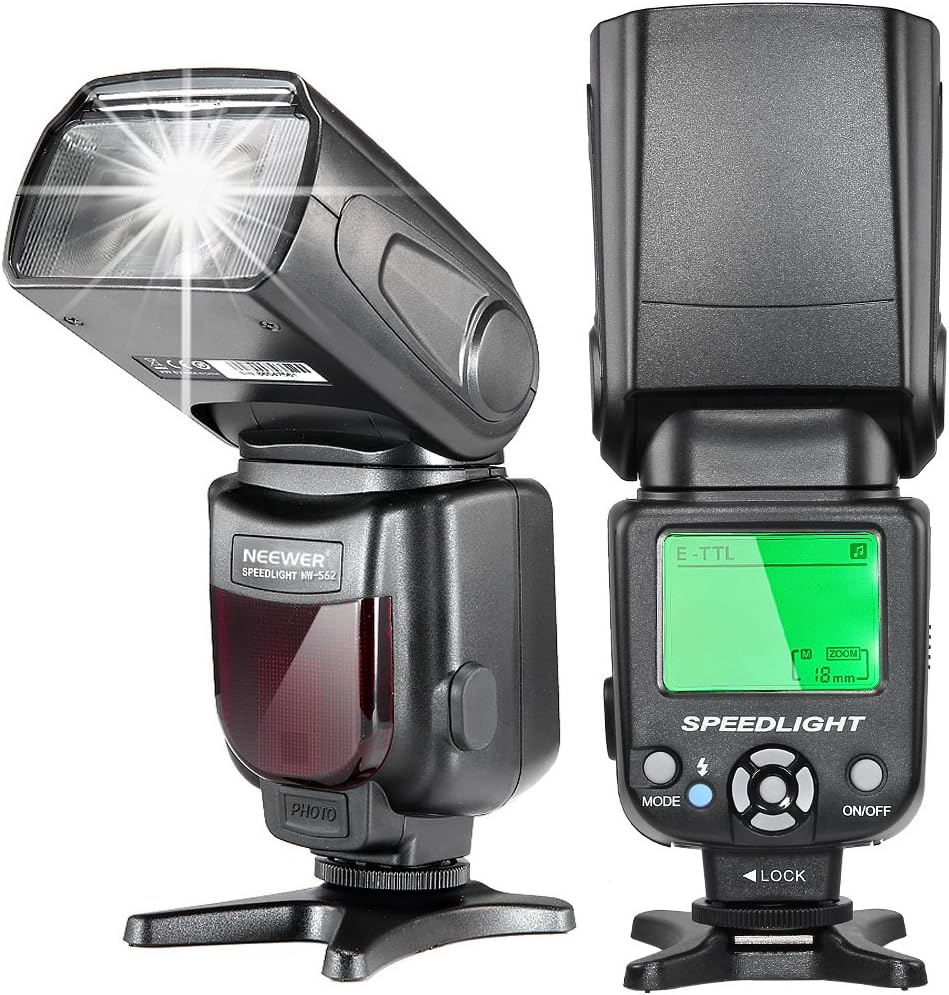
Image: Front and rear view of the Neewer NW-562C flash unit, showing the flash head, control panel, and LCD display.
- Flash Head: Emits light, can be tilted and rotated.
- Control Panel: Buttons and LCD display for mode selection and settings adjustment.
- Hot Shoe Mount: For attaching to a camera or stand.
- Battery Compartment: Holds 4 AA batteries.
- PC Sync Port: For wired connection to cameras or triggers.
- External Charge Port: For connecting an external power pack (not included).
4.2 FC-16 2.4GHz Wireless Flash Trigger
The FC-16 trigger system allows for wireless control of your flash unit, enabling off-camera lighting setups.
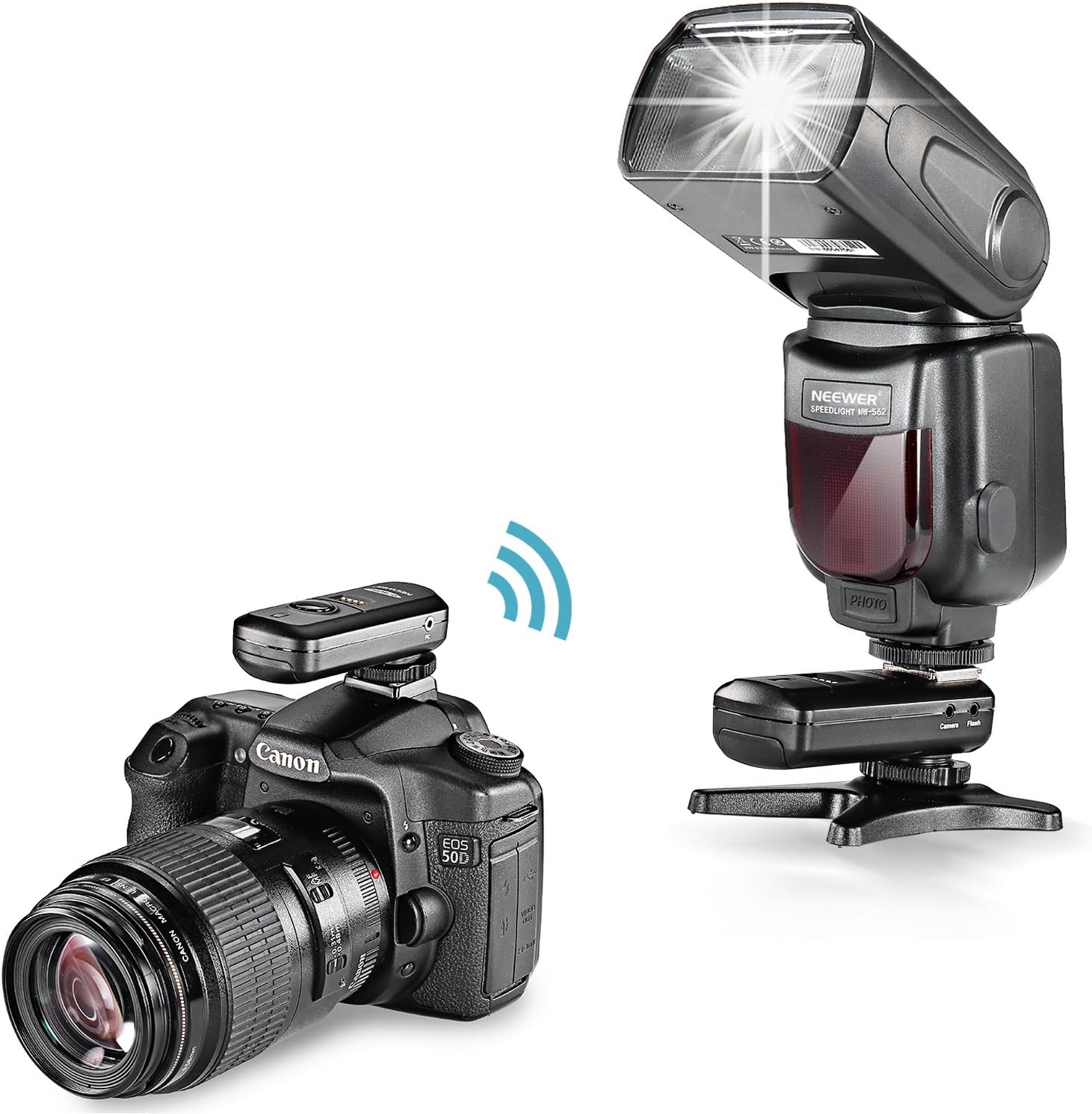
Image: A Canon DSLR camera with the FC-16 wireless trigger transmitter mounted on its hot shoe, wirelessly communicating with the NW-562C flash placed off-camera.
- Transmitter: Mounts on the camera's hot shoe.
- Receiver: Attaches to the flash unit's hot shoe or PC sync port.
- Channel Selector: Allows selection of 16 different channels to avoid interference.
- 1/4 inch Tripod Mount: On the receiver for mounting on light stands.
5. Setup
5.1 Installing Batteries
- For NW-562C Flash: Open the battery compartment cover. Insert 4 AA alkaline or Ni-MH batteries, ensuring correct polarity. Close the cover securely.
- For FC-16 Wireless Trigger (Transmitter & Receiver): Open the battery compartment cover. Insert 2 AAA alkaline batteries into each unit, observing polarity. Close the cover securely.
5.2 Mounting the Flash on Camera

Image: The NW-562C flash unit securely mounted on the hot shoe of a Canon DSLR camera.
- Slide the flash unit's hot shoe mount into your camera's hot shoe.
- Rotate the locking ring or lever on the flash unit clockwise until it is securely fastened to the camera.
5.3 Connecting the FC-16 Wireless Trigger
- Transmitter: Mount the FC-16 transmitter onto your camera's hot shoe and secure it.
- Receiver: Mount the FC-16 receiver onto the NW-562C flash unit's hot shoe. Alternatively, connect the receiver to the flash's PC sync port using the provided PC sync cable.
- Channel Matching: Ensure both the transmitter and receiver are set to the same channel (1-16) using their respective channel selectors.
- Remote Camera Trigger (Optional): Connect the appropriate C1 or C3 cable from the FC-16 receiver to your camera's remote shutter release port. This allows the transmitter to act as a remote shutter release.

Image: A Canon DSLR camera connected to the FC-16 wireless trigger receiver via a coiled cable, demonstrating its use as a remote camera trigger.
6. Operating Instructions
6.1 Power On/Off
Press and hold the ON/OFF button on the flash unit to power it on or off. The LCD screen will illuminate upon power-on.
6.2 Flash Modes
Press the MODE button to cycle through the available flash modes:
- TTL (Through-The-Lens): The flash output is automatically controlled by the camera's metering system for optimal exposure.
- M (Manual): Allows you to manually set the flash output from 1/128 to 1/1 power in 0.3 EV steps (22 fine-tuning stalls).
- S1 (Slave 1): The flash fires in response to a single pre-flash from a master flash. Suitable for manual flash modes on the master.
- S2 (Slave 2): The flash fires in response to the second flash from a master flash, ignoring the pre-flash. Suitable for TTL flash modes on the master.
- Multi (Stroboscopic): The flash fires a series of rapid flashes during a single exposure, creating a stroboscopic effect. You can set the flash frequency, flash count, and power output.
6.3 Flash Coverage (Zoom)
The flash offers both manual and automatic zoom for flash coverage from 18mm to 180mm. In TTL mode, the zoom typically adjusts automatically with your lens's focal length. In Manual mode, you can adjust it using the control buttons.
6.4 Tilting and Rotation

Image: Diagram illustrating the horizontal rotation (0-180 degrees) and vertical tilt (-7 to 90 degrees) capabilities of the NW-562C flash head.
The flash head can be tilted vertically from -7 to 90 degrees and rotated horizontally from 0 to 180 degrees. This allows for bounce flash techniques, directing light off ceilings or walls for softer illumination.
6.5 Additional Functions
- PC Sync: Use the PC sync port for a wired connection to cameras or other flash triggers.
- Sniff Mode: Refers to the S1/S2 slave modes, where the flash 'sniffs' for a master flash signal.
- Over Temperature Protection: The flash unit will automatically stop firing if it overheats to prevent damage. Allow it to cool down before resuming use.
- FEC (Flash Exposure Compensation): Adjusts the flash output in TTL mode to fine-tune exposure.
7. Maintenance
- Cleaning: Use a soft, dry cloth to clean the flash unit and trigger. For stubborn dirt, a slightly damp cloth can be used, followed by a dry one. Do not use solvents or abrasive cleaners.
- Storage: Store the kit in a cool, dry place away from direct sunlight. Remove batteries if storing for extended periods to prevent leakage.
- Battery Care: Replace batteries when the low battery indicator appears. Dispose of used batteries responsibly.
8. Troubleshooting
- Flash not firing:
- Check if batteries are correctly installed and charged.
- Ensure the flash is powered on.
- Verify the flash is securely mounted on the camera hot shoe or connected via PC sync.
- If using the wireless trigger, ensure both transmitter and receiver are powered on, have fresh batteries, and are set to the same channel.
- Check camera flash settings.
- Flash output too weak/strong:
- In TTL mode, check camera's exposure compensation or flash exposure compensation (FEC) settings.
- In Manual mode, adjust the power output setting on the flash unit.
- Ensure flash coverage (zoom) matches the lens focal length.
- Slow recycle time:
- Replace batteries with fresh ones.
- Reduce flash power output.
- Wireless trigger not working:
- Ensure both transmitter and receiver have fresh batteries and are powered on.
- Verify both units are set to the same channel.
- Check operating distance (up to 100m).
- Ensure no obstructions are blocking the signal.
9. Specifications
| Feature | Specification |
|---|---|
| NW-562C E-TTL Flash | |
| Guide No. | 58 (ISO 100, 180mm) |
| Flash Modes | TTL, M, S1/S2, Multi |
| Flash Coverage | 18-180mm (Manual/Automatic Zoom) |
| Horizontal Tilting Degree | 0-180 degrees |
| Vertical Tilting Degree | -7-90 degrees |
| Color Temperature | 5500K |
| Flash Duration | 1/200s - 1/20000s |
| Flash Control | 1/128-1/1 step length 0.3EV (22 fine-tuning stalls) |
| Peripheral Interface | Hot shoe, PC mount, External charge mount |
| Recycle Time | Approx. 2.9s |
| Power Source | 4 x AA batteries (not included) |
| Lighting Times | 100-1500 times (with AA alkaline batteries) |
| Additional Functions | PC sync, Sniff mode (S1/S2), Over temperature protection, FEC |
| FC-16 2.4G Wireless Flash Trigger | |
| Frequency | 2.4GHz |
| Operating Distance | Up to 100m |
| Channels | 16 Selectable Channels |
| Tripod Mount | 1/4 inch (on receiver) |
| Sync Speed | 1/250 second |
| Transmitter Power | 2 x AAA alkaline batteries (not included) |
| Receiver Power | 2 x AAA alkaline batteries (not included) |
| General | |
| Product Dimensions | 10.2 x 5 x 4.9 inches |
| Item Weight | 1.28 pounds |
10. Warranty and Support
Neewer products are designed for reliability and performance. For warranty information and technical support, please refer to the official Neewer website or contact your local distributor. Keep your purchase receipt as proof of purchase for any warranty claims.


