
1. Introduction
This manual provides instructions for the SNHDIGITAL Stereo 3.5mm Flat Wired Headset. This headset is designed for audio playback and communication with compatible devices featuring a standard 3.5mm audio jack. It includes an in-line control box for managing calls and music.

Image 1: Overview of the SNHDIGITAL Stereo 3.5mm Flat Wired Headset.
2. Setup
Follow these steps to set up your headset for first use.
2.1 Connecting the Headset
- Locate the 3.5mm audio jack on your smartphone, tablet, MP3 player, or other compatible device.
- Insert the 3.5mm plug of the headset firmly into the device's audio jack. Ensure a secure connection for optimal audio quality.
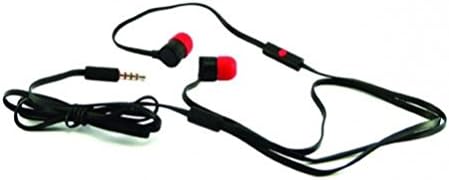
Image 2: The 3.5mm audio jack for connecting to devices.
2.2 Wearing the Earbuds
- Gently insert each earbud into the corresponding ear canal (left earbud into the left ear, right earbud into the right ear).
- Adjust the earbuds for a comfortable and secure fit. A proper fit helps in achieving better sound isolation and audio quality.
- The headset comes with tangle-free flat cables, reducing the likelihood of knots and making it easier to use.
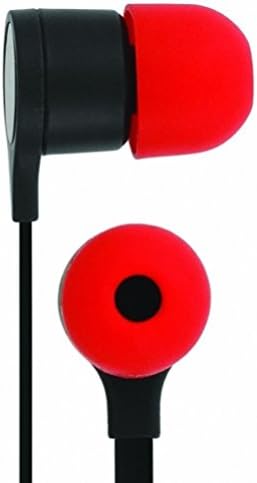
Image 3: Detail of an earbud for proper placement.
3. Operating Instructions
The headset features an in-line control box for convenient management of calls and music playback.
3.1 In-line Control Box
The control box is located on the cable and typically features a single button for multiple functions.

Image 4: The in-line control button for call and music management.
Call Management:
- Answer/End Call: Press the control button once to answer an incoming call. Press it again to end an active call.
- Reject Call: Press and hold the control button for approximately 2 seconds to reject an incoming call.
Music Playback:
- Play/Pause: Press the control button once to play or pause music playback.
- Next Track: Press the control button twice quickly to skip to the next song.
- Previous Track: Press the control button three times quickly to go back to the previous song.
3.2 Microphone Usage
The integrated microphone allows for hands-free communication during calls. Ensure the microphone is positioned appropriately for clear voice capture.
4. Maintenance
Proper care will extend the life and performance of your headset.
4.1 Cleaning
- Use a soft, dry cloth to wipe the earbuds and cable.
- For ear tips, gently remove them and clean with a mild soap solution if necessary, then rinse thoroughly and ensure they are completely dry before reattaching.
- Avoid using harsh chemicals or abrasive materials, as these can damage the headset.
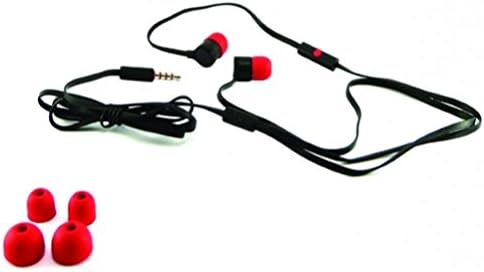
Image 5: Headset shown with interchangeable ear tips for cleaning or replacement.
4.2 Storage and Cable Care
- Store the headset in a clean, dry place when not in use.
- The flat cable design helps prevent tangles. Avoid excessive bending or pulling of the cable to prevent internal damage.
5. Troubleshooting
If you encounter issues with your headset, refer to the following common problems and solutions.
| Problem | Possible Cause | Solution |
|---|---|---|
| No sound or low volume |
|
|
| Microphone not working |
|
|
| Control button not responding |
|
|
6. Specifications
| Feature | Detail |
|---|---|
| Brand | SNHDIGITAL |
| Model | B018WIBSNE |
| Connectivity Technology | Wired |
| Headphone Jack | 3.5 mm Jack |
| Ear Placement | In Ear |
| Form Factor | In Ear |
| Control Type | In-line control button |
| Additional Features | Microphone Included, Tangle-Free Flat Cable |
| Compatible Devices | Cellphones, Tablets, MP3 Players with standard 3.5mm headset connector |
| Color | Black / Red |
| Item Weight | 1 Ounce |
7. Warranty Information
Specific warranty details for this product are typically provided at the point of purchase or within the product packaging. Please retain your proof of purchase for any warranty claims. For information regarding returns, refer to the retailer's return policy, which is generally 30 days from the date of purchase for refund or replacement.
8. Customer Support
For further assistance, technical support, or inquiries regarding your SNHDIGITAL Stereo 3.5mm Flat Wired Headset, please contact the retailer or manufacturer directly. Refer to your purchase documentation for specific contact details.