
1. Product Overview
The Brodit 855164 Proclip is a vehicle-specific mounting base designed for secure and ergonomic placement of mobile devices in your car. This product is a two-part solution; it requires a separate, compatible Brodit device holder (for your smartphone, GPS, or tablet) to be screwed onto this mounting base.
The Proclip offers enhanced comfort and safety by positioning your mobile devices closer to you, making them easier to handle while driving. Its discreet and elegant design provides better visibility by keeping the windshield clear, unlike traditional suction cup mounts.
Key features include:
- Two-Part Solution: Requires an additional Brodit device holder specific to your mobile device.
- Vehicle-Specific Design: Ensures perfect compatibility and integration with your vehicle's dashboard.
- Quick Installation: Installs in approximately 1 minute without the need for special tools or drilling.
- Damage-Free Removal: Can be removed without leaving any traces or altering your dashboard.
- Improved Ergonomics and Safety: Positions devices optimally for visibility and ease of access.

Image 1.1: The Brodit 855164 Proclip Vehicle Mount with its accompanying gap opener tool.
2. Package Contents
Please verify that all items are present in your package:
- Brodit 855164 Proclip Vehicle Mount
- Gap Opener Tool
3. Setup and Installation
The Proclip is designed for quick and easy installation without damaging your vehicle's interior. Follow these steps carefully:
- Identify Mounting Location: Refer to the specific instructions provided with your Proclip for the exact mounting location in your vehicle. The Proclip utilizes existing gaps in your dashboard.
- Clean the Surface: Ensure the dashboard surface where the Proclip will be installed is clean and free of dust or grease.
- Prepare the Gaps: Use the provided gap opener tool to gently widen the dashboard gaps where the Proclip's edges will be inserted. This makes insertion easier and prevents damage.
- Insert the Proclip: Carefully insert the first edge of the Proclip into the designated dashboard gap. Apply gentle pressure until it is securely seated.
- Secure the Second Edge: Guide the second edge of the Proclip into its corresponding dashboard gap. Ensure both edges are fully inserted and the mount feels stable.
- Test Stability: Gently tug on the installed Proclip to ensure it is firmly in place and does not wobble.
- Attach Device Holder: Once the Proclip is securely mounted, you can screw your compatible Brodit device holder onto the pre-drilled holes on the Proclip's faceplate.

Image 3.1: The Brodit Proclip mount, illustrating the pre-drilled holes for attaching a device holder.
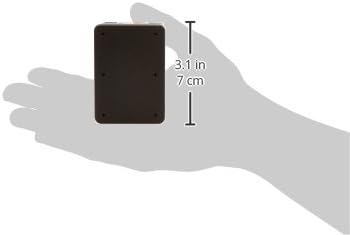
Image 3.2: The Brodit Proclip mount held in a hand, showing its compact size and approximate dimensions for reference during installation.
4. Operating Instructions
Once the Brodit Proclip and your specific device holder are installed, using it is straightforward:
- Insert Device: Place your mobile device into the attached Brodit device holder according to its specific design (e.g., slide in, clip in).
- Adjust Angle (if applicable): If your device holder has an adjustable swivel or tilt mechanism, adjust it to your preferred viewing angle for optimal visibility and minimal glare.
- Remove Device: When not in use, carefully remove your mobile device from the holder.
Always ensure your device is securely fastened in the holder before driving. Avoid adjusting the device or holder while the vehicle is in motion to maintain focus on the road.
5. Maintenance
To ensure the longevity and proper function of your Brodit Proclip, follow these simple maintenance guidelines:
- Cleaning: Wipe the Proclip with a soft, damp cloth to remove dust and grime. Avoid using harsh chemicals or abrasive cleaners, as these can damage the plastic material.
- Check Fasteners: Periodically check that the Proclip remains securely seated in the dashboard gaps and that the device holder is firmly screwed onto the Proclip. Tighten screws if necessary.
- Avoid Excessive Force: Do not apply excessive force when inserting or removing devices, as this could stress the holder or the Proclip.
6. Troubleshooting
If you encounter any issues with your Brodit Proclip, consider the following common solutions:
- Proclip feels loose after installation:
- Ensure both edges of the Proclip are fully inserted into the dashboard gaps.
- Verify that the Proclip is the correct model for your specific vehicle. Vehicle-specific fit is crucial for stability.
- Difficulty inserting the Proclip:
- Use the gap opener tool to gently create sufficient space in the dashboard gaps before attempting to insert the Proclip.
- Ensure you are inserting the correct edge first as per your vehicle-specific instructions.
- Device holder wobbles on the Proclip:
- Check that the screws attaching the device holder to the Proclip are tightened securely.
- Ensure the device holder itself is not damaged or worn.
7. Specifications
| Brand | Brodit |
| Model Name | Vehicle holder |
| Item Model Number | 855164 |
| Material | Plastic |
| Color | Black |
| Item Weight | 70 g |
| Product Dimensions (L x W x H) | 10 x 6 x 5 cm |
| Mounting Type | Dashboard |
| Compatible Devices | Smartphone (requires specific device holder) |
| Special Feature | Lightweight |
| Water Resistance Level | Not waterproof |
8. Warranty and Support
Brodit products are manufactured to high standards. For specific warranty information, please refer to the documentation included with your purchase or visit the official Brodit website. Warranty terms may vary by region and retailer.
For technical support, installation assistance, or inquiries regarding compatible device holders, please contact Brodit customer service or your authorized retailer. Contact information can typically be found on the Brodit official website or on your purchase receipt.


