
1. Introduction
The MINT InstantFlex TL70 is a unique twin-lens instant camera designed for use with Fujifilm Instax Mini films. It combines classic Twin Lens Reflex (TLR) aesthetics with modern functionality, offering manual control over focus and aperture, along with a built-in flash. This manual provides essential information for setting up, operating, and maintaining your InstantFlex TL70 camera.
Key features include a wide range of apertures (f/5.6 to f/22, plus a f/bokeh setting), a 61mm fixed focal length lens, and a focusing distance from 48cm to infinity. It supports shutter speeds from 1/500 to 1 second in A mode and up to 10 seconds in Bulb mode, with ±1 EV exposure compensation. The camera also features a Fresnel ground-glass focusing screen for precise focusing and supports infinite multiple exposures.
2. What's in the Box
Upon unboxing your MINT InstantFlex TL70, please ensure all the following items are present:
- InstantFlex TL70 Camera Body
- Lens Cap
- 3 AA Batteries
- User Guide (this document)
3. Camera Components
Familiarize yourself with the main components of your InstantFlex TL70 camera:
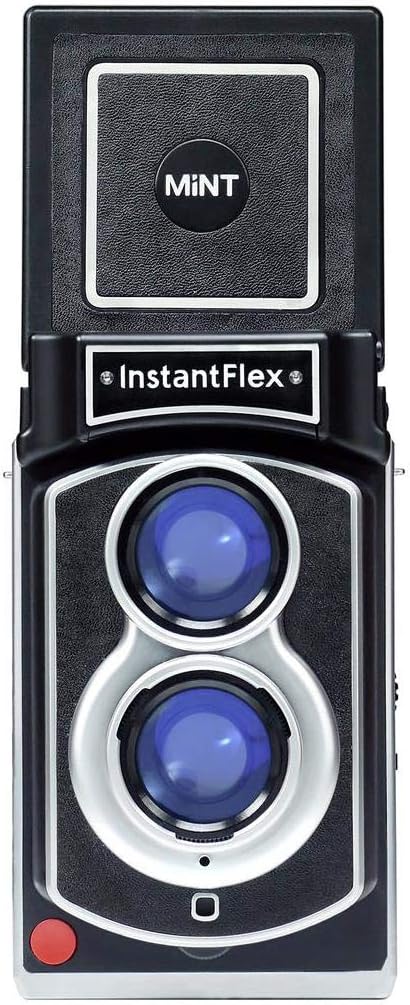
- Viewing Lens (Upper): Used for composing and focusing your shot.
- Taking Lens (Lower): The lens through which the image is captured onto the film.
- Viewfinder Hood: Flips open to reveal the ground-glass focusing screen.
- Shutter Button: Red button on the front lower-left for taking photos.
- Flash Unit: Located above the lenses, it pops up for use.
- Exposure Compensation Switch: Located on the side, allows adjustment of exposure (EV+/-).
- Focusing Knob: Typically located on the side or front, used to adjust focus.
- Film Ejection Slot: Where the developed instant film emerges after a shot.
- Tripod Mount: A standard 1/4" thread on the bottom for mounting to a tripod.
- Battery Compartment: Located on the bottom, holds 3 AA batteries.


4. Setup
4.1. Battery Installation
- Locate the battery compartment cover on the bottom of the camera.
- Slide or unlatch the cover to open the compartment.
- Insert 3 AA batteries, ensuring correct polarity (+/-) as indicated inside the compartment.
- Close the battery compartment cover securely.

4.2. Film Loading
The InstantFlex TL70 uses Fujifilm Instax Mini instant film.
- Open the film compartment door on the back of the camera.
- Align the yellow mark on the film pack with the yellow mark inside the camera's film compartment.
- Gently push the film pack into place. Do not force it.
- Close the film compartment door firmly until it clicks.
- The camera will automatically eject the dark slide (film cover). Do not open the film door until all 10 exposures have been used.
4.3. Attaching a Neck Strap (Optional)
The camera includes neck strap holders on both sides. Thread your preferred neck strap through these holders for secure carrying.
5. Operating the Camera
5.1. Powering On/Off
The camera powers on automatically when the viewfinder hood is opened. To power off, close the viewfinder hood.
5.2. Focusing
The InstantFlex TL70 features manual focusing.
- Open the viewfinder hood and look down into the ground-glass screen.
- Rotate the focusing knob (usually located on the front or side of the camera) until your subject appears sharp and clear on the focusing screen.
- The focusing distance ranges from 48cm to infinity.
5.3. Setting Aperture
The aperture controls the amount of light entering the lens and the depth of field.
- Available apertures: f/5.6, f/8, f/16, f/22, and f/bokeh.
- Rotate the aperture ring around the taking lens to select your desired setting.
- f/5.6: Widest aperture, allows more light, shallower depth of field (blurry background).
- f/22: Narrowest aperture, allows less light, deeper depth of field (more in focus).
- f/bokeh: A special setting designed to maximize background blur.
5.4. Shutter Speed and Exposure Control
The camera operates in an aperture-priority mode with two main shutter settings:
- A Mode (Automatic): The camera automatically selects a shutter speed between 1/500 and 1 second based on the chosen aperture and lighting conditions.
- B Mode (Bulb): Allows for long exposures up to 10 seconds. The shutter remains open as long as the shutter button is pressed (up to 10 seconds).
Use the exposure compensation switch (EV+/-) on the side of the camera to adjust the exposure by ±1 EV if needed. A correct exposure confirmation light will assist in determining optimal settings.
5.5. Using the Flash
The built-in electric flash features Automatic Light Emission Control.
- To activate the flash, gently push it upwards until it locks into position.
- The flash will automatically fire when needed in low-light conditions.
- To deactivate, push the flash unit back down until it clicks into its housing.
5.6. Taking a Photo
- Ensure batteries are installed and film is loaded.
- Open the viewfinder hood.
- Compose and focus your shot using the ground-glass screen.
- Select your desired aperture.
- Choose 'A' or 'B' for shutter speed, and adjust EV compensation if necessary.
- Press the red shutter button firmly.
- The camera will automatically eject the exposed film, which will develop over a few minutes.
5.7. Multiple Exposures
The InstantFlex TL70 supports infinite multiple exposures on a single frame. Consult the specific instructions provided with your camera for the exact procedure to activate and manage multiple exposures. Typically, this involves a specific sequence of shutter presses or a dedicated switch.
6. Maintenance
- Cleaning the Lenses: Use a soft, lint-free cloth specifically designed for camera lenses. Avoid harsh chemicals.
- Camera Body: Wipe the camera body with a dry, soft cloth. Do not use water or cleaning solutions directly on the camera.
- Film Rollers: Periodically check the film rollers (located inside the film compartment) for any dust or debris. Clean gently with a soft, damp cloth if necessary, ensuring they are dry before loading new film.
- Battery Care: Remove batteries if the camera will not be used for an extended period to prevent leakage.
- Storage: Store the camera in a cool, dry place away from direct sunlight and extreme temperatures.
7. Troubleshooting
| Problem | Possible Cause | Solution |
|---|---|---|
| Camera does not power on. | Dead or incorrectly inserted batteries. | Check battery polarity. Replace with fresh AA batteries. Ensure viewfinder hood is fully open. |
| Film does not eject. | No film loaded, film loaded incorrectly, or film compartment door not closed properly. | Ensure a fresh film pack is loaded correctly. Close the film door firmly. |
| Photos are blurry. | Incorrect focus, camera shake, or subject movement. | Carefully adjust focus using the ground-glass screen. Hold the camera steady or use a tripod. Ensure adequate shutter speed for moving subjects. |
| Photos are too dark/light. | Incorrect aperture setting, insufficient flash, or incorrect exposure compensation. | Adjust aperture for lighting conditions. Use flash in low light. Adjust EV compensation (EV+/-) as needed. |
| Lines or marks on photos. | Dirty film rollers. | Gently clean the film rollers inside the film compartment with a soft, damp cloth. |
8. Specifications
| Feature | Detail |
|---|---|
| Model Name | Instantflex TL70 |
| Item Model Number | INSTANTFLEX TL70 2.0 |
| Film Format Type | Instant (Fujifilm Instax Mini) |
| Apertures | f/5.6, f/8, f/16, f/22, f/bokeh |
| Lens | 3 elements, aspherical lenses, f=61mm |
| Focusing Distance | 48cm to infinity (manual focus) |
| Shutter Speed (A Mode) | 1/500 to 1 second |
| Shutter Speed (B Mode) | Maximum 10 seconds |
| Flash | Built-in electric flash with Automatic Light Emission Control |
| Exposure Control | EV (±1 EV compensation) |
| Batteries | 3 AA Batteries (included) |
| Adapters | Tripod mount and neck strap holder |
| Product Dimensions (L x W x H) | 55.51 x 31.57 x 40.16 inches |
| Item Weight | 1.16 pounds (526 Grams) |
9. Warranty and Support
For warranty information and technical support, please refer to the official MINT website or contact MINT customer service directly. Keep your proof of purchase for any warranty claims.
You can visit the MINT Store for more information: MINT Store on Amazon.


