
1. Important Safety Instructions
Always observe basic safety precautions when using electrical appliances to reduce the risk of fire, electric shock, and personal injury.
- Read all instructions: Familiarize yourself with the controls and proper use of the appliance.
- Wear eye protection: Always wear safety glasses or goggles when operating the hedge trimmer.
- Wear appropriate clothing: Do not wear loose clothing or jewelry. Wear heavy-duty long pants, long sleeves, boots, and gloves.
- Keep area clear: Keep children, bystanders, and pets at least 15 meters (50 feet) away from the work area.
- Avoid dangerous environments: Do not use the appliance in damp or wet locations. Do not use in rain.
- Electrical safety: Ensure the power supply matches the rating plate. Use only extension cords suitable for outdoor use and rated for the appliance's power.
- Inspect before use: Check for damaged parts, misaligned moving parts, or any other condition that may affect operation.
- Disconnect power: Always disconnect the appliance from the power supply before cleaning, servicing, or when not in use.
WARNING: To reduce the risk of electric shock, do not expose the hedge trimmer to water or rain. Do not use in wet conditions.
2. Product Overview
The BLACK+DECKER PH5551-QS is a powerful corded pole hedge trimmer designed for efficient and safe trimming of hedges, especially those at height. Its telescopic handle and pivoting head provide versatility and extended reach.
Key Features:
- 550W Motor: Provides ample power for effective cutting.
- Telescopic Fiberglass Handle: Adjustable length to reach hedges up to 4 meters (approximately 13 feet) high.
- Pivoting Head: Features 6 adjustable positions from -60° to +90° for optimal cutting angles.
- 51 cm Asymmetric Double-Action Blade: Designed for clean cuts, reduced vibration, and improved lateral balance.
- 22 mm Blade Spacing: Suitable for cutting through thicker branches.
- Double Switch: Ensures safe operation by requiring two-hand activation.

Figure 2.1: Overview of the BLACK+DECKER PH5551-QS Pole Hedge Trimmer, showing its extended form with the cutting blade at the top and handle at the bottom.
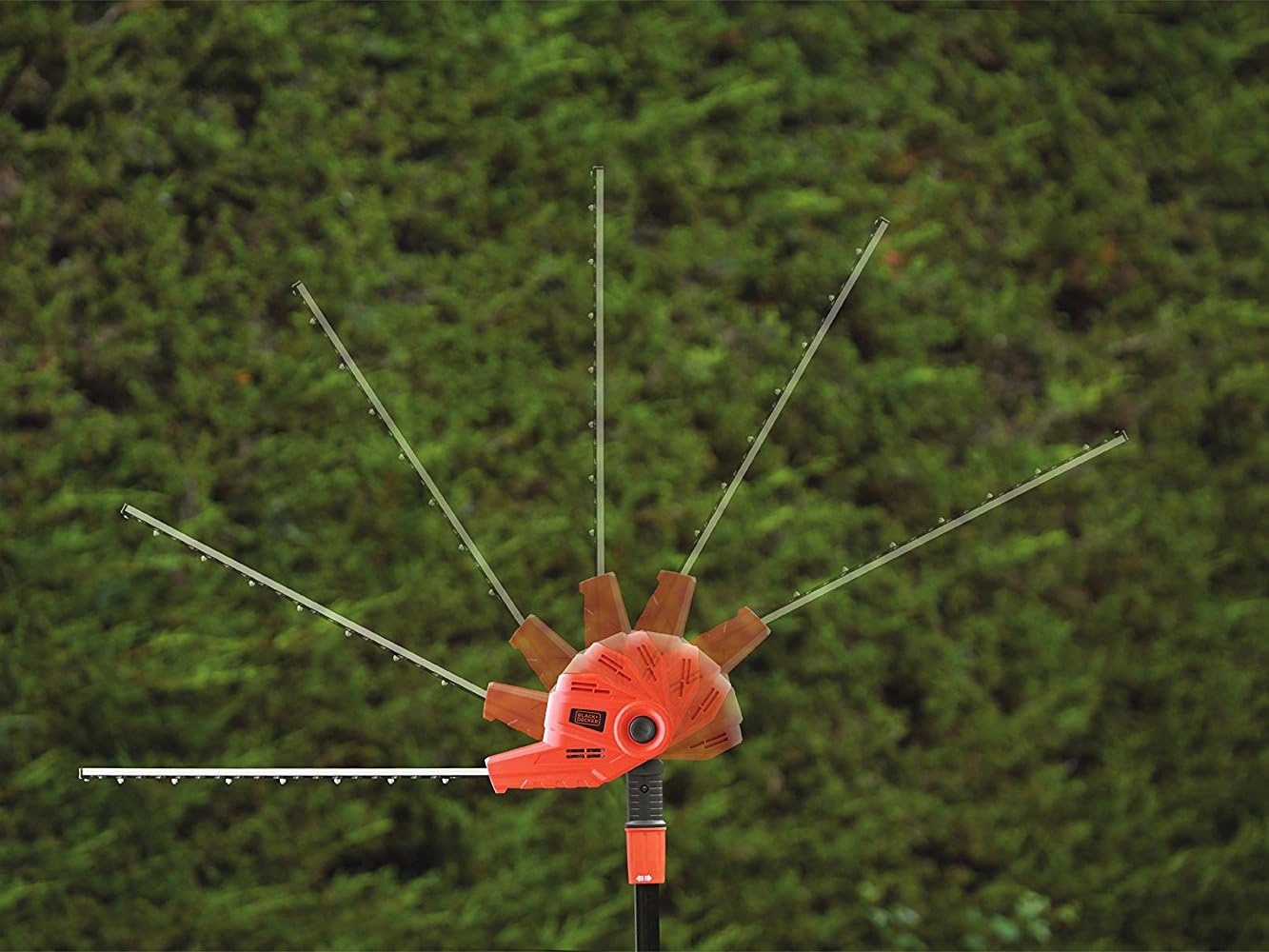
Figure 2.2: Illustration of the hedge trimmer's pivoting head, demonstrating its ability to adjust to various angles for versatile cutting.
3. Setup
Before operating your pole hedge trimmer, ensure it is properly assembled and all safety checks are performed.
3.1 Assembly
- Unpack: Carefully remove all components from the packaging.
- Inspect: Check for any signs of damage during transit. Do not use if damaged.
- Handle Attachment: Ensure the main handle and auxiliary handle are securely attached.
- Power Connection: Connect the appliance to a suitable outdoor-rated extension cord. Ensure the connection is secure and protected from moisture.
3.2 Initial Checks
- Verify that the blade is clean and free of debris.
- Ensure all fasteners are tight.
- Check the power cord for any cuts, fraying, or damage.
- Confirm that the double switch mechanism operates freely and correctly.

Figure 3.1: A user demonstrating the proper two-hand grip on the pole hedge trimmer, essential for control and safety during operation.
4. Operating Instructions
Follow these instructions for safe and effective operation of your BLACK+DECKER PH5551-QS pole hedge trimmer.
4.1 Adjusting the Telescopic Handle
The fiberglass telescopic handle allows you to extend the reach of the trimmer for high hedges. To adjust:
- Loosen the locking collar on the telescopic pole.
- Extend or retract the pole to the desired length. The maximum reach is approximately 4 meters.
- Tighten the locking collar securely to prevent the pole from slipping during use.
4.2 Adjusting the Pivoting Head
The pivoting head can be adjusted to 6 different positions to achieve various cutting angles. To adjust:
- Ensure the trimmer is disconnected from the power supply.
- Locate the head adjustment button or lever.
- Press the button/lever and rotate the head to the desired angle (-60° to +90°).
- Release the button/lever and ensure the head locks firmly into place before use.
4.3 Starting and Stopping
The trimmer features a double switch for enhanced safety:
- To Start: Simultaneously press the safety lock-off button and squeeze the trigger switch.
- To Stop: Release the trigger switch.
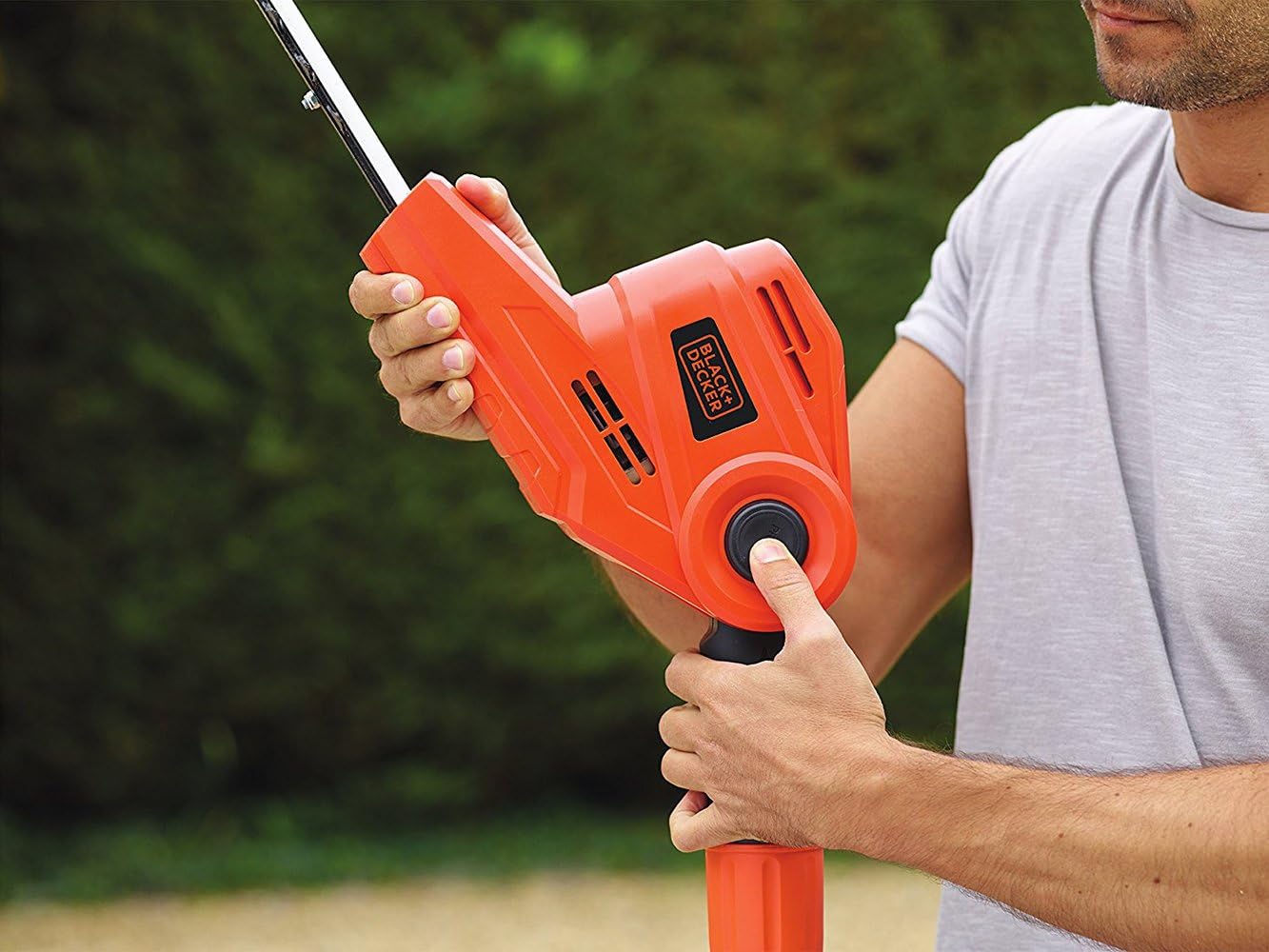
Figure 4.1: Close-up of a user's hand engaging the double switch mechanism on the handle, illustrating the two-step process for starting the trimmer.
4.4 Cutting Techniques
For best results and safety, follow these cutting techniques:
- Maintain Balance: Always maintain a firm grip with both hands and ensure stable footing.
- Sweep Motion: Use a wide, sweeping motion to cut hedges. For vertical surfaces, cut from bottom to top.
- Avoid Overloading: Do not force the trimmer through thick branches. The 22mm blade spacing is for maximum capacity; cut smaller sections if resistance is met.
- High Hedges: Utilize the telescopic handle and pivoting head to reach the top and sides of tall hedges without using a ladder. Work from a safe distance.

Figure 4.2: A user effectively trimming the top of a tall hedge using the extended pole hedge trimmer, demonstrating its reach capability.

Figure 4.3: An individual using the pole hedge trimmer to trim a hedge from a comfortable and safe distance, highlighting the benefit of the extended handle.
5. Maintenance
Regular maintenance ensures the longevity and optimal performance of your pole hedge trimmer.
5.1 Cleaning
- Disconnect Power: Always unplug the trimmer before cleaning.
- Blade Cleaning: Use a stiff brush to remove debris, sap, and leaves from the blades. Avoid using water directly on electrical components.
- General Cleaning: Wipe down the housing with a damp cloth. Do not use harsh chemicals or abrasive cleaners.
5.2 Blade Lubrication
After each use, or at least once a month during active use, lubricate the blades to prevent rust and ensure smooth operation:
- Apply a light machine oil or blade lubricant along the cutting edge of the blades.
- Run the trimmer briefly (if safe to do so, ensuring no one is nearby) to distribute the lubricant.
5.3 Storage
- Store the trimmer in a dry, secure place, out of reach of children.
- Protect the blade with the supplied blade sheath when not in use.
- Avoid storing in direct sunlight or extreme temperatures.
6. Troubleshooting
This section addresses common issues you might encounter with your pole hedge trimmer.
| Problem | Possible Cause | Solution |
|---|---|---|
| Trimmer does not start. | No power supply; Safety switch not engaged; Damaged cord. | Check power outlet and extension cord; Ensure both safety lock-off and trigger are pressed; Inspect cord for damage and replace if necessary. |
| Poor cutting performance. | Dull or dirty blades; Overloading the motor. | Clean and lubricate blades; Sharpen blades if necessary (consult service center); Do not force the trimmer, cut smaller sections. |
| Excessive vibration. | Bent or damaged blade; Loose components. | Inspect blade for damage and replace if necessary; Check all screws and fasteners for tightness. |
| Motor overheats. | Continuous heavy use; Blocked ventilation slots. | Allow the trimmer to cool down; Clear any debris from ventilation slots. |
7. Specifications
Technical details for the BLACK+DECKER PH5551-QS Pole Hedge Trimmer.
| Specification | Value |
|---|---|
| Model Number | PH5551-QS |
| Power Source | Corded Electric |
| Motor Power | 550 W |
| Blade Length | 51 cm |
| Blade Spacing | 22 mm |
| Telescopic Reach | Up to 4 meters (approx.) |
| Pivoting Head Positions | 6 positions (-60° to +90°) |
| Product Dimensions (L x W x H) | 204 x 18 x 10 cm |
| Item Weight | 2.43 kg |
| Material | Fiberglass (pole) |
8. Warranty and Support
BLACK+DECKER products are manufactured to high-quality standards and are guaranteed for professional and home use. For specific warranty details, please refer to the warranty card included with your product or visit the official BLACK+DECKER website.
For technical assistance, spare parts, or service, please contact BLACK+DECKER customer support in your region. Have your model number (PH5551-QS) and purchase date ready when contacting support.
You can find contact information and additional resources on the official BLACK+DECKER website: www.blackanddecker.com


