1. Introduction
The VOLT SinusPro-2500W is a versatile pure sine wave inverter-charger designed for off-grid applications. It integrates an inverter, a battery charger, and an automatic voltage regulator (AVR) into a single compact unit, providing reliable power for various electrical devices. This manual provides essential information for the safe and efficient operation of your SinusPro-2500W unit.
This device is suitable for powering sensitive electronics and appliances such as refrigerators, compressors, fans, pumps, central heating furnaces, and fluorescent lighting, thanks to its pure sine wave output.
2. Safety Information
Please read all safety instructions carefully before installation and operation. Failure to follow these instructions may result in electric shock, fire, or serious injury.
- Ensure proper ventilation around the unit to prevent overheating.
- Do not expose the unit to rain, moisture, or direct sunlight.
- Keep the unit away from flammable materials and gases.
- All electrical connections must be performed by qualified personnel in accordance with local electrical codes.
- Do not open the unit casing. There are no user-serviceable parts inside.
- Disconnect all power sources before performing any maintenance or cleaning.
- Use appropriate personal protective equipment (PPE) when working with batteries and electrical systems.
3. Product Features
- Pure Sine Wave Output: Provides clean and stable power, ideal for sensitive electronic equipment.
- Integrated Functions: Combines an inverter, battery charger, and automatic voltage regulator (AVR).
- High-Performance Microprocessors: Equipped with two microprocessors for reliable and efficient control.
- Advanced Battery Charging: Features advanced technology for optimal battery charging.
- Automatic Voltage Regulation (AVR): Ensures stable output voltage even with fluctuating input.
- Comprehensive Protection: Includes protection against overload, short circuit, overcharge, overheating, and low battery voltage.
- Clear Control Panel: Easy-to-read display for monitoring system status.
- Toroidal Transformer: Utilizes a CRGO toroidal transformer for enhanced efficiency.
- UPS Functionality: Provides uninterruptible power supply capabilities.
4. Package Contents
Upon unpacking, please verify that all items listed below are present and undamaged. If any items are missing or damaged, contact your dealer immediately.
- VOLT SinusPro-2500W Inverter-Charger Unit
- Battery Connection Cables (Red and Black)
- AC Input Power Cable
- Mounting Hardware (Screws and Wall Plugs)
- User Manual (This Document)

Figure 4.1: Overview of the SinusPro-2500W inverter-charger unit, showing the main unit, battery cables, AC input cable, and mounting screws.
5. Setup and Installation
Proper installation is crucial for the safe and efficient operation of the SinusPro-2500W. Refer to the diagrams below for connection points.
5.1 Mounting the Unit
- Choose a dry, well-ventilated location, away from direct sunlight and heat sources.
- Ensure the mounting surface is strong enough to support the unit's weight (approximately 16 kg).
- Use the provided mounting hardware to securely attach the unit to a wall.

Figure 5.1: Angled view of the SinusPro-2500W, highlighting the side mounting brackets and the various cable connection points.

Figure 5.2: Rear view of the SinusPro-2500W, illustrating the cooling fan, a warning label (in Polish), and the main connection terminals.
5.2 Battery Connection (24V System)
- Connect the red battery cable to the positive (+) terminal of your 24V battery bank and the positive (+) terminal on the inverter.
- Connect the black battery cable to the negative (-) terminal of your 24V battery bank and the negative (-) terminal on the inverter.
- Ensure connections are tight and secure to prevent arcing.
5.3 AC Input Connection
- Connect the provided AC input power cable to the designated AC input port on the inverter.
- Plug the other end of the AC input cable into a grounded 230V AC power outlet or generator.
5.4 AC Output Connection
- Connect your appliances or load to the AC output sockets on the inverter.
- Ensure the total power consumption of connected devices does not exceed the inverter's rated output (2000W continuous).
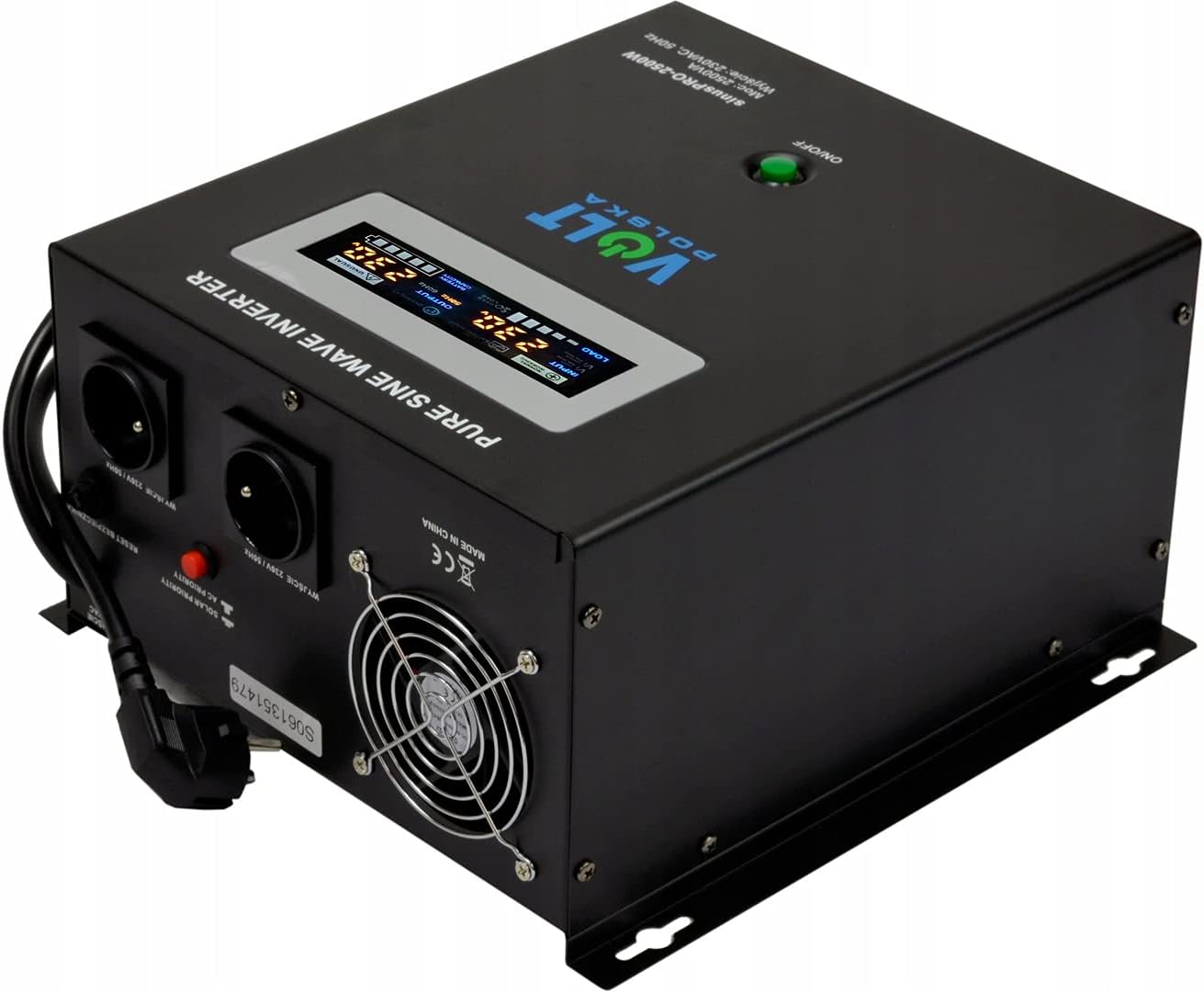
Figure 5.3: Top-down view of the SinusPro-2500W, illustrating the digital display, AC output sockets, and various input/output labels.
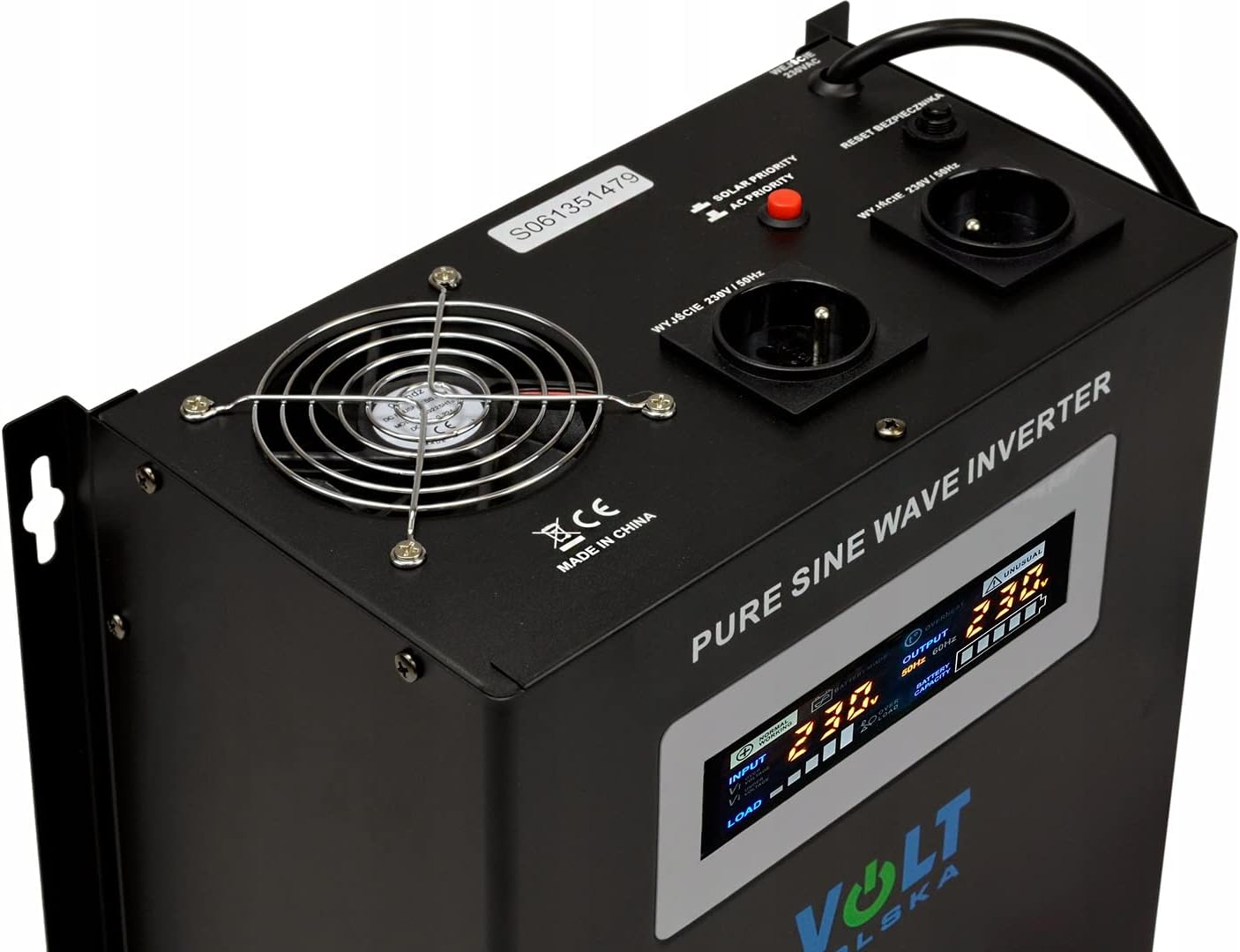
Figure 5.4: Close-up view of the top panel, detailing the clear digital display, the main ON/OFF button, and the AC output sockets.
6. Operating Instructions
6.1 Powering On/Off
- To power on the unit, press and hold the "ON/OFF" button located on the front panel until the display illuminates.
- To power off the unit, press and hold the "ON/OFF" button again until the display turns off.

Figure 6.1: Side view of the SinusPro-2500W, illustrating the connected battery cables (red and black) and the AC input cable.
6.2 Display Indicators
The front panel display provides real-time information about the inverter's status:
- Input Voltage: Shows the incoming AC voltage from the grid or generator.
- Output Voltage: Displays the stable 230V AC output voltage.
- Load Level: Indicates the percentage of the inverter's capacity currently being used.
- Battery Status: Shows the battery charge level and charging status.
- Warning/Error Indicators: Alerts for conditions such as overload, low battery, or overheating.
6.3 Operating Modes (UPS Functionality)
The SinusPro-2500W automatically switches between operating modes:
- AC Mode: When grid power is available, the unit charges the batteries and passes AC power directly to the loads.
- Inverter Mode: When grid power is interrupted, the unit automatically switches to battery power, converting DC to AC to supply the loads.
- Charging Mode: When connected to AC input, the intelligent charger will charge the connected 24V battery bank.
7. Maintenance
Regular maintenance ensures the longevity and optimal performance of your SinusPro-2500W.
- Cleaning: Periodically clean the exterior of the unit with a soft, dry cloth. Do not use liquid cleaners or solvents.
- Ventilation: Ensure that the ventilation openings are clear of dust and debris to allow for proper airflow.
- Connections: Regularly check all electrical connections (battery, AC input, AC output) for tightness and corrosion. Tighten if necessary.
- Battery Health: Monitor the health of your 24V battery bank. Ensure batteries are properly maintained according to their manufacturer's guidelines.
8. Troubleshooting
This section addresses common issues you might encounter with your SinusPro-2500W. If the problem persists after following these steps, contact customer support.
| Problem | Possible Cause | Solution |
|---|---|---|
| Unit does not power on. | No battery connection; Low battery voltage; Faulty power button. | Check battery connections; Charge batteries; Contact support if button is faulty. |
| No AC output. | Overload; Short circuit; Low battery voltage; Overheating. | Reduce load; Check for short circuits; Charge batteries; Allow unit to cool down. |
| Alarm sounds continuously. | Overload; Low battery voltage; Overheating. | Refer to display for specific error code; Address the indicated issue. |
| Battery not charging. | AC input not connected; AC input voltage too low/high; Faulty battery. | Ensure AC input is connected; Check AC input voltage (140-275V); Test battery. |
Note: Some user reviews indicate that the actual continuous power output might be lower than the stated 2500W/2000W, especially for inductive loads. If you experience frequent overload alarms with loads below the rated capacity, consider reducing the connected load or consulting technical support.
9. Specifications
| Feature | Specification |
|---|---|
| Model Name | SinusPro-2500W |
| Brand | Volt Polska |
| Rated Power (Continuous) | 2000 Watts |
| Peak Power (VA) | 2500 VA |
| Input Voltage (Battery) | 24 Volts DC |
| Output Voltage (AC) | 230 Volts AC |
| Output Waveform | Pure Sine Wave |
| AC Input Voltage Range (AVR) | 140-275 Vac |
| Charger Current | 20 Amps (Intelligent Charger) |
| Weight | 16 Kilograms |
| Color | Black |
| Efficiency | High efficiency |
10. Warranty and Support
For warranty information and technical support, please contact your original point of purchase or visit the official Volt Polska website. Keep your purchase receipt as proof of purchase for warranty claims.
Manufacturer: Volt
ASIN: B018975GI6