
1. Introduction
The DUOYI DY4100 is a digital earth ground resistance tester designed for measuring earth resistance and earth voltage. This instrument is suitable for various electrical installations, lightning protection systems, and other applications requiring accurate ground resistance measurements. It features high accuracy, ease of use, and a robust design for field applications.
1.1 Safety Information
- Always read and understand this manual before operating the device.
- Observe all safety precautions and warnings indicated on the instrument and in this manual.
- Do not use the instrument if it appears damaged or is operating abnormally.
- Ensure all test leads are properly connected before taking measurements.
- Avoid contact with live circuits. High voltages can be present during measurements.
- Do not operate the instrument in explosive atmospheres or in the presence of flammable gases or dust.
- Replace batteries only with the specified type and ensure correct polarity.
2. Package Contents
Verify that all items listed below are present and in good condition upon unpacking:
- DUOYI DY4100 Digital Earth Ground Resistance Tester Unit
- Test Leads (Red, Green, Yellow)
- Auxiliary Earth Rods (2 pieces)
- Carrying Case
- User Manual
- Batteries (if included, typically AA or 9V)
3. Product Features
- Digital Display: Large LCD for clear reading of measurements.
- Earth Resistance Measurement: Capable of measuring earth resistance from 0 to 2000 Ohms.
- Earth Voltage Measurement: Measures earth voltage up to 200V AC.
- Data Hold Function: Freezes the displayed reading for easy recording.
- Low Battery Indication: Alerts the user when batteries need replacement.
- Over-range Indication: Displays "OL" when the measured value exceeds the selected range.
- Robust Design: Durable casing suitable for outdoor and industrial environments.
4. Setup
4.1 Battery Installation
- Locate the battery compartment cover on the back of the instrument.
- Use a screwdriver to open the cover.
- Insert the specified batteries (e.g., 6 x AA 1.5V batteries) observing the correct polarity (+/-) as indicated inside the compartment.
- Replace the battery compartment cover and secure it with the screw.
4.2 Connecting Test Leads and Earth Rods
The DY4100 typically uses a 3-pole or 2-pole method for earth resistance measurement. The 3-pole method is generally recommended for accuracy.
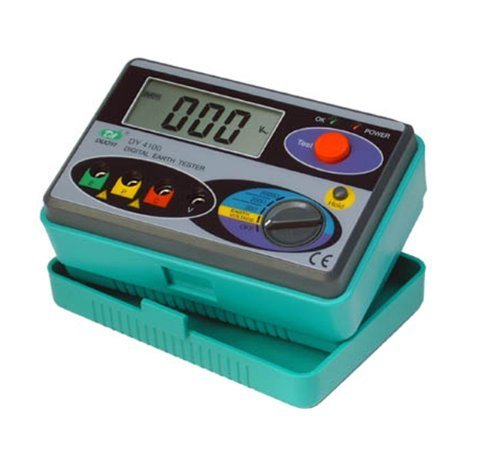
Image: DUOYI DY4100 Digital Earth Ground Resistance Tester. This image shows the main unit of the DY4100, typically accompanied by its test leads and auxiliary earth rods, illustrating the components used for earth resistance measurements.
- Identify Terminals: The instrument has terminals labeled E (Earth), P (Potential), and C (Current).
- Connect Test Leads:
- Connect the green test lead to the E terminal and to the earth electrode under test.
- Connect the yellow test lead to the P terminal and to the potential auxiliary earth rod.
- Connect the red test lead to the C terminal and to the current auxiliary earth rod.
- Position Auxiliary Earth Rods: Insert the two auxiliary earth rods into the ground in a straight line from the earth electrode under test. The potential rod (P) should be approximately 5-10 meters from the earth electrode, and the current rod (C) should be another 5-10 meters beyond the potential rod. Ensure good contact with the soil.
5. Operating Instructions
5.1 Powering On/Off
- To power on, rotate the function switch to the desired measurement range (e.g., 20Ω, 200Ω, 2000Ω for earth resistance, or Earth Voltage).
- To power off, rotate the function switch to the "OFF" position.
5.2 Earth Voltage Measurement
- Connect the green test lead to the E terminal and the earth electrode.
- Connect the yellow test lead to the P terminal and the potential auxiliary earth rod.
- Rotate the function switch to the "Earth Voltage" position.
- Read the voltage value displayed on the LCD. If the voltage is too high (e.g., above 10V), it may affect the accuracy of earth resistance measurements.
5.3 Earth Resistance Measurement (3-Pole Method)
- Ensure the test leads and auxiliary earth rods are connected as described in Section 4.2.
- Rotate the function switch to the desired earth resistance range (e.g., 20Ω, 200Ω, 2000Ω). Start with the highest range if the resistance value is unknown.
- Press the "TEST" button. The instrument will begin the measurement.
- Read the earth resistance value displayed on the LCD.
- If the display shows "OL", the resistance is higher than the selected range; switch to a higher range. If the display shows a very low value, switch to a lower range for better resolution.
- Release the "TEST" button to stop the measurement.
5.4 Data Hold Function
During a measurement, press the "HOLD" button to freeze the current reading on the display. Press "HOLD" again to release the data hold function and resume live readings.
6. Maintenance
6.1 Cleaning
Wipe the instrument's casing with a soft, damp cloth. Do not use abrasive cleaners or solvents. Ensure the instrument is powered off and disconnected from all test leads before cleaning.
6.2 Battery Replacement
When the low battery indicator appears on the display, replace all batteries promptly. Refer to Section 4.1 for battery installation instructions. Remove batteries if the instrument will not be used for an extended period to prevent leakage.
6.3 Storage
Store the instrument in its carrying case in a cool, dry place, away from direct sunlight and extreme temperatures. Avoid environments with high humidity or corrosive gases.
6.4 Calibration
For optimal accuracy, it is recommended to have the DUOYI DY4100 calibrated by a qualified service center annually or as required by your quality assurance program.
7. Troubleshooting
| Problem | Possible Cause | Solution |
|---|---|---|
| Instrument does not power on. | Dead or incorrectly installed batteries. | Check battery polarity; replace batteries. |
| Display shows "OL" during resistance measurement. | Resistance value exceeds selected range; poor contact with earth rods. | Switch to a higher resistance range; ensure earth rods are firmly inserted and connections are secure. |
| Inaccurate or unstable readings. | High earth voltage; poor contact; dry soil; interference. | Check earth voltage (should be low); moisten soil around rods; ensure good connections; check for nearby electrical interference. |
| No reading when "TEST" button is pressed. | Loose test lead connections; internal fault. | Verify all test lead connections; if problem persists, contact support. |
8. Specifications
- Earth Resistance Ranges: 0-20Ω, 0-200Ω, 0-2000Ω
- Earth Resistance Accuracy: ±(2% reading + 2 digits)
- Earth Voltage Range: 0-200V AC (50/60Hz)
- Earth Voltage Accuracy: ±(2% reading + 2 digits)
- Power Source: 6 x 1.5V AA Batteries
- Display: LCD with data hold
- Operating Temperature: 0°C to 40°C (32°F to 104°F)
- Storage Temperature: -10°C to 50°C (14°F to 122°F)
- Dimensions: Approximately 150mm x 100mm x 70mm
- Weight: Approximately 680g (including batteries)
9. Warranty and Support
DUOYI products are manufactured under strict quality control standards. This product is covered by a limited warranty against defects in materials and workmanship for a period specified at the time of purchase. Please retain your proof of purchase for warranty claims.
For technical support, service, or warranty inquiries, please contact your local distributor or the DUOYI customer service department. Contact information can typically be found on the DUOYI official website or on the product packaging.
When contacting support, please provide the model number (DY4100) and a detailed description of the issue.