
Introduction
The Reflexion PS07BT is a versatile mobile karaoke system designed for portable entertainment. This unit combines powerful audio output with various connectivity options, including Bluetooth, USB, and AUX-in, along with microphone and guitar inputs. It features integrated light effects and a rechargeable battery, making it suitable for both indoor and outdoor use. This manual provides essential information for the safe and effective operation of your PS07BT system.
Safety Information
Please read all safety instructions carefully before using the device. Keep this manual for future reference.
- Do not expose the unit to rain, moisture, or extreme temperatures.
- Avoid placing the unit near heat sources such as radiators, stoves, or other heat-producing appliances.
- Use only the power adapter supplied with the unit.
- Do not open the casing. Refer all servicing to qualified personnel.
- Keep the unit away from strong magnetic fields.
- Ensure proper ventilation and do not block any ventilation openings.
- Handle the microphone and cables with care to prevent damage.
Package Contents
Verify that all items are present in the package:
- Reflexion PS07BT Mobile Karaoke System
- Microphone
- User Manual
- Power Adapter (not explicitly listed but implied for charging)
Product Overview
Familiarize yourself with the components and controls of your Reflexion PS07BT system.

Figure 1: Front view of the Reflexion PS07BT Mobile Karaoke System, showcasing the speaker grille and blue LED light effects.

Figure 2: Overview of the PS07BT system, highlighting its dimensions (49cm height, 20cm width), LCD display, and karaoke function.
Control Panel
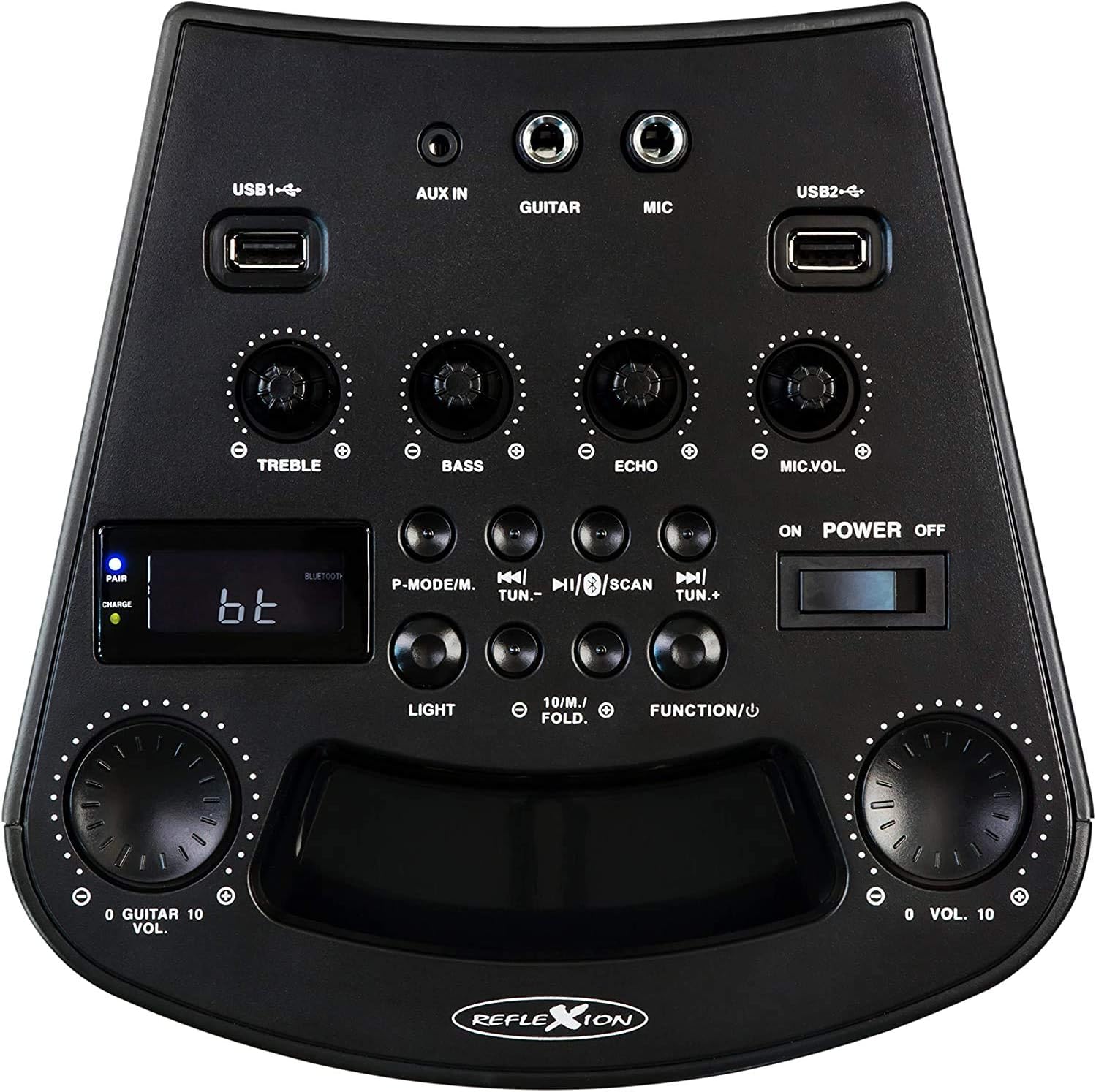
Figure 3: Detailed view of the PS07BT control panel, showing input ports, sound adjustment knobs, and function buttons.
- USB1 / USB2 Ports: For playing audio from USB storage devices.
- AUX IN: 3.5mm input for external audio sources.
- GUITAR: 6.3mm input for connecting a guitar.
- MIC: 6.3mm input for connecting the microphone.
- TREBLE Knob: Adjusts high-frequency sound.
- BASS Knob: Adjusts low-frequency sound.
- ECHO Knob: Adjusts the echo effect for microphone input.
- MIC.VOL Knob: Adjusts the microphone volume.
- P-MODE/M Button: Program mode / Mode selection.
- TUN.- / TUN.+ Buttons: Tune down / Tune up for FM radio.
- SCAN Button: Scans for FM radio stations.
- LIGHT Button: Controls the LED light effects.
- FUNCTION/U Button: Switches between input modes (Bluetooth, USB, AUX, FM).
- VOL. Knob: Master volume control.
- POWER ON/OFF Switch: Turns the unit on or off.
- LCD Display: Shows current mode, track information, or FM frequency.
- PAIR/CHARGE Indicators: Bluetooth pairing status and battery charging status.
Rear Panel

Figure 4: Rear panel of the PS07BT, displaying the AC power input and product information label.
- AC Power Input: Connect the power adapter here for charging and operation.
- Product Label: Contains model number, serial number, and electrical specifications.
Setup
Charging the Battery
The PS07BT features a built-in rechargeable battery. Before first use, fully charge the unit.
- Connect the supplied power adapter to the AC power input on the rear of the unit.
- Plug the power adapter into a wall outlet.
- The CHARGE indicator light will illuminate during charging.
- A full charge takes approximately 4 hours. The CHARGE indicator may change or turn off once fully charged (refer to specific indicator behavior in the quick start guide if available).
A fully charged battery provides up to 4 hours of playback time.
Connecting Microphone and Guitar
To use the karaoke or instrument features:
- Insert the microphone cable into the MIC input on the control panel.
- If connecting a guitar, insert its cable into the GUITAR input.
- Adjust the MIC.VOL and ECHO knobs as desired during operation.
Operating Instructions
Power On/Off
Slide the POWER ON/OFF switch to the 'ON' position to turn on the unit. Slide it to 'OFF' to power down.
Selecting Input Mode
Press the FUNCTION/U button repeatedly to cycle through available input modes: Bluetooth (bt), USB, AUX, and FM Radio.
Bluetooth Connection
- Turn on the PS07BT and select 'bt' mode using the FUNCTION/U button. The 'PAIR' indicator will flash, indicating it's ready for pairing.
- Enable Bluetooth on your mobile device (smartphone, tablet, etc.).
- Search for available devices and select 'Reflexion PS07BT' from the list.
- Once connected, the 'PAIR' indicator will stop flashing and remain solid. You can now play audio from your device through the PS07BT.
USB Playback
- Insert a USB storage device (e.g., USB flash drive) containing audio files into either the USB1 or USB2 port.
- Select 'USB' mode using the FUNCTION/U button.
- The unit will automatically begin playing audio files from the USB device. Use the track control buttons (usually combined with TUN.-/TUN.+) to navigate tracks.
AUX-In Connection
- Connect an external audio source (e.g., MP3 player, laptop) to the AUX IN port using a 3.5mm audio cable.
- Select 'AUX' mode using the FUNCTION/U button.
- Play audio from your external device. The volume can be controlled via both the external device and the PS07BT's master volume knob.
FM Radio Operation
- Select 'FM' mode using the FUNCTION/U button.
- Press the SCAN button to automatically scan and save available FM radio stations.
- Use the TUN.- and TUN.+ buttons to manually tune to stations or select saved stations.
Karaoke Function
With a microphone connected to the MIC input, you can sing along to music playing from any source (Bluetooth, USB, AUX, FM). Adjust the MIC.VOL knob to control your voice volume and the ECHO knob for an echo effect.
Light Effects
Press the LIGHT button to activate or change the integrated blue LED light effects, which can synchronize with the music beat.
Volume and Sound Adjustments
- Master Volume: Use the large VOL. knob to adjust the overall sound output level.
- Treble/Bass: Use the TREBLE and BASS knobs to fine-tune the audio's high and low frequencies.
Maintenance
Cleaning
Wipe the unit with a soft, dry cloth. Do not use abrasive cleaners, waxes, or solvents as they may damage the finish. Ensure the unit is powered off and unplugged before cleaning.
Storage
When not in use for extended periods, store the unit in a cool, dry place, away from direct sunlight and extreme temperatures. It is recommended to fully charge the battery before storing and to recharge it every few months to maintain battery health.
Troubleshooting
If you encounter issues with your PS07BT, refer to the following common problems and solutions:
| Problem | Possible Solution |
|---|---|
| No power | Ensure the power adapter is securely connected and plugged into a working outlet. Check if the battery is charged. Slide the POWER switch to ON. |
| No sound | Increase the master VOL. knob. Check the volume on your connected audio source (e.g., phone). Ensure the correct input mode (Bluetooth, USB, AUX, FM) is selected. Check all cable connections. |
| Bluetooth not connecting | Ensure the unit is in 'bt' mode and the 'PAIR' indicator is flashing. Turn off and on Bluetooth on your device. Move your device closer to the PS07BT. Forget the device from your phone's Bluetooth list and try pairing again. |
| Microphone not working | Ensure the microphone is securely plugged into the MIC input. Increase the MIC.VOL knob. Check if the microphone has its own ON/OFF switch and is turned on. |
| USB playback issues | Ensure the USB device is formatted correctly (FAT32 recommended) and contains compatible audio files. Try a different USB device. |
Specifications
Technical details for the Reflexion PS07BT Mobile Karaoke System:
- Model Name: PS07BT
- Dimensions (L x W x H): 20.2 x 49 x 20.1 cm
- Weight: 2 Kilograms
- Max Speaker Output Power: 320 Watts
- Connectivity Technology: Bluetooth
- Audio Output Mode: Stereo
- Material: Plastic
- Speaker Type: Subwoofer
- Special Features: Bluetooth, USB Port
- Average Battery Life: 4 hours
- Charging Time: 4 hours
- Control Method: Touch (referring to buttons/knobs)
- Total USB 2.0 Ports: 2
- Color: Black
- Power Source: Corded Electric / Battery

Figure 5: The PS07BT's integrated handle allows for easy portability.
Warranty and Support
The Reflexion PS07BT comes with a spare parts availability period of 1 year. For technical support or warranty inquiries, please contact your retailer or the manufacturer's customer service. Keep your proof of purchase for warranty claims.


