
Mighty Max Battery ML-24V8A15
Mighty Max Battery 24 Volt 8 Amp Charger User Manual
Model: ML-24V8A15
Product Overview
The Mighty Max Battery 24 Volt 8 Amp Charger (Model ML-24V8A15) is designed to efficiently charge 24-volt sealed lead acid and gel cell batteries. This charger features an enhanced charging method to prevent over-charging and includes short circuit protection, ensuring a fully charged battery and safe operation.
Key features include:
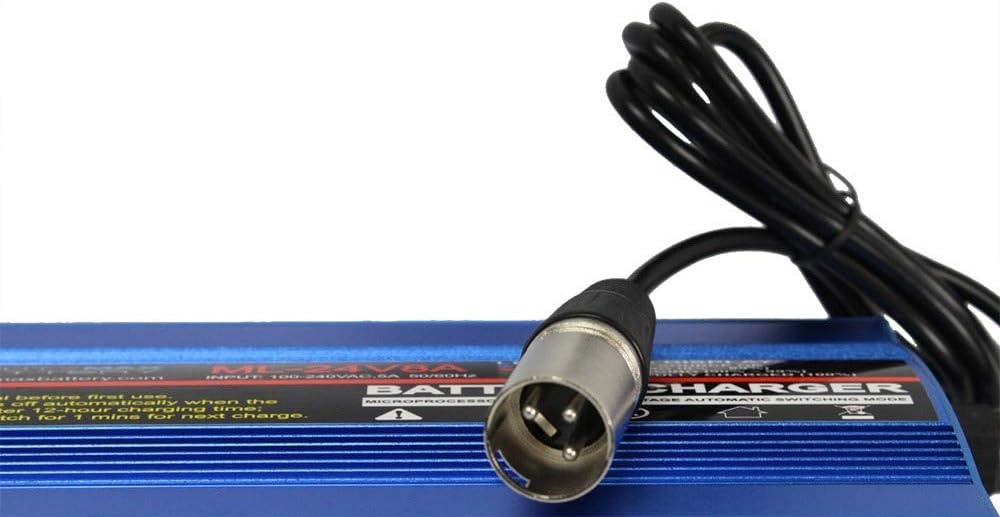
- 24 Volts 8 Amp output with a 3-pin XLR connector.
- Enhanced charging method to prevent battery over-charge.
- Short circuit protection for safe and complete charging.
- Compatibility with both sealed lead acid and gel cell batteries.
- Three-color LED indication for monitoring charging progress.

Safety Information
Please read all safety instructions before using the charger. Failure to follow these instructions may result in electric shock, fire, or serious injury.
- Indoor Use Only: This charger is designed for indoor use. Do not expose to rain or moisture.
- Ventilation: Ensure adequate ventilation around the charger during operation. Do not cover the charger.
- Battery Compatibility: Only use this charger with 24-volt sealed lead acid or gel cell batteries. Using it with other battery types may cause damage or injury.
- Connection: Always connect the charger to the battery first, then plug the charger into the power outlet. Disconnect from the power outlet before disconnecting from the battery.
- Damaged Charger: Do not operate the charger if it has been dropped, damaged, or if the power cord or connector is frayed. Contact customer support for assistance.
- Children: Keep the charger and battery out of reach of children.
- Flammable Materials: Do not charge batteries near flammable liquids or gases.
Setup
Follow these steps to set up your Mighty Max Battery Charger:
- Unpack: Carefully remove the charger from its packaging and inspect it for any signs of damage.
- Placement: Place the charger on a stable, flat surface in a well-ventilated area, away from direct sunlight, heat sources, and moisture.
- Connect Power Cord: Insert the detachable power cord into the AC input port on the rear of the charger. Ensure it is firmly seated.
- Connect to Battery: Connect the 3-pin XLR output connector of the charger to the charging port on your 24-volt battery or mobility device. Ensure the connection is secure.
- Plug into Outlet: Plug the charger's power cord into a standard 100-240V AC, 50/60Hz wall outlet.
- Power On: Flip the power switch on the rear of the charger to the "ON" position.

Operating Instructions
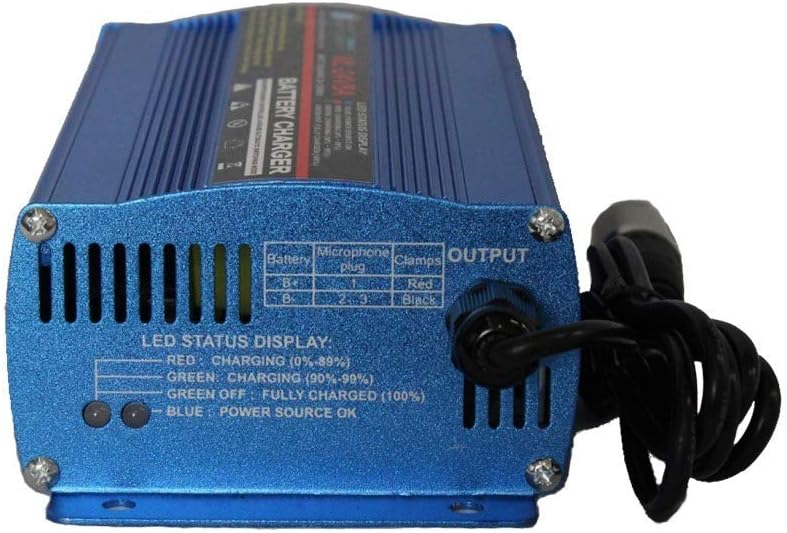
Once the charger is properly set up and powered on, it will begin the charging process. The charger features a three-color LED status display to indicate the charging progress:
| LED Color | Status | Description |
|---|---|---|
| Blue | Power Source OK | Indicates the charger is connected to a power source and ready. |
| Red | Charging (0% - 89%) | The battery is actively charging. |
| Green | Charging (90% - 99%) | The battery is nearing full charge. |
| Green Off | Fully Charged (100%) | The battery is fully charged, and the charger has entered float mode or stopped charging. |
The charger is designed to automatically stop charging when the battery is full or after a 12-hour charging time to prevent overcharging. For optimal performance, it is recommended to turn off the charger for 1 minute before starting a new charging cycle.
Maintenance
Proper maintenance ensures the longevity and optimal performance of your charger:
- Cleaning: Disconnect the charger from both the power outlet and the battery before cleaning. Use a soft, dry cloth to wipe the exterior. Do not use liquid cleaners or solvents.
- Storage: Store the charger in a cool, dry place when not in use. Keep it away from extreme temperatures and humidity.
- Cable Care: Avoid kinking or bending the power and output cables sharply. Do not pull the cables to disconnect the charger. Always grasp the plug or connector.
- Inspection: Periodically inspect the charger, cables, and connectors for any signs of wear, damage, or corrosion. If any damage is found, discontinue use and contact customer support.
Troubleshooting
If you encounter issues with your Mighty Max Battery Charger, refer to the following common problems and solutions:
| Problem | Possible Cause | Solution |
|---|---|---|
| Charger not turning on (No Blue LED) | No power from outlet; Power switch off; Loose power cord connection. | Check the wall outlet with another device; Ensure the power switch is ON; Re-seat the power cord firmly into the charger and outlet. |
| Charger connected but not charging (No Red/Green LED) | Battery not properly connected; Battery is already fully charged; Battery is severely discharged or faulty. | Ensure the XLR connector is fully inserted into the battery port; Check the battery's charge level; Consult a battery specialist if the battery is severely discharged or suspected faulty. |
| Charging takes too long | Battery capacity is very high; Battery is old or degraded. | Charging time varies with battery capacity and discharge level. Allow up to 12 hours for a full charge. Consider replacing old batteries. |
| Charger gets hot during charging | Normal operation; Poor ventilation. | It is normal for the charger to warm up during use. Ensure it is placed in a well-ventilated area and not covered. If it becomes excessively hot or emits smoke/odor, disconnect immediately and contact support. |
If the problem persists after trying these solutions, please contact Mighty Max Battery customer support.
Specifications
| Attribute | Value |
|---|---|
| Model | ML-24V8A15 |
| Brand | Mighty Max Battery |
| Input Voltage | 100-240V AC, 50/60Hz |
| Output Voltage | 24 Volts |
| Output Current | 8 Amps |
| Wattage | 128 watts |
| Connector Type | 3-Pin XLR |
| Product Dimensions | Approximately 0.79 x 0.79 x 0.79 inches (from product data, though this seems incorrect for a charger, using provided data) |
| Item Weight | 2.65 pounds |
| Color | Blue |
Note: Product dimensions provided in source data (0.79 x 0.79 x 0.79 inches) may be a placeholder or incorrect. Please refer to the physical product for accurate measurements.
Warranty and Support
Mighty Max Battery products are manufactured to high-quality standards. For specific warranty details regarding your ML-24V8A15 charger, please refer to the warranty information provided with your purchase or visit the official Mighty Max Battery website.
If you require technical assistance, have questions about product operation, or need to report an issue, please contact Mighty Max Battery customer support. Contact information can typically be found on the product packaging, the official brand website, or through your point of purchase.
For more information, you can visit the Mighty Max Battery brand page on Amazon.