Introduction
This manual provides detailed instructions for the setup, operation, and maintenance of your Sangean Digital Compact AM/FM Dual Alarm Clock Radio. Please read these instructions carefully before using the device to ensure proper functionality and longevity.
Setup
1. Powering the Unit
Your radio can be powered by either an AC adapter or 4 AA batteries for portable use.
- AC Power: Connect the provided AC adapter to the DC IN jack on the radio and then plug it into a standard wall outlet.
- Battery Power: Open the battery compartment cover on the back of the unit. Insert 4 AA batteries, ensuring correct polarity (+/-) as indicated inside the compartment. Close the cover securely.
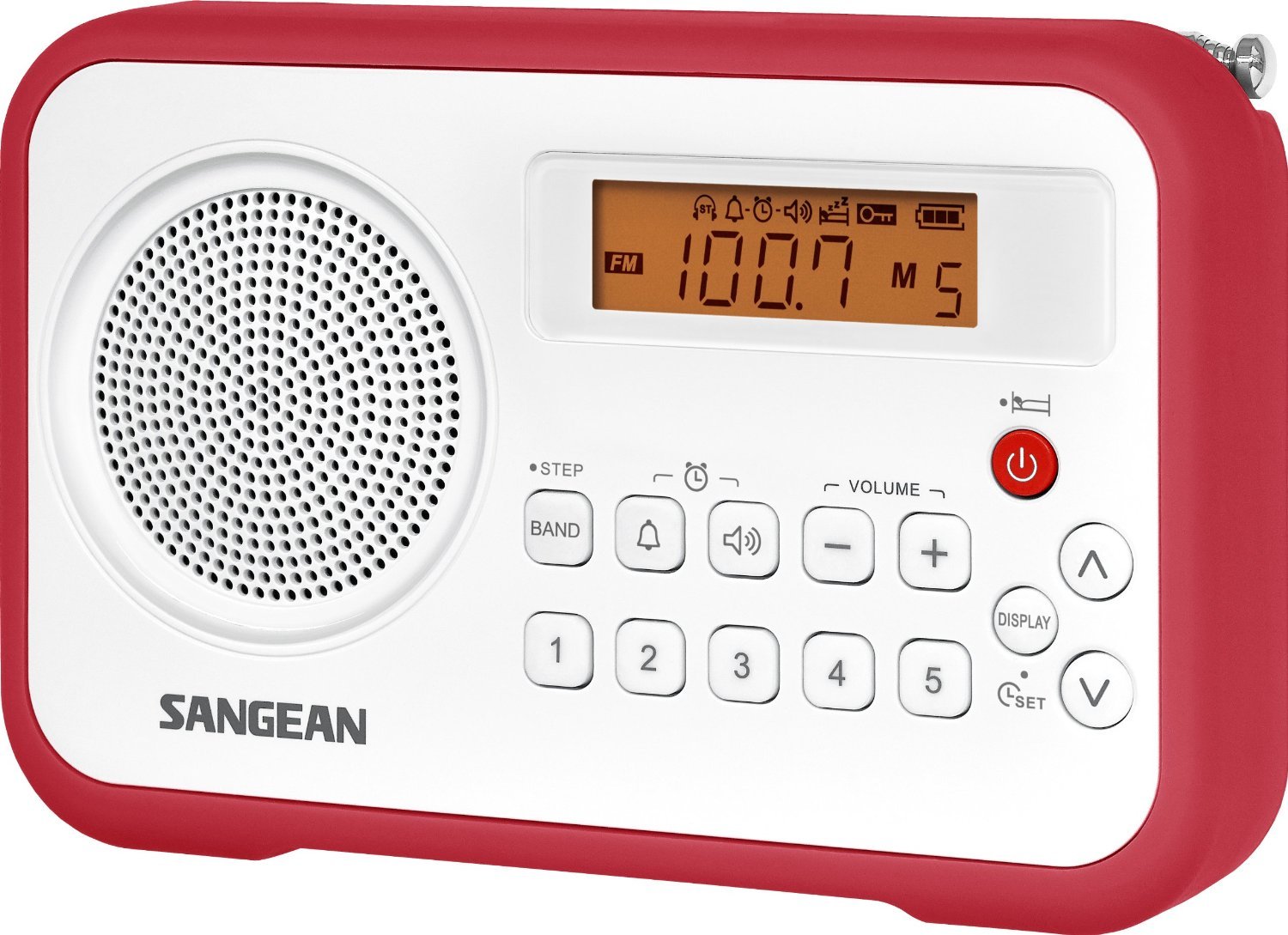
Image: The Sangean Digital Compact AM/FM Dual Alarm Clock Radio, showcasing its compact design, large display, and control buttons. This image illustrates the overall appearance of the product.
2. Initial Power On
Press the Power button to turn on the radio. The display will illuminate.
Operating Instructions
1. Setting the Time
- With the unit powered off, press and hold the 'Time Set' button.
- Use the 'Tune/Select' knob or '+' / '-' buttons to adjust the hour. Press 'Time Set' again to confirm.
- Adjust the minute using the 'Tune/Select' knob or '+' / '-' buttons. Press 'Time Set' to confirm.
2. AM/FM Radio Tuning
- Selecting Band: Press the 'Band' button to switch between AM and FM.
- Manual Tuning: Rotate the 'Tune/Select' knob to manually adjust the frequency.
- Auto Scan: Press and hold the 'Tune/Select' knob or 'Scan' button (if available) to automatically scan for the next available station.
- Setting Presets: Tune to your desired station. Press and hold a 'Preset' button (e.g., M1-M5) until the display confirms the preset is saved. The radio supports 5 FM and 5 AM presets.
- Recalling Presets: Briefly press the desired 'Preset' button to recall a saved station.
3. Setting Dual Alarms
The radio features two independent alarms (Alarm 1 and Alarm 2).
- Press and hold the 'Alarm 1' or 'Alarm 2' button.
- Use the 'Tune/Select' knob or '+' / '-' buttons to set the desired alarm time. Press the respective 'Alarm' button to confirm the hour and then the minute.
- Select the alarm source (Buzzer or Radio) using the 'Tune/Select' knob or '+' / '-' buttons. Press the 'Alarm' button to confirm.
- Adjust the alarm volume if 'Radio' is selected as the source. Press the 'Alarm' button to confirm.
- To activate/deactivate an alarm, briefly press the 'Alarm 1' or 'Alarm 2' button. An alarm icon will appear/disappear on the display.
Note: The gradual wake alarm feature starts with a subtle, low volume that gradually increases to a reasonably high level to gently wake you.
4. Sleep Timer
The sleep timer allows the radio to play for a set duration before automatically turning off.
- While the radio is playing, press the 'Sleep' button repeatedly to cycle through available sleep times (e.g., 15, 30, 60, 90 minutes, OFF).
- The radio will automatically turn off after the selected duration.
5. Earphone Jack
For private listening, connect standard 3.5mm earphones to the earphone jack located on the side of the unit. The built-in speaker will be muted automatically when earphones are connected.
Maintenance
1. Cleaning
Wipe the radio's exterior with a soft, damp cloth. Do not use abrasive cleaners or solvents, as these can damage the finish. Ensure the unit is powered off and unplugged before cleaning.
2. Battery Care
- Remove batteries if the unit will not be used for an extended period to prevent leakage.
- Do not mix old and new batteries, or different types of batteries.
- Dispose of used batteries responsibly according to local regulations.
Troubleshooting
| Problem | Possible Cause / Solution |
|---|---|
| No power |
|
| Poor radio reception |
|
| Alarm does not sound |
|
| Display is blank or dim |
|
Specifications
- Product Dimensions: 6.5 x 1.4 x 4.2 inches
- Brand: Sangean
- Color: White & Red
- Special Feature: Portable
- Tuner Technology: AM, FM
- Power Source: AC Adapter, Battery Powered (4 AA batteries)
- Radio Bands Supported: AM, FM
- Frequency: 108 MHz (FM max)
- Compatible Devices: Earphone
- UPC: 702679473832
Warranty and Support
For warranty information or technical assistance, please refer to the warranty card included with your product or visit the official Sangean website. You may also contact Sangean customer support directly for further assistance.


