
1. Introduction
The Gourmia GPC400 4 Qt Digital Pressure Cooker is a versatile kitchen appliance designed to simplify your cooking experience. This electric pressure cooker features 13 preset cooking modes, an intuitive LCD display, and an automatic 24-hour delay timer. With 800 watts of power and SpeedSense Technology, it cooks food up to 70% faster while retaining essential nutrients and flavors. This manual provides comprehensive instructions for the safe and efficient operation, maintenance, and troubleshooting of your Gourmia GPC400 pressure cooker.

Image: The Gourmia GPC400 Digital Pressure Cooker positioned on a kitchen counter, surrounded by fresh cooking ingredients.
2. Important Safeguards
When using electrical appliances, basic safety precautions should always be followed to reduce the risk of fire, electric shock, and injury. Read all instructions carefully before operating the Gourmia GPC400 pressure cooker.
- Read All Instructions: Familiarize yourself with the appliance's operation before use.
- Hot Surfaces: Do not touch hot surfaces. Always use handles or knobs.
- Children: Close supervision is necessary when the appliance is used by or near children.
- Water Immersion: To protect against electric shock, do not immerse the cord, plugs, or the main unit in water or other liquid.
- Unplug When Not In Use: Unplug from the outlet when not in use and before cleaning. Allow to cool before putting on or taking off parts.
- Damaged Cord: Do not operate any appliance with a damaged cord or plug, or after the appliance malfunctions or has been damaged in any manner.
- Accessories: The use of accessory attachments not recommended by the appliance manufacturer may cause injuries.
- Outdoor Use: Do not use outdoors.
- Filling Capacity: Do not fill the inner pot above the 2/3 full line. When cooking foods that expand, do not fill above the 1/2 full line.
- Lid Safety: Do not force the lid open. Ensure all pressure is released before attempting to open.
- Pressure Release Valve: Ensure the pressure release valve is clean and free from obstructions before each use.
3. Product Components and Features
The Gourmia GPC400 is designed for ease of use and safety. Below are the key components and features of your pressure cooker.

Image: An infographic illustrating the core features of the Gourmia Smart-Pot Pressure Cooker, including SpeedSense Technology for faster cooking, a non-stick liner, and a secure lid system.
Key Features:
- 13 Cook Modes: Includes presets for Soup, Meat, Poultry, Steam, Sauté, Slow Cook, Dessert, Rice, Porridge, Beans, and more.
- SpeedSense Technology: 800 watts of power cooks food up to 70% faster.
- PressurePerfect System: Ensures precise pressure monitoring for consistent results.
- Patented 12-Level Lid Safety Lock System: Provides enhanced safety during operation.
- 24-Hour Delay Timer: Allows for delayed cooking starts.
- Automatic Keep Warm: Maintains food temperature after cooking.
- Removable Non-Stick Pot: For easy cleaning and serving.

Image: A visual guide showcasing the 13 distinct cooking presets offered by the Gourmia GPC400, such as Soup, Rice, Porridge, Slow Cook, Beans, Sauté, Poultry, Meat, Steam, and Dessert.
4. Setup and First Use
4.1 Unpacking
- Carefully remove all packaging materials from the pressure cooker and its accessories.
- Check that all components are present and undamaged.
4.2 Initial Cleaning
- Wash the inner pot, sealing ring, and lid thoroughly with warm, soapy water. Rinse and dry completely.
- Wipe the exterior of the main unit with a damp cloth. Do not immerse the main unit in water.
4.3 Placement
- Place the pressure cooker on a stable, level, heat-resistant surface, away from walls or cabinets to allow for proper ventilation.
- Ensure the power cord is not tangled or obstructing walkways.
5. Operating Instructions
5.1 Control Panel Overview
The digital control panel features an LCD display and various buttons for selecting cooking modes and adjusting settings.
- Preset Time: Activates the delay timer function.
- Soup, Meat, Poultry, Steam, Sauté, Slow Cook, Dessert, Rice, Porridge, Beans: Dedicated buttons for specific cooking modes.
- Pressure Cook Time: Adjusts the cooking duration for pressure cooking modes.
- +, - Buttons: Used to increase or decrease cooking time or delay time.
- Warm/Cancel: Cancels the current cooking program or activates the Keep Warm function.
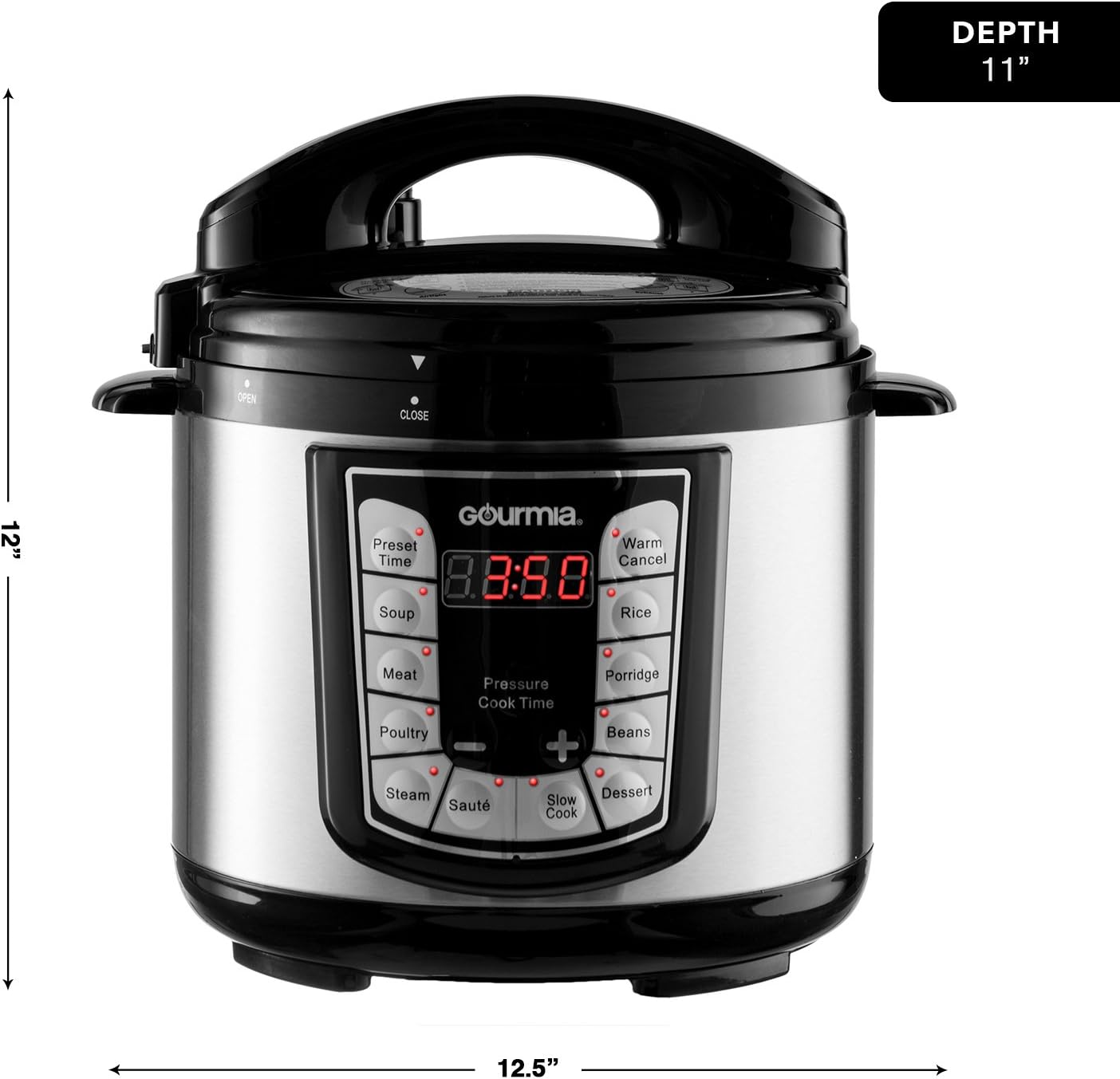
Image: A front-facing view of the Gourmia GPC400 Digital Pressure Cooker, illustrating its dimensions: 12.5 inches in width, 12 inches in height, and 11 inches in depth.
5.2 Basic Cooking Steps
- Add Ingredients: Place your food and liquid into the inner pot. Ensure the liquid level is between the MIN and MAX fill lines.
- Secure the Lid: Place the lid on the cooker, aligning the arrow on the lid with the arrow on the base. Rotate the lid clockwise until it locks into place. The patented 12-level lid safety lock system will engage.
- Set Pressure Release Valve: Ensure the pressure release valve is in the 'Sealing' position for pressure cooking.
- Select Cooking Mode: Press the desired preset button (e.g., 'Meat', 'Soup', 'Rice'). The default cooking time for that mode will appear on the display.
- Adjust Time (Optional): Use the '+' and '-' buttons to adjust the cooking time if needed.
- Start Cooking: The cooker will automatically begin the preheating process, then start cooking.
- Pressure Release: Once cooking is complete, the cooker will beep and switch to 'Keep Warm' mode. You can choose between two pressure release methods:
- Natural Release: Allow the pressure to dissipate naturally. This can take 10-30 minutes depending on food volume.
- Quick Release: Carefully turn the pressure release valve to the 'Venting' position. Steam will rapidly escape. Keep hands and face clear of the steam.
- Open Lid: Once the float valve drops, indicating all pressure is released, rotate the lid counter-clockwise to open.
5.3 Delay Timer Function
To use the 24-hour delay timer:
- Add ingredients and secure the lid as described above.
- Select your desired cooking mode and adjust the cooking time.
- Press the 'Preset Time' button. The display will show a default delay time.
- Use the '+' and '-' buttons to set the desired delay time (up to 24 hours).
- The cooker will start counting down the delay time, then automatically begin the cooking process once the delay timer reaches zero.

Image: A chart comparing typical cooking times with the faster cooking times achieved using the Gourmia Smart Pot for various food categories including grains, meat, and vegetables.
6. Maintenance and Cleaning
Regular cleaning and maintenance will ensure the longevity and optimal performance of your Gourmia GPC400 pressure cooker.
6.1 Daily Cleaning
- Unplug: Always unplug the appliance and allow it to cool completely before cleaning.
- Inner Pot: The removable inner pot is dishwasher-safe. Alternatively, wash it with warm, soapy water and a non-abrasive sponge. Rinse thoroughly and dry.
- Lid: Wash the lid, including the sealing ring and pressure release valve, with warm, soapy water. Ensure no food particles are lodged in the valve. Rinse and dry.
- Sealing Ring: Remove the sealing ring from the lid for thorough cleaning. Ensure it is properly reinstalled before next use.
- Exterior: Wipe the exterior of the main unit with a damp cloth. Do not use harsh chemicals or abrasive cleaners. Never immerse the main unit in water.
6.2 Storage
Store the pressure cooker in a dry place. You may place the lid upside down on the inner pot to prevent odors and allow air circulation.
7. Troubleshooting
If you encounter issues with your Gourmia GPC400, refer to the following common problems and solutions:
- Cooker Not Building Pressure:
- Ensure the lid is properly sealed and locked.
- Check that the sealing ring is correctly installed and not damaged.
- Verify the pressure release valve is in the 'Sealing' position.
- Ensure there is sufficient liquid in the inner pot as per recipe requirements.
- Lid Cannot Be Opened After Cooking:
- Do not force the lid. All internal pressure must be released before the lid can be opened.
- Ensure the float valve has dropped completely. If not, perform a quick release or wait for natural release.
- Food Not Cooking Properly:
- Check that the correct cooking mode and time were selected.
- Ensure the inner pot is properly seated and making contact with the heating element.
- Verify the power supply is stable.
- Error Codes: If an error code appears on the display, unplug the unit, wait a few minutes, and plug it back in. If the error persists, contact customer support.
For more detailed troubleshooting or issues not listed here, please refer to the Gourmia website or contact customer support.
8. Specifications
| Specification | Detail |
|---|---|
| Brand | Gourmia |
| Model Number | GPC400 |
| Capacity | 3.79 Liters (4 Quarts) |
| Material | Stainless Steel |
| Color | Silver |
| Wattage | 800 watts |
| Control Method | Touch |
| Operation Mode | Automatic |
| Special Features | Keep Warm Setting, Locking Lid |
| Item Weight | 4.08 kg |
| Dishwasher-Safe Parts | Inner Pot |
9. Warranty and Support
For information regarding the product warranty, please refer to the documentation included with your purchase or visit the official Gourmia website. For technical support, replacement parts, or any other inquiries, please contact Gourmia customer service directly.
Website: www.gourmia.com