
1. Introduction
The Heat N Glo RC300 is a multifunction remote control designed for use with gas fireplaces equipped with the Hearth & Home Technologies IntelliFire Plus System (IPI). This remote provides comprehensive control over various fireplace functions, enhancing user convenience and comfort.
Key features include:
- Control of pilot light, flame height, and blower speed.
- Operation of up to two 120 VAC auxiliary functions.
- Integrated thermostat functions for automatic room temperature control.
- Support for Intermittent Pilot Ignition (IPI) for fuel conservation and optional constant pilot mode.
- Seamless transition to battery backup during power outages.
- Built-in safety features and memory settings.
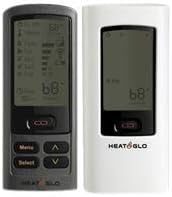
Image 1.1: The Heat N Glo RC300 remote control, shown in both black and white variants, displaying its digital screen and control buttons.
2. Setup and Installation
2.1 Compatibility Requirements
The RC300 remote control is exclusively for use with Hearth & Home Technologies IntelliFire Plus System (IPI) fireplaces. Operation of this remote device requires the AUX300 module, which is rated for 120 VAC, 60HZ.

Image 2.1: The AUX300 module, a black rectangular unit with power cord and auxiliary function buttons, essential for the RC300 remote's operation.
2.2 Battery Installation
The remote control requires batteries for operation. To install or replace batteries:
- Locate the battery compartment on the back of the remote.
- Open the compartment cover.
- Insert the required batteries (e.g., AAA, as shown in Image 2.2), ensuring correct polarity (+/-).
- Close the battery compartment cover securely.

Image 2.2: The Heat N Glo RC300 remote control displayed alongside AAA batteries, screws, and wall anchors, indicating items typically included for setup.
2.3 Pairing the Remote with Your Fireplace
After installing batteries and ensuring the AUX300 module is connected, the remote must be paired with your fireplace's IntelliFire Plus system. The pairing process can vary slightly depending on your specific fireplace model. Generally, it involves:
- Ensuring the fireplace is powered on.
- Initiating a pairing sequence on the fireplace receiver or control module. This may involve pressing a button or accessing a reset pinhole (sometimes requiring a paper clip) on the fireplace unit itself.
- Activating the pairing function on the RC300 remote as per its on-screen instructions.
Important: Refer to your specific fireplace's instruction manual for detailed and accurate pairing procedures. Incorrect pairing can prevent the remote from functioning.
3. Operating Instructions
The RC300 remote provides various functions accessible through its display and buttons. Familiarize yourself with the 'Menu', 'Select', and arrow (Up/Down) buttons for navigation.
3.1 Basic Fireplace Control
- IPI On/Off: Activate or deactivate the Intermittent Pilot Ignition system.
- Pilot Activation: Manually turn the pilot light on or off.
- Flame Control: Adjust the flame height and modulation settings.
- Fan Speed Control: Regulate the speed of the fireplace's blower fan.
- AUX Function: Control up to two connected 120 VAC auxiliary devices (e.g., lights, additional fans).
3.2 Thermostat Functions
The remote includes thermostat capabilities to maintain a desired room temperature.
- Temperature Readout: Displays the current room temperature.
- Thermostat Mode: Set a desired temperature, and the fireplace will automatically adjust its operation to reach and maintain that temperature.
- Time Mode: Allows for scheduling fireplace operation based on time settings.
3.3 Battery Strength Indicator
The remote's display includes a battery strength indicator. Monitor this indicator and replace batteries when they are low to ensure uninterrupted operation.
4. Maintenance
4.1 Battery Replacement
When the battery strength indicator shows low power, replace the batteries promptly to avoid interruption of service. Refer to Section 2.2 for battery installation instructions.
4.2 Cleaning
To clean the remote control, gently wipe the surface with a soft, dry cloth. Do not use abrasive cleaners, solvents, or liquids, as these can damage the device.
5. Troubleshooting
If you encounter issues with your RC300 remote control, try the following troubleshooting steps:
- Remote Not Responding:
- Check the battery strength indicator and replace batteries if necessary.
- Ensure the remote is within effective range of the fireplace receiver.
- Verify that the AUX300 module is properly connected and receiving power.
- Thermostat Sensor Issues: If the thermostat function is not accurately controlling the temperature (e.g., not turning off when the set temperature is reached), a system reset may be required. Some fireplace units have a reset button (often a small pinhole) that can be activated with a paper clip. Consult your fireplace's specific instruction manual for reset procedures.
- Pairing Issues: If the remote loses connection or fails to pair with the fireplace, repeat the pairing process as detailed in your fireplace's instruction manual (refer to Section 2.3).
6. Specifications
- Item Model Number: RC300-HNG
- Manufacturer: HHT
- Package Dimensions: 13 x 4 x 4 inches
- Item Weight: 3 pounds
- Power Requirements (Remote): Batteries (e.g., AAA)
- Power Requirements (AUX300 Module): 120 VAC, 60HZ
- Special Feature: Adjustable Thermostat
- Compatible Devices: Heat N Glo Gas Stoves and Fireplaces with IntelliFire Plus System (IPI)
7. Warranty and Support
7.1 Warranty Information
Returns are generally not accepted on opened or used items unless specifically covered under a warranty. An RMA (Return Merchandise Authorization) or RGA (Return Goods Authorization) is typically required for product returns. Please note that all returns may be subject to a 20% restocking fee. For detailed warranty terms, refer to the documentation provided with your purchase or contact the manufacturer.
7.2 Technical Support
For technical assistance, specific compatibility questions, or if issues persist after troubleshooting, please contact the manufacturer (HHT) or your authorized Heat N Glo dealer. They can provide specialized support for your fireplace system and remote control.