
1. Product Overview
The UGREEN RJ45 Ethernet Coupler is designed to extend the length of existing Ethernet cables by connecting two male network cables. This female-to-female adapter ensures a secure and stable connection, maintaining signal integrity for various network applications.
It is compatible with Cat5e, Cat6, and Cat7 Ethernet cables and meets Category 6 performance standards (TIA/EIA 568-C.2). The coupler features nickel-plated contacts and a robust design to prevent signal loss and corrosion.

Image 1.1: The UGREEN RJ45 Coupler facilitates extending Ethernet cable reach by joining two cables.
2. Package Contents
- UGREEN RJ45 Ethernet Coupler (10-pack)
3. Setup Instructions
Setting up the UGREEN RJ45 Ethernet Coupler is a simple process. Follow these steps to extend your network connection:
- Prepare Cables: Ensure you have two male RJ45 Ethernet cables that you wish to connect.
- Insert First Cable: Take one Ethernet cable and firmly insert its RJ45 connector into one of the female ports of the UGREEN coupler until you hear a click, indicating it is securely latched.
- Insert Second Cable: Take the second Ethernet cable and firmly insert its RJ45 connector into the remaining female port of the UGREEN coupler until it clicks into place.
- Verify Connection: Gently tug on both cables to ensure they are securely seated and will not easily disconnect.

Image 3.1: The coupler in use, extending an Ethernet cable to a laptop for an extended reach.

Image 3.2: A detailed view of the coupler showing the connection points for two RJ45 Ethernet cables.
4. Operating Instructions
Once connected, the UGREEN RJ45 Ethernet Coupler operates passively to extend your network connection. It is designed to maintain high-speed data transmission without significant signal degradation.
- Data Transmission: The coupler supports speeds up to 1 Gigabit per second (1Gbps) when used with Cat6 or Cat7 Ethernet cables.
- Compatibility: It is compatible with various network devices including laptops, personal computers, routers, printers, and smart televisions.
- Applications: Suitable for home networking, office environments, and surveillance systems.

Image 4.1: The coupler supports stable connections for activities like online gaming and streaming, ensuring no signal loss.

Image 4.2: Illustrates the universal compatibility of the coupler with a range of network-enabled devices.
5. Maintenance
To ensure optimal performance and longevity of your UGREEN RJ45 Ethernet Coupler, consider the following maintenance guidelines:
- Keep Clean: Periodically inspect the ports for dust or debris. Use a can of compressed air to gently clean the ports if necessary.
- Avoid Physical Stress: Do not bend or pull the connected Ethernet cables excessively, as this can damage the coupler or the cable connectors.
- Store Properly: When not in use, store the couplers in a dry, cool place away from direct sunlight and extreme temperatures.
- Handle with Care: Avoid dropping the coupler or subjecting it to strong impacts.
6. Troubleshooting
If you encounter issues with your UGREEN RJ45 Ethernet Coupler, try the following troubleshooting steps:
- No Network Connection:
- Ensure both Ethernet cables are fully inserted into the coupler and clicked into place.
- Check the integrity of the Ethernet cables themselves by testing them individually or replacing them.
- Verify that the network devices (router, computer) are functioning correctly.
- Slow Network Speed:
- Confirm that both connected Ethernet cables are of the appropriate category (Cat5e, Cat6, or Cat7) for your desired speed.
- Ensure the total length of the extended cable run does not exceed the recommended maximum for your cable category (e.g., 100 meters for Cat6).
- Test the network speed without the coupler to isolate the issue.
- Intermittent Connection:
- Check for any loose connections at the coupler or device ports.
- Inspect the coupler and cable connectors for any visible damage or bent pins.
7. Specifications
| Feature | Detail |
|---|---|
| Brand | UGREEN |
| Model Number | 20390P10 |
| Connector Type | RJ45 Female to Female |
| Compatibility | Cat5e, Cat6, Cat7 Ethernet Cables |
| Speed Support | Up to 1 Gbps |
| Dimensions (L x W x H) | 1.65 x 0.98 x 0.90 inches (approx.) |
| Material | High quality ABS plastic, PBT plastic, Nickel-plated pure copper, Pure copper plated tentacles |
| Color | Black |
| RoHS Compliant | Yes |
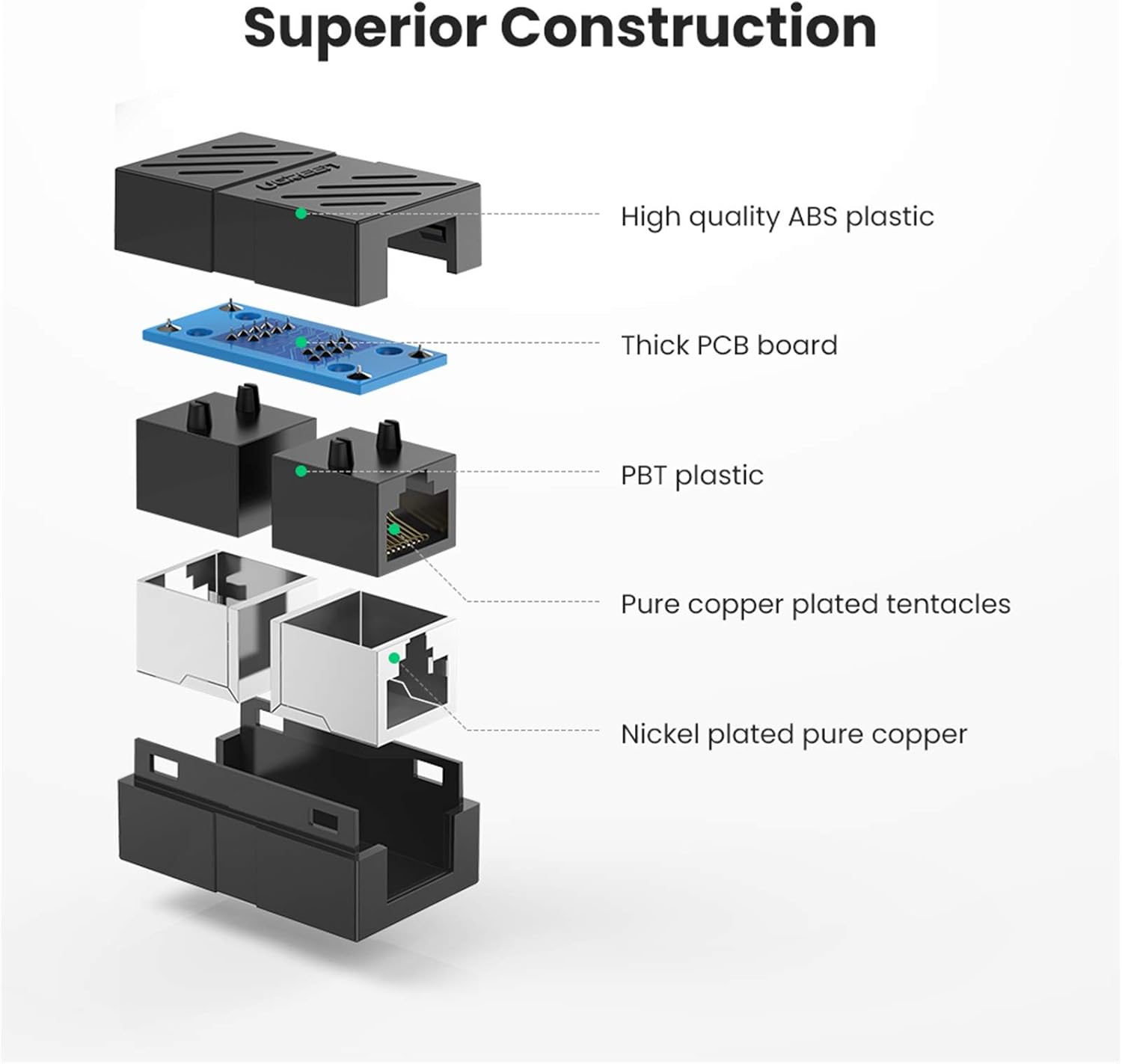
Image 7.1: An exploded diagram illustrating the superior construction and internal components of the coupler, including ABS plastic, PCB board, PBT plastic, and copper contacts.

Image 7.2: The compact design of the UGREEN coupler, highlighting its small dimensions for easy integration into any setup.
8. Warranty and Support
The UGREEN RJ45 Ethernet Coupler comes with a product warranty. For specific details regarding the warranty period and terms, please refer to the packaging or visit the official UGREEN website.
For technical support, product inquiries, or warranty claims, please contact UGREEN customer service through their official website or the contact information provided with your purchase.
UGREEN Official Website: www.ugreen.com