
Introduction
This manual provides comprehensive instructions for the setup, operation, and maintenance of your Infomir MAG 254/255 Remote Control. This remote is designed as a multipurpose replacement part for Linux System OTT IPTV Set Top Boxes, specifically compatible with MAG 250, MAG 254, MAG 255, MAG 260, MAG 265, 270, and 275 models.

Figure 1: Front view of the Infomir MAG 254/255 Remote Control, showcasing its button layout.
Setup
1. Battery Installation
The Infomir MAG 254/255 Remote Control requires two (2) AA batteries for operation. Batteries are not included with the remote control.
- Locate the battery compartment on the back of the remote control.
- Slide the battery compartment cover downwards or in the direction indicated by an arrow to open it.
- Insert two AA batteries, ensuring the positive (+) and negative (-) terminals align correctly with the markings inside the compartment.
- Replace the battery compartment cover by sliding it back into place until it clicks securely.
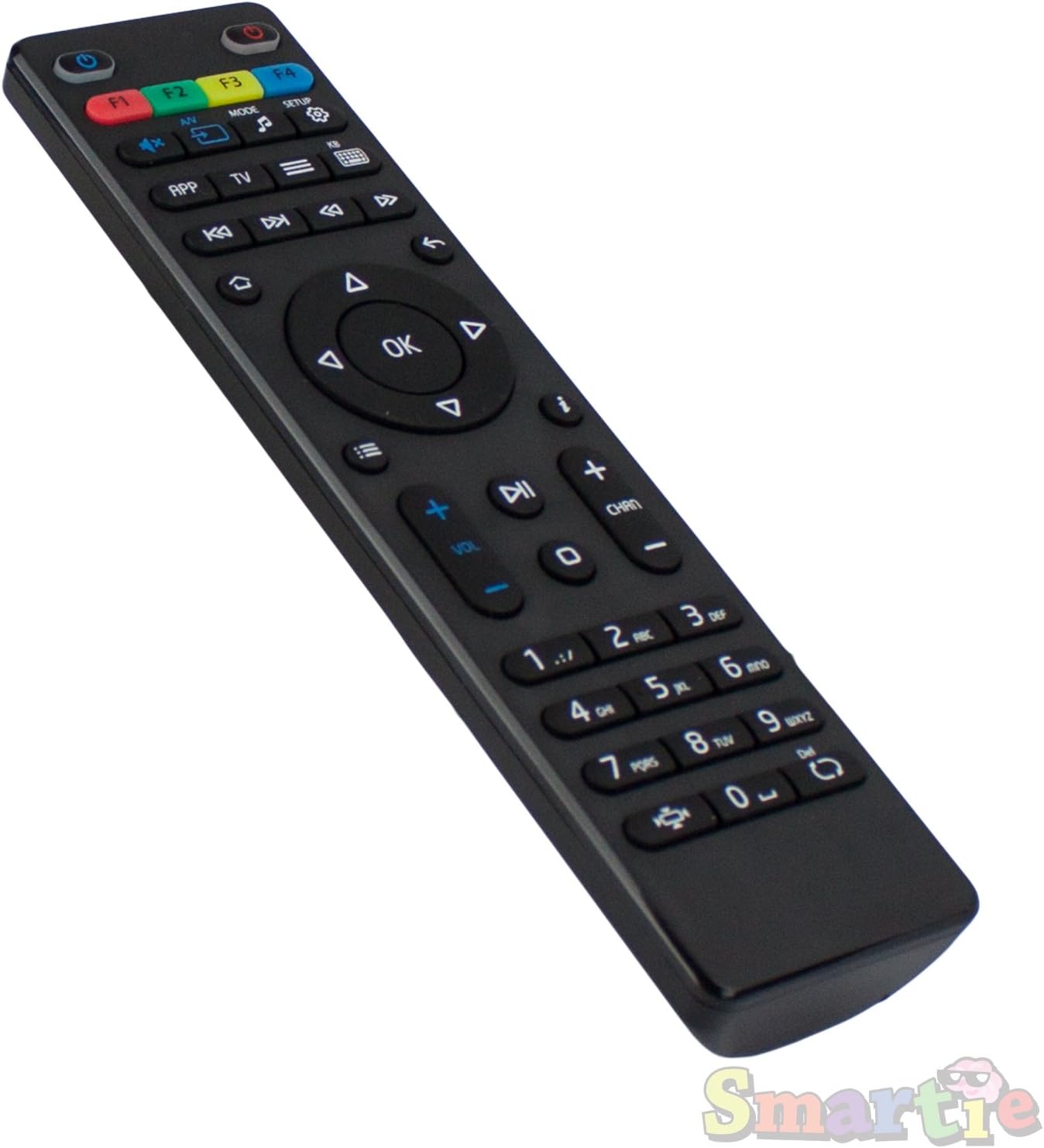
Figure 2: Angled view of the remote control, showing its ergonomic design and button arrangement.
2. Initial Connection
This remote control is designed to work immediately with compatible Infomir MAG Set Top Boxes (models 250, 254, 255, 260, 265, 270, 275) without requiring any special configuration or pairing. Once batteries are installed, point the remote control towards your Set Top Box and begin operation.
Operating Instructions
The remote control features a standard layout for navigating your IPTV Set Top Box. Below is a general overview of key button functions:
- Power Button (●): Located at the top right, used to power on/off the Set Top Box.
- F1-F4 Buttons: Programmable function keys, typically used for quick access to specific features or applications.
- A/V, Mode, Setup Buttons: For adjusting audio/video settings, changing input modes, or accessing system setup menus.
- Navigation Pad (Up, Down, Left, Right, OK): Used for menu navigation and selection. The OK button confirms selections.
- Back/Return Button (↶): Returns to the previous screen or menu.
- Volume Up/Down (VOL +/-): Adjusts the audio volume.
- Channel Up/Down (CHAN +/-): Changes the television channel.
- Numeric Keypad (0-9): For direct channel entry or inputting numbers.
- Mute Button (🔇): Mutes or unmutes the audio.
- Media Control Buttons (Play, Pause, Stop, Rewind, Fast Forward, Skip): For controlling media playback.
Refer to your Infomir MAG Set Top Box's user manual for specific functions and customization options related to these buttons.
Maintenance
Proper maintenance ensures the longevity and optimal performance of your remote control.
- Cleaning: Use a soft, dry cloth to clean the surface of the remote control. Do not use liquid cleaners, aerosols, or abrasive materials, as these can damage the remote.
- Battery Replacement: Replace batteries when the remote control's responsiveness decreases or it stops functioning. Always replace both batteries simultaneously with new AA batteries.
- Storage: Store the remote control in a cool, dry place away from direct sunlight and extreme temperatures. If storing for an extended period, remove the batteries to prevent leakage.
- Handling: Avoid dropping the remote control or subjecting it to strong impacts, which can damage internal components.
Troubleshooting
If you encounter issues with your Infomir MAG 254/255 Remote Control, refer to the following common troubleshooting steps:
| Problem | Possible Cause | Solution |
|---|---|---|
| Remote control not responding. | Dead or incorrectly installed batteries. | Replace batteries with new AA batteries, ensuring correct polarity. |
| Remote control works intermittently. | Low battery power; Obstruction between remote and Set Top Box; Remote control too far from Set Top Box. | Replace batteries. Ensure a clear line of sight to the Set Top Box. Move closer to the Set Top Box. |
| Certain buttons do not work. | Button stuck or damaged; Internal circuit issue. | Gently press the button multiple times. If the issue persists, the remote may require replacement. |
| Remote control interferes with other devices. | Infrared interference. | Ensure other infrared devices are not pointing at the Set Top Box. |
If these steps do not resolve the issue, contact customer support for further assistance.
Specifications
- Brand: MAG
- Manufacturer: Infomir
- Model Number: LYSB016APRQIM-ELECTRNCS
- Compatible Devices: Infomir MAG 250, 254, 255, 260, 265, 270, 275 Linux IPTV Set Top Boxes
- Power Source: 2 x AA Batteries (not included)
- Product Dimensions: 6.7 x 2 x 0.6 inches (approximately)
- Item Weight: 2 ounces (approximately)
- Color: Black
- Special Feature: Ergonomic design
Warranty and Support
Warranty Information
Specific warranty details for this replacement remote control may vary depending on the retailer and region of purchase. Please refer to your purchase receipt or contact the seller directly for information regarding warranty coverage and terms.
Customer Support
For technical assistance, troubleshooting beyond this manual, or inquiries regarding your Infomir MAG 254/255 Remote Control, please contact the manufacturer, Infomir, or the authorized reseller from whom you purchased the product. Contact information can typically be found on the product packaging or the seller's website.
You may also visit the official MAG Store on Amazon for additional product information and support resources.