
Air Hogs 20071015
Air Hogs - Hover Blade Blue Instruction Manual
Model: 20071015
1. Introduction
This manual provides essential information for the safe and effective operation of your Air Hogs Hover Blade Blue. Please read this manual thoroughly before use and retain it for future reference. The Air Hogs Hover Blade is a remote-controlled flying toy designed for indoor and outdoor use, offering an engaging experience for users aged 8 and above.

Figure 1: The Air Hogs Hover Blade Blue with its accompanying remote control unit.
2. Safety Information
To prevent injury or damage, observe the following safety precautions:
- Age Recommendation: This product is recommended for users aged 8-10 years. Adult supervision is advised for younger users.
- Battery Safety: Use only the specified batteries (6 AA batteries required). Do not mix old and new batteries, or different types of batteries. Ensure correct polarity. Remove batteries if the device will not be used for an extended period.
- Flying Environment: Operate the Hover Blade in open, clear areas, away from people, pets, and obstacles. Avoid flying near power lines, trees, or water.
- Propeller Safety: Keep fingers, hair, and loose clothing away from the rotating propellers. Do not touch the Hover Blade while it is in operation.
- Impacts: Avoid crashing the Hover Blade. Repeated impacts can cause damage to the product.
- Water Exposure: Do not expose the Hover Blade or its remote control to water or moisture.
- Modifications: Do not attempt to modify or disassemble the Hover Blade or its components. This may void the warranty and cause malfunction.
3. What's in the Box
Upon opening the package, verify that all components are present:
- 1 x Air Hogs Hover Blade Blue
- 1 x Remote Control Unit
- 1 x Instruction Manual (this document)

Figure 2: The Air Hogs Hover Blade Blue as packaged, showing the device and remote.
4. Setup
4.1 Battery Installation
The Air Hogs Hover Blade requires 6 AA batteries for operation (not included). These batteries power the remote control unit.
- Locate the battery compartment on the back of the remote control unit.
- Using a small Phillips head screwdriver, unscrew the battery compartment cover.
- Insert 6 new AA batteries, ensuring correct polarity (+/-) as indicated inside the compartment.
- Replace the battery compartment cover and secure it with the screw.
4.2 Initial Pairing
The Hover Blade and its remote control are typically pre-paired. If pairing is required:
- Ensure fresh batteries are installed in the remote control.
- Turn on the Hover Blade (if it has a power switch).
- Turn on the remote control.
- The indicator lights on both devices should confirm a successful connection. Refer to the remote control's specific instructions for detailed pairing steps if issues arise.
5. Operating Instructions
5.1 Basic Operation
The Air Hogs Hover Blade is designed for both remote-controlled flight and a unique "Toss and Fly" boomerang action.
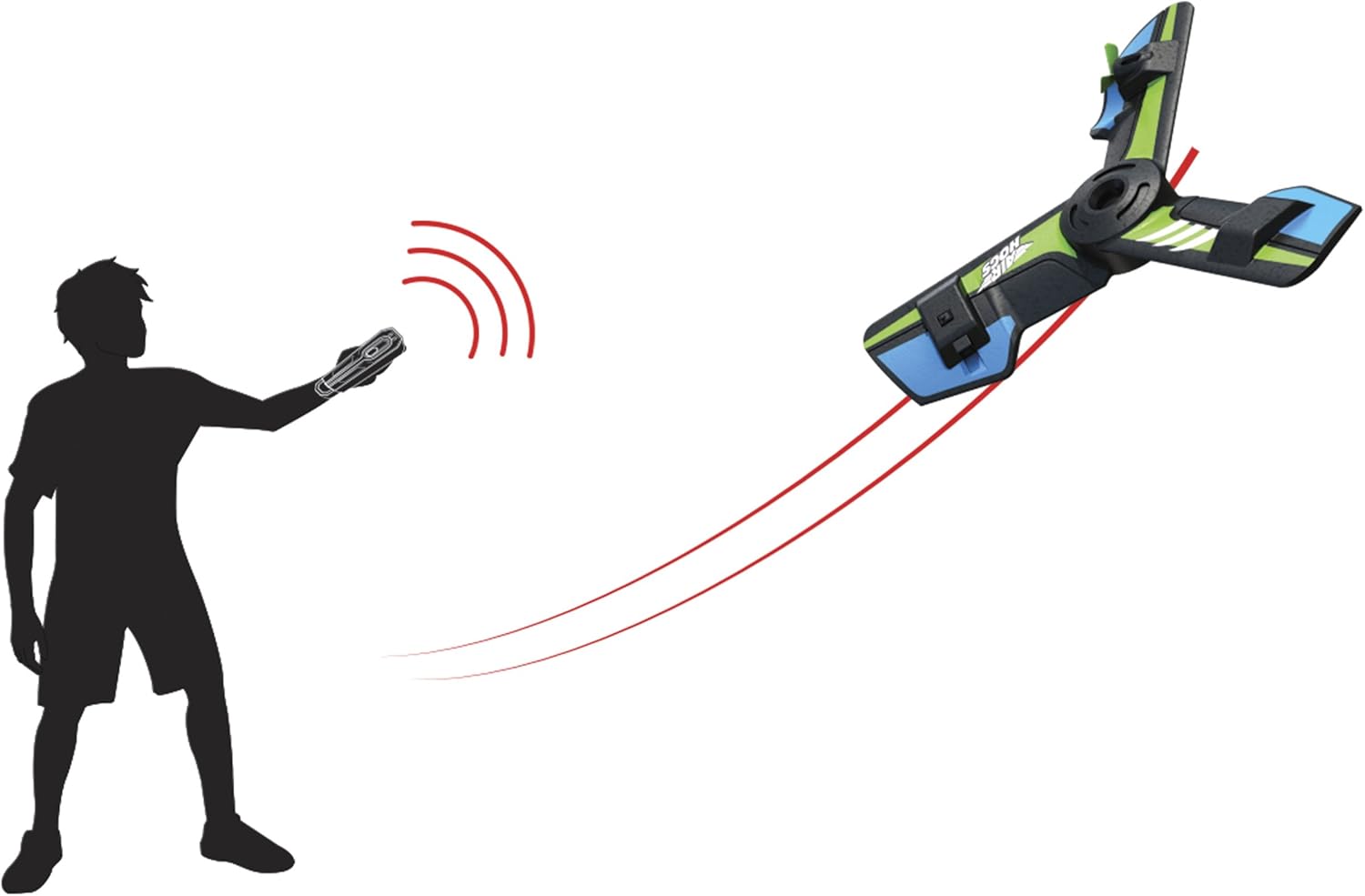
Figure 3: Illustration of the Hover Blade's boomerang flight path when thrown.
5.2 Toss and Fly Boomerang Mode
To activate the boomerang feature:
- Ensure the Hover Blade is powered on.
- Hold the Hover Blade firmly by its central body.
- With a gentle but firm toss, launch the Hover Blade forward. It is designed to return to you, similar to a boomerang. Experiment with different throwing angles and strengths for optimal return.
5.3 Remote Control Flight
The remote control allows for precise adjustments during flight. Refer to the remote control's specific button layout for functions such as throttle, steering, and trim adjustments. Practice in an open area to familiarize yourself with the controls.
- Throttle Control: Typically controls the altitude and speed.
- Directional Control: Allows for steering the Hover Blade left, right, forward, and backward.
- Trim Adjustments: Used to fine-tune the Hover Blade's stability and prevent unwanted drifting.

Figure 4: Close-up view of the Air Hogs Hover Blade, highlighting its design.
6. Maintenance
Proper maintenance ensures the longevity of your Air Hogs Hover Blade:
- Cleaning: Use a soft, dry cloth to wipe down the Hover Blade and remote control. Do not use harsh chemicals or water.
- Storage: Store the Hover Blade and remote control in a cool, dry place, away from direct sunlight and extreme temperatures. Remove batteries from the remote control if storing for extended periods.
- Propeller Inspection: Periodically check the propellers for any damage, cracks, or debris. Damaged propellers can affect flight performance and safety.
7. Troubleshooting
If you encounter issues with your Air Hogs Hover Blade, refer to the following common problems and solutions:
| Problem | Possible Cause | Solution |
|---|---|---|
| Hover Blade does not respond to remote. | Low batteries in remote; not paired; out of range. | Replace batteries; re-pair devices; operate within recommended range. |
| Hover Blade does not fly straight or drifts. | Trim settings incorrect; damaged propeller; strong air currents. | Adjust trim controls; inspect and replace damaged propellers; fly in calm conditions. |
| Short flight time. | Old or low-quality batteries. | Use fresh, high-quality alkaline batteries. |
8. Specifications
| Feature | Detail |
|---|---|
| Model Number | 20071015 |
| Product Dimensions | 8.98 x 8.98 x 1.56 inches |
| Item Weight | 3.02 ounces |
| Recommended Age | 8 - 10 years |
| Batteries Required | 6 AA batteries (for remote control) |
| Manufacturer | Spinmaster - Import |
9. Warranty and Support
For warranty information or technical support, please contact the manufacturer, Spinmaster - Import, directly. Keep your purchase receipt as proof of purchase.
You can also visit the official Air Hogs Store on Amazon for more product information and support resources.
Ask a question about this manual
Ask about setup, troubleshooting, compatibility, parts, safety, or missing instructions. Manuals+ will review the question and use this page’s manual context to help answer it.