
La Crosse Technology WS6825
La Crosse Technology WS6825 Color Weather Station User Manual
Model: WS6825
1. Introduction
This manual provides detailed instructions for the setup, operation, and maintenance of your La Crosse Technology WS6825 Color Weather Station. Please read this manual thoroughly to ensure proper use and to maximize the performance of your device. Keep this manual for future reference.
2. Package Contents
Verify that all components are present in your package:
- WS6825 Color Weather Station (Main Unit)
- Wireless Outdoor Sensor
- 5.0V AC Power Adapter
Note: Batteries for the main unit (backup) and outdoor sensor are not included and must be purchased separately.

Image 2.1: Main unit and wireless outdoor sensor.

Image 2.2: The weather station and sensor as packaged.
3. Setup Guide
3.1 Powering the Outdoor Sensor
- Open the battery compartment on the back of the outdoor sensor.
- Insert 2 x AA LR6 1.5V batteries (not included), observing the correct polarity (+/-).
- Close the battery compartment securely.
3.2 Powering the Main Unit
- Insert 3 x AAA LR3 backup batteries (not included) into the battery compartment on the back of the main unit, observing the correct polarity (+/-). These batteries provide backup power in case of a power outage.
- Connect the 5.0V AC power adapter to the main unit's power jack and then plug it into a standard electrical outlet. The display will illuminate.
3.3 Sensor Placement
For accurate outdoor readings and optimal wireless transmission:
- Place the outdoor sensor in a shaded area, away from direct sunlight, heat sources, and moisture.
- Ensure the sensor is within 90 meters (300 ft.) of the main unit in an open field. Obstacles like walls and electronic devices can reduce the transmission range.
- Allow the product to stabilize without displacement for accurate readings.
3.4 Initial Synchronization
After powering both units, the main unit will automatically search for the outdoor sensor. This process may take a few minutes. Once connected, the outdoor temperature and humidity will appear on the display.
3.5 Basic Settings (Time, Date, Language)
Refer to the 'Operating' section for detailed instructions on setting the time, date, and display language.
4. Operating Instructions
4.1 Display Overview
The color display provides a clear overview of various weather data. An example of the display layout is shown below:
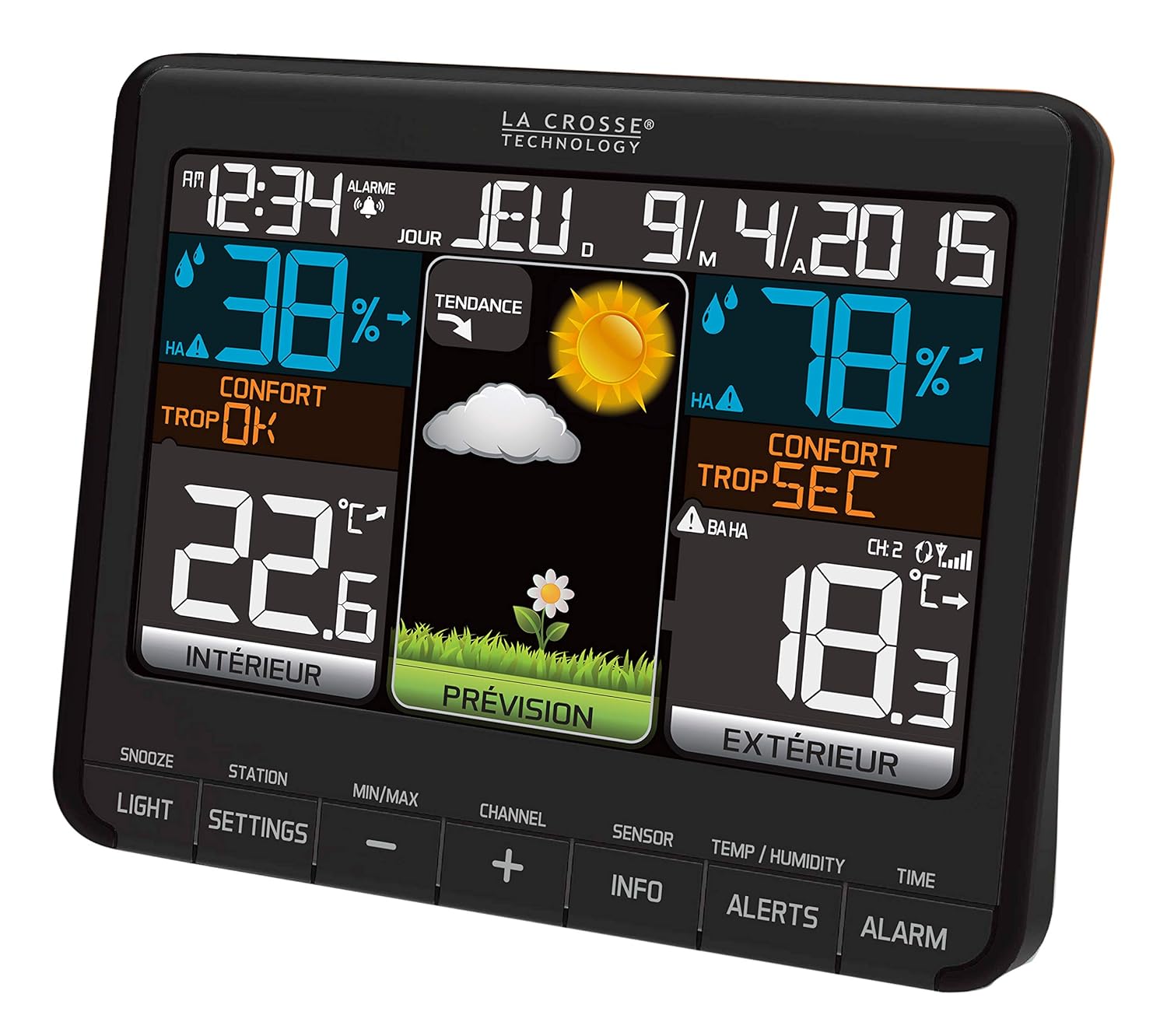
Image 4.1: Main unit display with various weather information.
4.2 Button Functions
The main unit features several buttons for navigation and settings:
- LIGHT: Adjusts backlight intensity (High, Low, OFF).
- SNOOZE: Activates snooze function for the alarm.
- SETTINGS: Enters settings mode for time, date, and other parameters.
- MIN/MAX: Displays daily minimum and maximum recorded values.
- CHANNEL (+/-): Selects between multiple outdoor sensors (if applicable).
- SENSOR: Manually searches for the outdoor sensor.
- INFO: Toggles display of additional information like Dew Point or Heat Index.
- ALERTS: Accesses programmable high/low alerts.
- ALARM: Sets and activates the alarm.
- TEMP/HUMIDITY: Toggles temperature unit (°C/°F) or humidity display.
- TIME: Enters time setting mode.
4.3 Setting Time, Date, and Language
- Press and hold the SETTINGS button to enter the setup menu.
- Use the +/- buttons to adjust values and SETTINGS to confirm and move to the next item.
- Set the time format (12H or 24H), hour, minute, year, month, and date.
- Select your preferred display language from the available options: French, German, Italian, Dutch, Spanish, Danish, English.
- Continue pressing SETTINGS until you exit the setup menu.
4.4 Alarm Function
- Press and hold the ALARM button to enter alarm setting mode.
- Use the +/- buttons to set the desired alarm time.
- Press ALARM again to confirm and activate the alarm. An alarm icon will appear on the display.
- When the alarm sounds, press SNOOZE to temporarily silence it. The alarm will sound again after a few minutes.
- To turn off the alarm, press any other button during the alarm sound, or press ALARM again to deactivate it.
4.5 Backlight Adjustment
Press the LIGHT button repeatedly to cycle through the backlight intensity options: High, Low, and OFF.
4.6 Viewing Min/Max Records
Press the MIN/MAX button to view the daily minimum and maximum recorded indoor and outdoor temperatures and humidity levels. Press again to cycle through the values.
4.7 Multiple Sensors (Optional)
The weather station supports up to 3 outdoor sensors. If you have additional sensors, use the CHANNEL button to switch between their readings.
5. Key Features Explained
- Temperature Monitoring: Displays indoor temperature from 0°C to 50°C (32°F to 122°F) and outdoor temperature from -40°C to 60°C (-40°F to 140°F). Features daily Min/Max records, trend indicators, and programmable high/low alerts.
- Humidity Monitoring: Measures indoor and outdoor humidity from 1% to 99% RH, with trend indicators.
- Weather Forecast: Provides a colored and animated forecast using 6 distinct icons, based on atmospheric pressure changes. Includes a trend indicator.
- Mold Risk Indicator: Displays « Low », « Medium », or « High » risk levels for both indoor and outdoor environments.
- Dew Point & Heat Index: Displays Dew Point and Heat Index values in °C or °F.
- Comfort Level Indicator: Shows indoor and outdoor comfort levels.
- USB Charging Port: Includes one USB charging port for external devices (charging cable not included).
- Wireless Transmission: The outdoor sensor transmits data wirelessly up to 90 meters (300 ft.) in open areas using a 433 MHz frequency.
- Low Battery Indicators: Icons on the display indicate when batteries need replacement for both the main unit and the outdoor sensor.
6. Maintenance
6.1 Battery Replacement
Replace batteries when the low battery indicator appears on the display:
- Main Unit (Backup): Replace 3 x AAA LR3 batteries.
- Outdoor Sensor: Replace 2 x AA LR6 1.5V batteries.
Always replace all batteries in a set at the same time. Do not mix old and new batteries or different types of batteries.
6.2 Cleaning
Clean the display and casing of the weather station and sensor with a soft, damp cloth. Do not use abrasive cleaners or solvents, as these may damage the surfaces.
6.3 Placement Considerations
To maintain accuracy, ensure the weather station and sensor are not exposed to direct sunlight, heat sources (e.g., lights, heaters), or excessive moisture. Avoid contact with plastics and other conductive materials that could affect readings.
7. Troubleshooting
| Problem | Possible Cause | Solution |
|---|---|---|
| No display or dim display | AC adapter not connected, power outage, low backup batteries, backlight off. | Ensure AC adapter is securely plugged in. Check backup batteries. Press the LIGHT button to adjust backlight intensity. |
| No outdoor temperature/humidity reading | Outdoor sensor batteries low or dead, sensor out of range, interference, incorrect channel. | Replace outdoor sensor batteries. Move sensor closer to the main unit. Press the SENSOR button to manually search. Ensure correct channel is selected if using multiple sensors. |
| Inaccurate temperature/humidity readings | Sensor exposed to direct sunlight or heat sources, insufficient stabilization time. | Relocate the outdoor sensor to a shaded area. Ensure the main unit is not near heat sources. Allow the device to stabilize for several hours after initial setup or relocation. |
| Weather forecast not changing | The weather station requires time to learn atmospheric pressure patterns. | Allow up to 3 weeks for the weather station to calibrate and provide accurate forecasts based on local atmospheric pressure changes. |
8. Specifications
- Model: WS6825
- Brand: La Crosse Technology
- Main Unit Dimensions (L x W x H): 150 x 42 x 123 mm
- Outdoor Sensor Dimensions (L x W x H): 40 x 20 x 130 mm
- Main Unit Power: 5.0V AC Adapter (included), 3 x AAA LR3 backup batteries (not included)
- Outdoor Sensor Power: 2 x AA LR6 1.5V batteries (not included)
- Indoor Temperature Range: 0°C to 50°C (32°F to 122°F)
- Outdoor Temperature Range: -40°C to 60°C (-40°F to 140°F)
- Temperature Precision: +/-1°C/2°F
- Temperature Resolution: 0.1°C
- Indoor/Outdoor Humidity Range: 1% to 99% RH
- Humidity Resolution: 1% RH
- Wireless Transmission Frequency: 433 MHz
- Wireless Transmission Range: Up to 90 meters (300 ft.) in open field
- Material: Plastic
- Special Feature: Color display
9. Warranty and Support
For warranty information and technical support, please refer to the documentation provided with your purchase or contact your retailer or the manufacturer directly. Specific warranty terms may vary by region and retailer.
Related Documents - WS6825
 |
La Crosse Wireless Color Forecast Station Model 308-1412 Instruction Manual Comprehensive instruction manual for the La Crosse Wireless Color Forecast Station (Model 308-1412), detailing setup, features, troubleshooting, and specifications for indoor/outdoor temperature, humidity, and weather forecasting. |
 |
La Crosse Technology 308A-146 Wireless Color Forecast Station: Setup & Features Quick setup guide for the La Crosse Technology 308A-146 Wireless Color Forecast Station, detailing features like weather forecasting, indoor/outdoor temperature and humidity, heat index, dew point, and setup instructions. |
 |
La Crosse Technology C87030/C87214 Wireless Color Forecast Station Instructional Manual Comprehensive instructional manual for the La Crosse Technology C87030/C87214 Wireless Color Forecast Station, covering setup, operation, features, specifications, and troubleshooting. Learn how to use your weather station for accurate forecasting and environmental monitoring. |
 |
La Crosse Technology Fisherman Forecast Station 308-1451 User Guide Comprehensive guide for the La Crosse Technology Fisherman Forecast Station (Model 308-1451), covering setup, features, specifications, and troubleshooting. Learn how to power up, set preferences, understand weather forecasts, and maintain your device. |
 |
La Crosse Technology V11 Wi-Fi Color Forecast Station Setup Guide This guide provides step-by-step instructions for setting up and using the La Crosse Technology V11 Wi-Fi Color Forecast Station. Learn how to connect to the La Crosse View app, pair sensors, configure settings, understand forecast data, and troubleshoot common issues. |
 |
La Crosse Technology C86371 Wireless Forecast Station Instruction Manual Comprehensive instruction manual for the La Crosse Technology C86371 Wireless Forecast Station, covering setup, features, operation, specifications, and troubleshooting for indoor and outdoor temperature, humidity, weather forecasting, and atomic time. |
Ask a question about this manual
Ask about setup, troubleshooting, compatibility, parts, safety, or missing instructions. Manuals+ will review the question and use this page’s manual context to help answer it.