
1. Important Safety Instructions
Please read all instructions carefully before using the appliance. Keep this manual for future reference.
- Always ensure the appliance is placed on a stable, flat, heat-resistant surface.
- Do not immerse the main unit, cord, or plug in water or any other liquid.
- Supervise children closely when the appliance is in use.
- Unplug the appliance from the power outlet when not in use and before cleaning.
- Do not operate any appliance with a damaged cord or plug, or after the appliance malfunctions or has been damaged in any manner.
- Use only accessories recommended by the manufacturer.
- Avoid touching hot surfaces. Use handles or knobs.
2. Product Overview
The Moulinex MK812101 Multicooker is designed to simplify your cooking with its versatile features. It includes 45 cooking programs and functions, ensuring a wide range of culinary possibilities. The innovative 5-liter non-stick spherical pot provides optimal and uniform heat distribution through convection for perfectly cooked meals.

Image: The spherical pot design ensures even heat distribution, leading to perfectly cooked dishes like rice, stews, and desserts.
Included Accessories:
- Steam Basket
- Rice Spoon
- Soup Spoon
- Measuring Cup
- Recipe Book
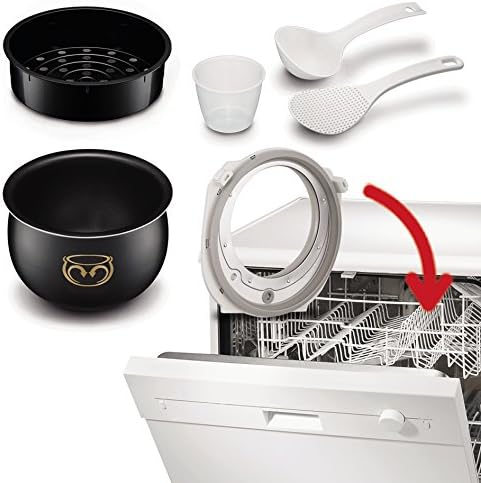
Image: All removable components, including the pot, steam basket, and utensils, are dishwasher-safe for easy cleaning.
3. Setup and First Use
3.1 Unpacking
- Carefully remove the multicooker and all accessories from the packaging.
- Retain the packaging materials for future transport or storage.
- Check that all listed accessories are present.
3.2 Initial Cleaning
Before first use, clean all removable parts to ensure hygiene and remove any manufacturing residues.
- Wash the inner pot, steam basket, lids, and all accessories with warm, soapy water. Rinse thoroughly and dry completely.
- Alternatively, these removable components are dishwasher-safe.
- Wipe the exterior of the main unit with a damp cloth. Do not immerse the main unit in water.
3.3 Assembly
Place the clean inner pot into the main unit. Ensure it is seated correctly.
4. Operating Instructions
4.1 Powering On and Control Panel
Plug the multicooker into a suitable power outlet. The display will illuminate. The control panel allows you to select various cooking programs and settings.

Image: The control panel features dedicated buttons for different food types and cooking functions, along with a digital timer display.

Image: Interacting with the intuitive control panel to select desired cooking settings.
4.2 Selecting Cooking Programs
The multicooker offers 45 pre-set programs and functions. Use the 'Menu' button or specific program buttons (e.g., 'Rice/Cereals', 'Steam', 'Baking') to navigate and select your desired cooking mode. The display will show the default cooking time and temperature for the selected program.
4.3 Delayed Start Function
You can program the multicooker to start cooking at a later time, up to 24 hours in advance. This feature allows you to prepare ingredients and have your meal ready exactly when you need it.
- Select your desired cooking program.
- Press the 'Delayed Start' button (often indicated by a clock icon).
- Adjust the delay time using the '+' and '-' buttons.
- Confirm your selection. The appliance will start cooking after the set delay.

Image: The Delayed Start function allows you to set a cooking start time up to 24 hours in advance.
4.4 Automatic Keep-Warm Function
After most cooking programs are complete, the multicooker will automatically switch to a 'Keep Warm' mode for up to 24 hours, maintaining your food at an optimal serving temperature.
4.5 Customizing and Memorizing Recipes
The appliance allows you to adjust cooking times and temperatures for certain programs and save your customized settings for future use. Refer to the included recipe book for detailed instructions on this feature.
4.6 Adding Ingredients During Cooking
The multicooker features a convenient one-click opening mechanism, allowing you to safely add ingredients at any point during the cooking process.
5. Cleaning and Maintenance
Regular cleaning ensures the longevity and optimal performance of your Moulinex Multicooker.
5.1 Daily Cleaning
- Always unplug the appliance and allow it to cool completely before cleaning.
- Remove the inner pot, steam basket, and any other removable accessories.
- Wash these parts with warm, soapy water or place them in the dishwasher.
- Wipe the exterior of the main unit with a soft, damp cloth. Do not use abrasive cleaners or scourers.
- Ensure all parts are thoroughly dry before reassembling or storing the appliance.
5.2 Care for the Non-Stick Pot
- To protect the non-stick coating, avoid using metal utensils inside the pot. Use only plastic, silicone, or wooden utensils.
- Do not use harsh detergents or abrasive sponges that could scratch the surface.
6. Troubleshooting
If you encounter any issues with your multicooker, please refer to the following general advice:
- Appliance does not turn on: Check if the power cord is securely plugged into both the appliance and the wall outlet. Ensure the power outlet is functional.
- Food not cooking properly: Verify that the correct program and cooking time have been selected. Ensure the inner pot is properly seated and the lid is closed securely.
- Unusual odors or smoke: Immediately unplug the appliance. This could indicate a serious issue. Contact customer support.
For persistent problems or issues not covered here, please contact Moulinex customer support.
7. Technical Specifications
| Specification | Detail |
|---|---|
| Brand | Moulinex |
| Model Number | MK812101 |
| Color | Silver |
| Dimensions (L x W x H) | 26 x 39 x 25 cm |
| Weight | 4.55 kg |
| Capacity | 5 Liters |
| Power | 750 Watts |
| Voltage | 220 Volts |
| Material | Ceramic, Plastic, Silver |
| Control Method | Touch |
| Operating Mode | Automatic |
| Special Features | Spherical pot for perfect cooking, One-click opening, Customizable recipes, Intelligent technology |
8. Warranty and Support
8.1 Product Warranty
This Moulinex Multicooker MK812101 comes with a 2-year warranty from the date of purchase, covering manufacturing defects under normal use.
8.2 Repairability
Moulinex is committed to product longevity. This appliance is designed for 15-year repairability, ensuring that spare parts are available for an extended period.
8.3 Customer Support
For warranty claims, technical assistance, or any questions regarding your product, please contact Moulinex customer support through their official website or the contact information provided in your purchase documentation.