
1. Introduction
Thank you for choosing the RYGHT Air Trainer R481542 Bluetooth In-Ear Headphones. This manual provides essential information for setting up, operating, and maintaining your headphones to ensure optimal performance and longevity. Please read this manual thoroughly before use.
2. Package Contents
Verify that all items are present in your package:
- RYGHT Air Trainer R481542 Bluetooth In-Ear Headphones
- USB Charging Cable
- Multiple sizes of Ear Tips (Small, Medium, Large)
- User Manual
3. Product Overview
The RYGHT Air Trainer R481542 are wireless Bluetooth in-ear headphones designed for mobile use. They feature an inline remote for convenient control of music and calls.

Image 1: RYGHT Air Trainer R481542 In-Ear Headphones showing the earbuds and inline remote control.
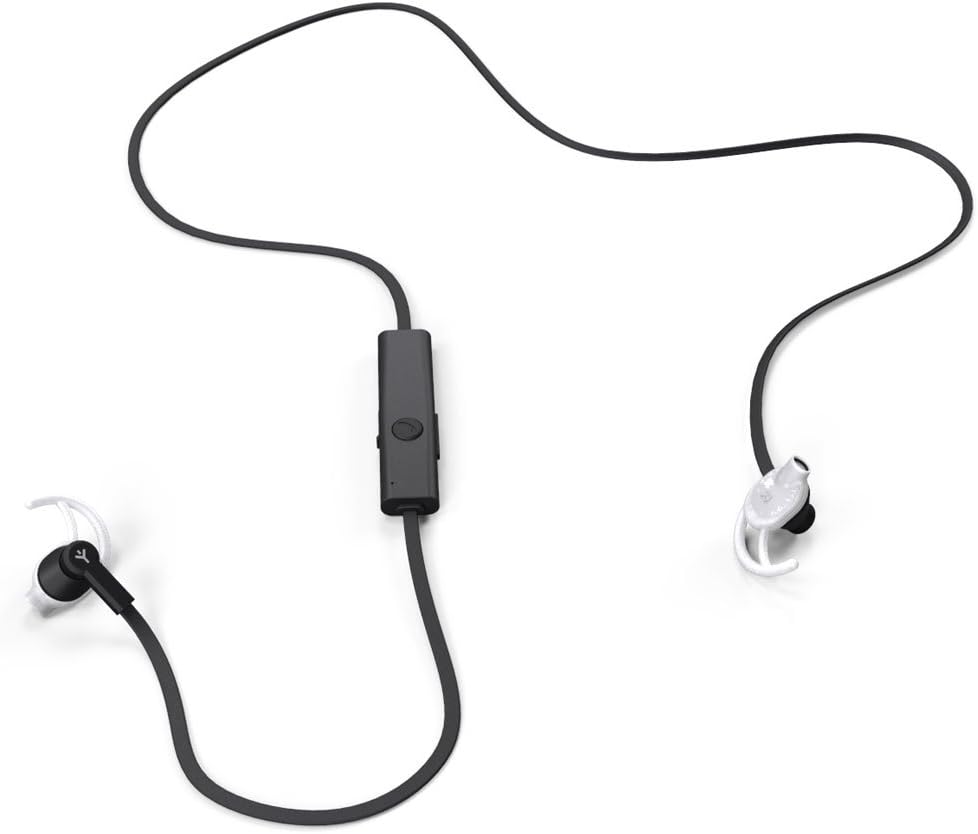
Image 2: RYGHT Air Trainer R481542 In-Ear Headphones displaying the full cable connecting the two earbuds and the central control unit.
4. Setup
4.1 Charging the Headphones
- Connect the USB charging cable to the charging port on the inline remote of your headphones.
- Plug the other end of the USB cable into a compatible USB power source (e.g., computer USB port, USB wall adapter).
- The LED indicator on the remote will illuminate to show charging status.
- A full charge takes approximately 2 hours. The LED indicator will change or turn off once charging is complete.
4.2 Bluetooth Pairing
- Ensure your headphones are fully charged.
- Press and hold the multi-function button on the inline remote until the LED indicator flashes red and blue, indicating pairing mode.
- On your smartphone or tablet, go to the Bluetooth settings.
- Turn on Bluetooth and search for available devices.
- Select "RYGHT Air Trainer" (or similar name) from the list of found devices.
- Once connected, the LED indicator will typically flash blue slowly or turn solid blue.
- Your headphones are now paired and ready for use.
4.3 Fitting the Earbuds
For optimal sound quality and comfort, choose the ear tips that best fit your ears. Experiment with the different sizes provided to find the most secure and comfortable fit.
5. Operating Instructions
5.1 Power On/Off
- Power On: Press and hold the multi-function button for approximately 3 seconds until the LED indicator flashes blue.
- Power Off: Press and hold the multi-function button for approximately 5 seconds until the LED indicator flashes red and then turns off. Ensure the headphones are properly turned off to conserve battery.
5.2 Music Playback
- Play/Pause: Press the multi-function button once.
- Next Track: Press and hold the Volume Up (+) button.
- Previous Track: Press and hold the Volume Down (-) button.
5.3 Call Management
- Answer/End Call: Press the multi-function button once.
- Reject Call: Press and hold the multi-function button for approximately 2 seconds.
- Redial Last Number: Double-press the multi-function button.
5.4 Volume Control
- Volume Up: Press the Volume Up (+) button.
- Volume Down: Press the Volume Down (-) button.
6. Maintenance
- Cleaning: Gently wipe the earbuds and cable with a soft, dry cloth. Do not use harsh chemicals or abrasive materials. Remove ear tips and clean them with mild soap and water if necessary, ensuring they are completely dry before reattaching.
- Storage: When not in use, store the headphones in a clean, dry place, away from extreme temperatures and direct sunlight. Avoid tangling the cable.
- Battery Care: To prolong battery life, avoid fully discharging the headphones frequently. Charge them regularly, even if not used for extended periods.
7. Troubleshooting
| Problem | Possible Cause | Solution |
|---|---|---|
| Headphones do not power on. | Low battery. | Charge the headphones for at least 30 minutes. |
| Cannot pair with device. | Headphones not in pairing mode; device Bluetooth off; too far from device. | Ensure headphones are in pairing mode (flashing red/blue). Turn device Bluetooth off and on. Move headphones closer to the device (within 10m). |
| No sound or poor sound quality. | Volume too low; headphones not properly connected; ear tips not fitted correctly. | Increase volume on both headphones and device. Re-pair the headphones. Adjust ear tip fit. |
| Short battery life. | Headphones not fully charged; not turned off correctly after use. | Ensure headphones are charged for the full 2 hours. Always power off the headphones by holding the multi-function button until the LED turns off. |
8. Specifications
| Model Number | R481542 |
| Brand | RYGHT |
| Bluetooth Version | 4.0 |
| Frequency Response | 20Hz - 22KHz |
| SNR (Signal-to-Noise Ratio) | 90 dB |
| Battery Type | Lithium Ion Polymer |
| Charging Time | Approximately 2 hours |
| Playback Time | Approximately 4 hours |
| Wireless Range | Up to 10 meters (33 feet) |
| Cable Length (earbud to earbud) | 700 mm (70 cm) |
| Weight | 15 g |
| Color | Black |
| Material | Plastic |
| Compatible Devices | Smartphones, Tablets |
9. Safety Information
- Do not expose the headphones to water, moisture, or extreme temperatures.
- Avoid listening at high volume levels for extended periods to prevent hearing damage.
- Keep out of reach of children.
- Do not attempt to disassemble or modify the headphones. This will void the warranty.
- Dispose of the product and battery responsibly according to local regulations.
10. Warranty and Support
RYGHT products are designed and manufactured to the highest quality standards. For warranty information or technical support, please refer to the warranty card included with your purchase or contact RYGHT customer service through their official website.