
DYON Sigma 40 PRO
Dyon Sigma 40 Pro LED TV User Manual
Model: Sigma 40 PRO
1. Introduction
Thank you for choosing the Dyon Sigma 40 Pro LED Television. This manual provides essential information for the safe and efficient operation of your new television. Please read these instructions carefully before using the device and retain them for future reference.
Important Safety Instructions
- Ensure the television is placed on a stable, level surface to prevent it from falling.
- Do not block ventilation openings. Maintain adequate space around the television for proper airflow.
- Protect the power cord from being walked on or pinched, particularly at plugs, convenience receptacles, and the point where they exit from the apparatus.
- Do not expose the television to rain or moisture to reduce the risk of fire or electric shock.
- Refer all servicing to qualified service personnel. Servicing is required when the apparatus has been damaged in any way, such as power-supply cord or plug is damaged, liquid has been spilled or objects have fallen into the apparatus, the apparatus has been exposed to rain or moisture, does not operate normally, or has been dropped.
2. Package Contents
Please check that all items are present and in good condition:
- Dyon Sigma 40 Pro LED Television Unit
- Remote Control
- Power Cable
- TV Stand (with screws)
- User Manual (this document)
3. Initial Setup
3.1 Attaching the Stand
- Carefully place the television screen-down on a soft, clean surface to prevent scratches.
- Align the stand with the mounting holes on the bottom of the television.
- Secure the stand using the provided screws. Do not overtighten.
3.2 Connecting Power
Plug the power cable into the TV's power input, then into a wall outlet.
3.3 Connecting Antenna/Cable
Connect your antenna or cable signal to the appropriate input on the back of the television. This model features a Triple Tuner with DVB-T2 H.265/HEVC support for various reception types.

Image: DVB-T2 HD Logo. This logo indicates compatibility with the DVB-T2 standard for digital terrestrial television, including H.265/HEVC encoding for high-definition broadcasts.
3.4 Connecting External Devices
Use HDMI or AV ports to connect external devices such as gaming consoles, Blu-ray players, or sound systems. The television also features an integrated DVD player.
3.5 First Power-On and Channel Scan
- Press the power button on the remote control or the TV.
- Follow the on-screen instructions to select your language and country.
- Initiate the automatic channel scan. This process will detect and store available television channels.

Image: Front view of the Dyon Sigma 40 Pro LED TV displaying a football match. The television features a slim bezel design and an integrated DVD player slot on the right side.
4. Operating the Television
4.1 Remote Control Functions
The remote control allows you to access all television functions. Familiarize yourself with the button layout:

Image: The remote control for the Dyon Sigma 40 Pro TV. Key buttons include Power, Channel Up/Down, Volume Up/Down, Menu, Source, OK, and dedicated buttons for DVD functions like Eject and DVD Setup.
- Power (Red Button): Turns the TV on or off.
- CH +/-: Changes channels.
- VOL +/-: Adjusts volume.
- MENU: Opens the main menu for settings.
- SOURCE: Selects input sources (HDMI, AV, DTV, ATV).
- OK: Confirms selections in menus.
- Navigation Buttons (Arrows): Navigate through menus and options.
- EJECT: Ejects a DVD from the integrated player.
- DVD SETUP: Accesses settings for the integrated DVD player.
4.2 Using the Integrated DVD Player
Insert a DVD disc into the slot on the side of the television. The TV should automatically switch to DVD mode. If not, press the SOURCE button and select 'DVD'. Use the remote control's DVD-specific buttons for playback, pause, stop, and chapter navigation.
4.3 Accessing Settings
Press the MENU button on the remote to access various settings, including Picture, Sound, Channel, Time, and System settings. Use the navigation buttons to browse and the OK button to confirm changes.
5. Maintenance and Care
5.1 Cleaning the Screen
Gently wipe the screen with a soft, lint-free cloth. For stubborn marks, lightly dampen the cloth with water or a specialized screen cleaner. Never spray liquid directly onto the screen.
5.2 Cleaning the Casing
Wipe the television casing with a soft, dry cloth. Avoid using abrasive cleaners or solvents, as these can damage the finish.
5.3 General Care
- Unplug the television from the power outlet during lightning storms or when left unused for long periods.
- Keep the television away from direct sunlight, heat sources, and excessive dust.
6. Troubleshooting
If you encounter issues with your television, please refer to the following common problems and solutions before contacting support.
| Problem | Possible Cause | Solution |
|---|---|---|
| No power | Power cable not connected; Power outlet faulty; TV in standby mode. | Check power cable connection; Test outlet with another device; Press power button on remote or TV. |
| No picture, but sound is present | Incorrect input source selected; Backlight issue. | Press SOURCE button to select correct input; Contact support if backlight issue persists. |
| No sound, but picture is present | Volume muted or too low; External audio device connected. | Increase volume or unmute; Check audio connections to external devices. |
| Remote control not working | Batteries depleted or incorrectly inserted; Obstruction between remote and TV. | Replace batteries; Ensure clear line of sight to TV's IR sensor. |
| DVD player is noisy | Normal operation noise; Disc scratched or dirty. | Some operational noise is normal. Clean or replace disc if noise is excessive or playback is affected. |
7. Product Specifications
Detailed technical specifications for the Dyon Sigma 40 Pro LED TV:
- Brand: DYON
- Model Name: Sigma 40 PRO
- Product Model Number: D800075
- Screen Size: 101.6 cm (40 inches)
- Display Technology: LED
- Resolution: Full-HD
- Tuner: Triple Tuner (DVB-T2 H.265/HEVC)
- Integrated Features: DVD Player
- Product Dimensions (W x D x H): 93.2 x 20.5 x 59.6 cm
- Product Weight: 7.4 Kilogram
- Display Contrast Ratio: 1200
- Power Consumption: 62 Watt
- Model Year: 2015
- Manufacturer: Axdia International GmbH
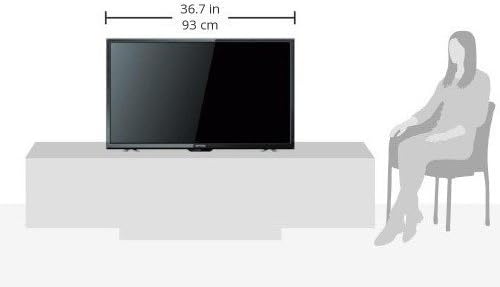
Image: Diagram illustrating the dimensions of the Dyon Sigma 40 Pro TV. The width is indicated as 36.7 inches (93 cm).
8. Warranty and Support
For warranty information, please refer to the warranty card included with your product or contact your retailer. For technical support or service inquiries, please reach out to the manufacturer or authorized service centers. Keep your purchase receipt as proof of purchase for warranty claims.