Introduction
This manual provides instructions for the VINABTY AA59-00741A replacement remote control. This remote is designed to function as a direct replacement for various Samsung TV models, offering essential control over your television without the need for complex programming.
Product Overview
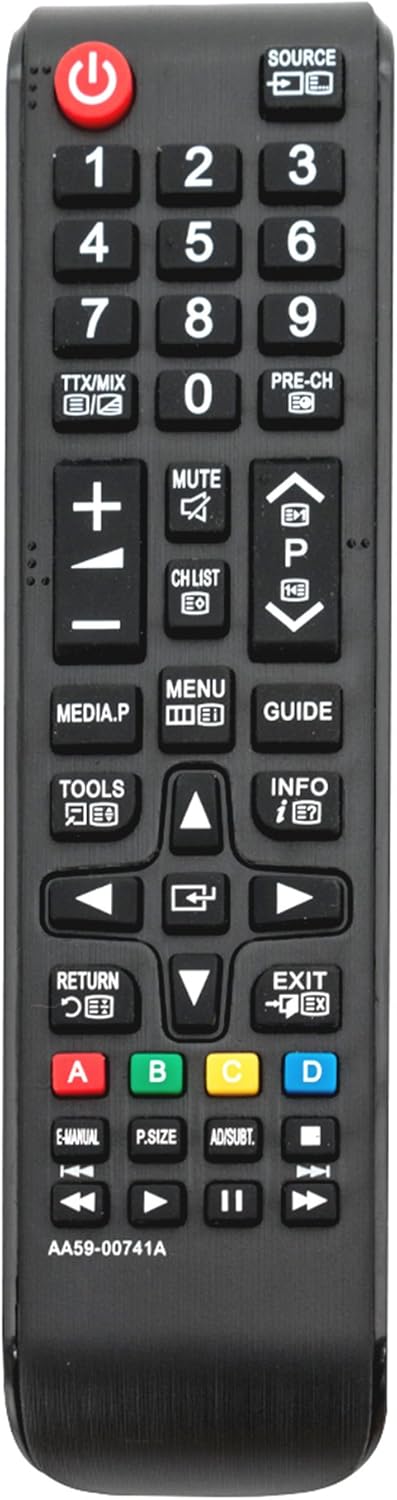
The VINABTY AA59-00741A remote control is a dedicated replacement unit. It features an ergonomic design for comfortable handling and includes all standard functions found on original Samsung TV remotes. The remote is black in color and operates using infrared technology.
Compatible Samsung TV Models:
This remote control is compatible with a wide range of Samsung TV models, including but not limited to:
- F5000/F5020 Series: UN32F5000, UN46F5000AF, UE32F5000, UE40F5000, UE39F5000, UE42F5000, UE46F5000, UE50F5000, UN50F5000AF
- E Series: PN43E440A2F, PN43E450A1F, PN51E440A2F, PN51E450A1F, PN51E530A3F, PN51E535A3F, PN60E530A3F, PN60E535A3F, UN26EH4000F, UN32EH4000F, UN32EH4050F, UN32EH5000F, UN37EH5000F, UN40EH5000F, UN40EH5050F, UN40EH6000F, UN40EH6050F, UN46EH5000F, UN46EH5050F, UN46EH6000F, UN50EH5000F, UN50EH5000V, UN50EH6000F, UN50EH6050F, UN55EH6000F, UN55EH6050F, UN60EH6000F, UN60EH6050F, UN65EH6000F, UN65EH6050F
- H Series: UA19H4000, UA22H5000, UA28H4000, UA32H4000, UA32H4100, UA32H5000, UA32H5050, UA32H5150, UA40H5000, UA40H5050, UA40H5100, UA40H5150, UA48H5000, UA48H5050, UA48H5100, UA48H5150, UA19H4000AW, UA22H5000AW, UA28H4000AW, UA32H4000AW, UA32H5000AW, UA40H5000AW, UA48H5000AW
- Other Models: T22B350ND, T24B350ND, T27B350ND, T28D310NH, UN19F4000AF, UN22F5000AF, UN29F4000AF, UN32F5050AF, UN39FH5000F, UN40F5000AF, PS43F4500, PS43F4510, PS51F4500, PS51F4510, PS51F5000, PS60F5000, PS64F5000, PS51F4500AM, PS51F5000AM, PS60F5000AM
Setup Instructions
1. Battery Installation
- Locate the battery compartment on the back of the remote control.
- Slide the battery cover downwards or in the direction indicated by an arrow to open it.
- Insert two (2) AAA batteries, ensuring the positive (+) and negative (-) terminals align correctly with the markings inside the compartment.
- Replace the battery cover by sliding it back into position until it clicks securely.

Once batteries are installed, the remote is ready for use. No additional programming or setup is required for most compatible Samsung TV models. Simply point the remote at your television and begin operating it.
Operating Instructions
The VINABTY AA59-00741A remote control provides standard functions for your Samsung TV. Familiarize yourself with the button layout for optimal use.
- Power Button (U): Turns the TV on or off.
- Number Buttons (0-9): Directly select channels.
- SOURCE: Changes the input source (e.g., HDMI1, AV, Component).
- VOL (+/-): Adjusts the volume level.
- CH (Up/Down): Changes channels sequentially.
- MUTE: Mutes or unmutes the TV audio.
- MENU: Accesses the TV's main menu.
- GUIDE: Displays the electronic program guide (if available).
- INFO: Displays information about the current program or input.
- Navigation Buttons (Up/Down/Left/Right/Enter): Used to navigate menus and confirm selections.
- RETURN: Returns to the previous menu or screen.
- EXIT: Exits the current menu or function.
- Color Buttons (A, B, C, D): Used for specific functions within certain TV menus or applications, as indicated on screen.
Maintenance
Battery Replacement
When the remote control's performance degrades or it stops responding, replace the batteries. Always replace both batteries simultaneously with new AAA batteries. Do not mix old and new batteries, or different types of batteries.
Cleaning
To clean the remote control, wipe it with a soft, dry cloth. Do not use liquid cleaners, sprays, or abrasive materials, as these can damage the remote's surface or internal components.
Troubleshooting
- Remote is not responding:
- Ensure the batteries are inserted correctly with the correct polarity.
- Replace old batteries with new AAA batteries.
- Check for any obstructions between the remote control and the TV's infrared sensor.
- Ensure you are within the effective range and pointing the remote directly at the TV.
- Some buttons are not working:
- This remote is a replacement and may not support all advanced functions of original remotes, especially smart TV features or voice control.
- If basic functions like volume or channel are not working, try replacing the batteries.
Specifications
| Model Number | AA59-00741A |
| Brand | VINABTY |
| Compatible Devices | Samsung Televisions |
| Power Source | 2 x AAA Batteries (not included) |
| Product Dimensions | 8 x 2 x 3 inches (approximately) |
| Item Weight | 0.352 ounces (approximately) |
| Color | Black |
| Special Feature | Ergonomic Design |
Warranty and Support
For warranty information or technical support, please refer to the retailer or manufacturer's official website where the product was purchased. Keep your purchase receipt as proof of purchase.


