
1. Introduction
Thank you for purchasing the Dabmar Lighting W2970-W Powder Coated Cast Aluminum Surface Mounted Wall Fixture. This manual provides detailed instructions for the safe installation, operation, and maintenance of your new lighting fixture. Please read this manual thoroughly before installation and retain it for future reference.
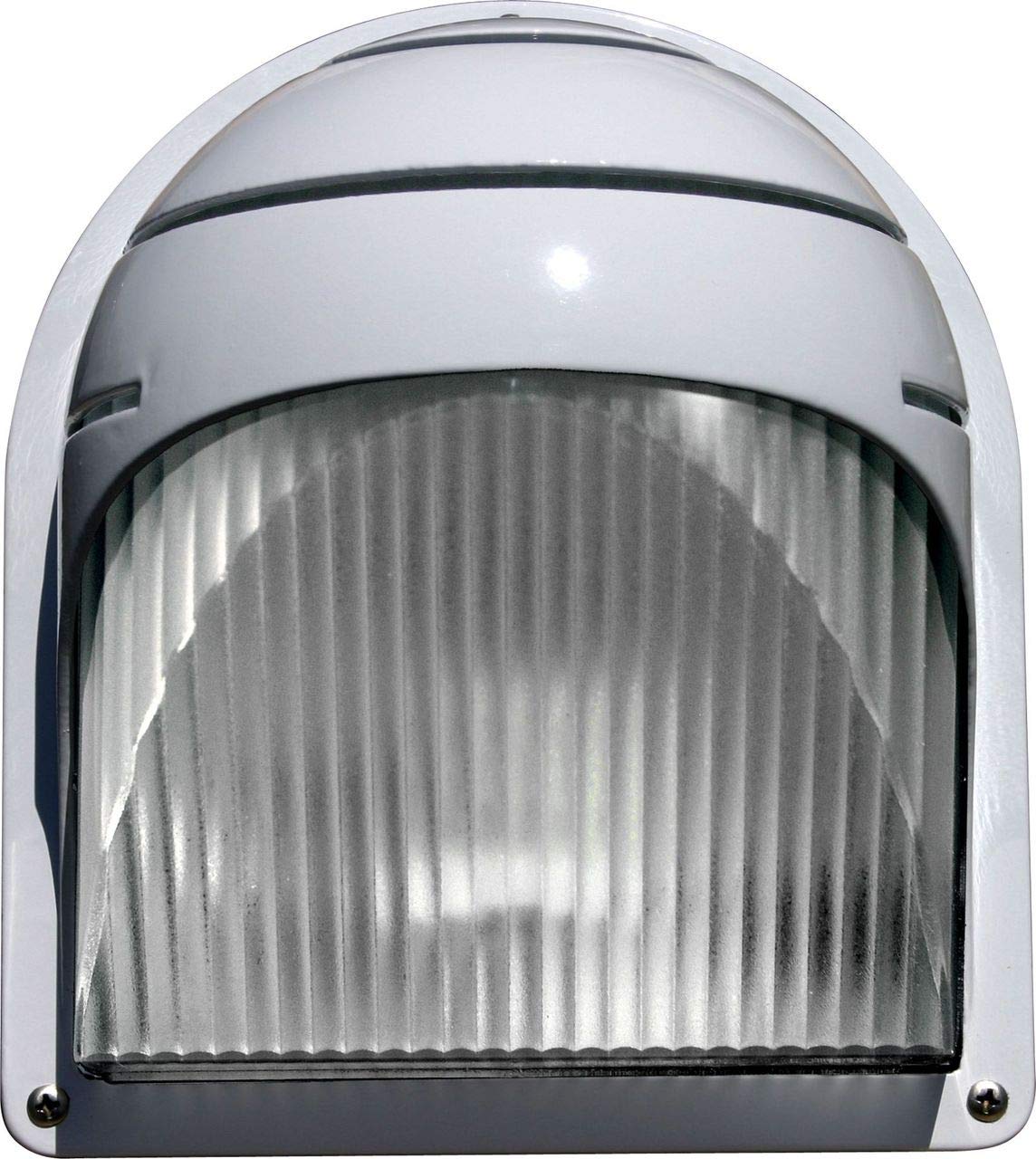
Image 1.1: Dabmar Lighting W2970-W Surface Mounted Wall Fixture. This image shows the white powder-coated cast aluminum fixture with its clear, ribbed Lexan lens, designed for surface mounting on a wall.
2. Safety Information
WARNING: Risk of electric shock. Turn off power at the circuit breaker or fuse box before installation or servicing. Improper installation can result in serious injury or death.
- All electrical connections must be in accordance with local codes, ordinances, or the National Electric Code (NEC). Consult a qualified electrician if you are unfamiliar with electrical wiring.
- This fixture is rated for 120 Volts. Ensure the power supply matches this rating.
- Do not exceed the maximum lamp wattage of 60 watts incandescent type.
- This fixture is ETL approved for wet locations, making it suitable for outdoor use.
- Handle the fixture with care to avoid damage. Do not install damaged products.
3. Package Contents
Verify that all components are present before beginning installation. If any parts are missing or damaged, contact Dabmar Lighting customer service.
- (1) W2970-W Wall Fixture (Powder Coated Cast Aluminum)
- (1) Clear, Ribbed Heat Resistant Lexan Lens
- (1) Mounting Hardware Kit (typically includes screws, wire nuts)
- (1) Instruction Manual
4. Setup and Installation
4.1 Tools Required (Not Included)
- Phillips head screwdriver
- Flathead screwdriver
- Wire strippers
- Pliers
- Electrical tape
- Safety glasses
4.2 Installation Steps
- Turn Off Power: Before starting, ensure the power to the installation area is turned off at the circuit breaker or fuse box.
- Prepare Mounting Surface: This fixture is designed for surface mounting. Ensure the mounting surface is clean, dry, and structurally sound.
- Attach Mounting Bracket: Secure the fixture's mounting bracket (if separate) to the wall using the provided screws. Ensure it is level and firmly attached.
- Make Electrical Connections:
- Connect the black wire from the fixture to the black (hot) wire from the electrical box using a wire nut.
- Connect the white wire from the fixture to the white (neutral) wire from the electrical box using a wire nut.
- Connect the green or bare copper ground wire from the fixture to the house ground wire (green or bare copper) and to the mounting bracket.
- Carefully tuck all wires into the electrical box.
- Secure Fixture to Mounting Bracket: Align the fixture with the mounting bracket and secure it in place using the provided screws or fasteners.
- Install Lamp: Insert one (1) 60-watt maximum incandescent lamp (not included) into the fixture's socket. Do not overtighten.
- Install Lens: Carefully place the clear, ribbed Lexan lens into position and secure it according to the fixture design (e.g., with retaining clips or screws).
- Restore Power: Once installation is complete and all connections are secure, restore power at the circuit breaker.

Image 4.1: Example of a typical wiring diagram for a wall-mounted light fixture. This diagram illustrates the connection of black (hot), white (neutral), and green/bare (ground) wires from the fixture to the corresponding house wiring.
5. Operating Instructions
The Dabmar Lighting W2970-W fixture operates via a standard wall switch connected to its power supply. Once installed and wired correctly, simply toggle the wall switch to turn the light fixture ON or OFF.
- Ensure the correct incandescent lamp (up to 60W) is installed.
- The fixture is designed for continuous outdoor use in wet locations.
6. Maintenance
6.1 Cleaning
To maintain the appearance and performance of your fixture, clean it periodically.
- Always turn off power at the circuit breaker before cleaning.
- Wipe the exterior surfaces with a soft, damp cloth.
- Do not use abrasive cleaners, solvents, or harsh chemicals, as these can damage the powder-coated finish or the Lexan lens.
- Clean the Lexan lens gently to avoid scratches.
6.2 Lamp Replacement
When the lamp needs replacement:
- Turn Off Power: Turn off power to the fixture at the circuit breaker.
- Allow to Cool: Allow the old lamp to cool completely before touching it.
- Remove Lens: Carefully remove the Lexan lens.
- Replace Lamp: Unscrew the old incandescent lamp and screw in a new 60-watt maximum incandescent lamp.
- Reinstall Lens: Reinstall the Lexan lens securely.
- Restore Power: Restore power at the circuit breaker.
Replacement ribbed lens: p-lens-2970 (item sold separately).
7. Troubleshooting
If your fixture is not operating correctly, refer to the following common issues and solutions:
| Problem | Possible Cause | Solution |
|---|---|---|
| Light does not turn on. |
|
|
| Light flickers. |
|
|
If the problem persists after attempting these solutions, consult a qualified electrician or contact Dabmar Lighting customer support.
8. Specifications
| Feature | Detail |
|---|---|
| Model Number | W2970-W |
| Brand | Dabmar Lighting |
| Construction Material | Powder Coated Cast Aluminum |
| Lens Material | Clear, Ribbed Heat Resistant Lexan |
| Finish | White (also available in Black, Verde Green) |
| Dimensions (H x W x D) | 8.00"H x 7.06"W x 5.00"D |
| Voltage | 120 Volts |
| Maximum Lamp Wattage | 60 Watt Incandescent Type (lamp not included) |
| ETL Approval | Approved for Wet Location |
| Mounting Type | Surface, Wall Mount |
| Item Weight | 2.2 Pounds |
| UPC | 849095053283 |
9. Warranty and Support
Dabmar Lighting products are manufactured to high standards and are backed by a manufacturer's warranty. For specific warranty details, please refer to the warranty card included with your product or visit the official Dabmar Lighting website.
For technical support, replacement parts, or any inquiries regarding your W2970-W fixture, please contact Dabmar Lighting customer service:
- Website: www.dabmar.com (Note: This is a placeholder URL, please refer to actual product documentation for correct contact information.)
- Phone: Refer to manufacturer's website or product packaging.
- Email: Refer to manufacturer's website or product packaging.
Please have your model number (W2970-W) and purchase date available when contacting support.