
1. Introduction
This manual provides essential information for the proper installation, operation, and maintenance of your HP 410A Cyan Toner Cartridge (CF411A). Designed for use with compatible HP Color LaserJet Pro M452 Series and HP Color LaserJet Pro MFP M377, M477 Series printers, this original HP toner cartridge ensures consistent, high-quality printing performance.
For optimal results and to maintain your printer's warranty, always use genuine HP toner cartridges.
2. Setup and Installation
Follow these steps to correctly install your new HP 410A Cyan Toner Cartridge:
- Unpack the Cartridge: Carefully remove the new toner cartridge from its packaging. Avoid touching the imaging drum or electrical contacts.
- Open the Printer Access Door: Locate and open the toner cartridge access door on your HP Color LaserJet Pro printer. Refer to your printer's specific user manual if you are unsure of the location.
- Remove the Old Cartridge: Grasp the handle of the used toner cartridge and pull it straight out of the printer.
- Prepare the New Cartridge: Gently rock the new cartridge back and forth several times to distribute the toner evenly inside the cartridge. This helps ensure consistent print quality.
- Remove the Sealing Tape: Pull the sealing tape tab straight out from the cartridge. Dispose of the tape properly.
- Insert the New Cartridge: Align the new toner cartridge with its slot in the printer and push it firmly until it clicks into place. Ensure it is securely seated.
- Close the Access Door: Close the toner cartridge access door. The printer will typically perform a calibration or initialization process after installation.
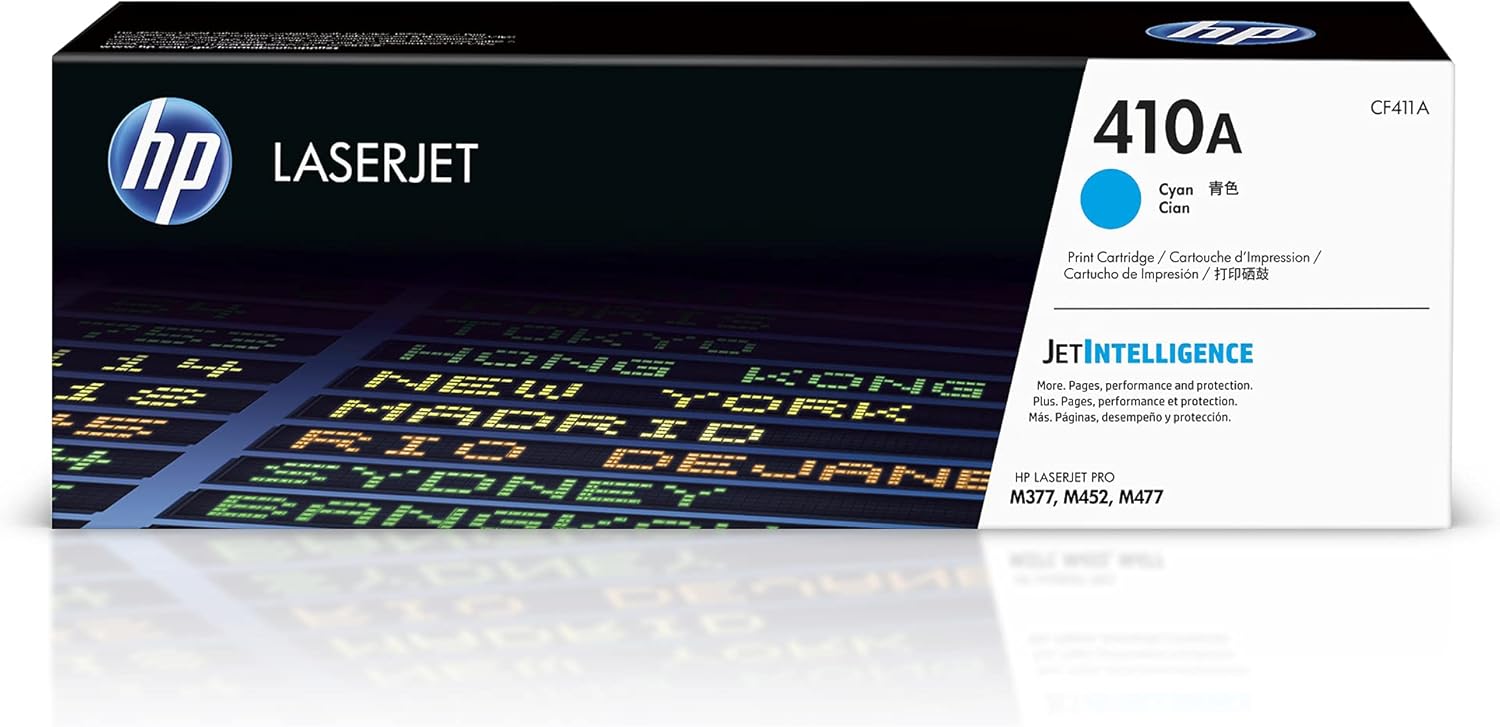
Image: The retail packaging for the HP 410A Cyan Toner Cartridge.

Image: The HP 410A Cyan Toner Cartridge shown with a list of compatible HP Color LaserJet Pro printer models. This cartridge is designed to work seamlessly with HP Color LaserJet Pro M452dn, M452dw, M452nw, and HP Color LaserJet Pro MFP M377dw, M477fdn, M477fdw, M477fnw series printers.
3. Operating the Toner Cartridge
The HP 410A Cyan Toner Cartridge is designed to deliver exceptional print quality and reliable performance. Here are some key aspects of its operation:
- Print Quality: Expect vibrant colors and sharp, rich blacks for all your documents and images. Original HP toner is formulated to produce consistent, professional-quality output.
- Page Yield: This cartridge has an approximate yield of 2,300 pages, based on ISO/IEC 19798 standards. Actual yield may vary significantly depending on the content of printed pages and other factors.
- Consistent Performance: HP toner cartridges are engineered to work seamlessly with HP printers, providing reliable and uninterrupted printing. This helps prevent common printing problems such as leaks or premature failures.

Image: Two documents, one with colorful charts and images, and another with text and an invoice, are shown under magnifying glasses, highlighting the vibrant colors and rich blacks produced by the toner.

Image: A visual comparison illustrating the difference in page yield between an HP standard-yield cartridge and an HP high-yield cartridge, demonstrating that high-yield cartridges produce more pages.

Image: A document being printed from a printer, with a red exclamation mark icon, symbolizing the importance of consistent and uninterrupted printing to avoid issues.
4. Maintenance and Care
Proper handling and maintenance of your toner cartridge can extend its life and ensure optimal performance:
- Storage: Store new toner cartridges in their original, unopened packaging in a cool, dry place, away from direct sunlight and extreme temperatures.
- Handling: Always handle the cartridge by its sides. Avoid touching the imaging drum or electrical contacts, as oils from your skin can cause print quality issues.
- Recycling: HP is committed to sustainability. Original HP Toner Cartridges contain recycled content, and you can easily recycle your used cartridges through the HP Planet Partners program.

Image: An HP LaserJet toner cartridge, indicating that it is easy to recycle through HP's recycling programs.
5. Troubleshooting
If you encounter issues with your HP 410A Cyan Toner Cartridge, consider the following common solutions:
- Poor Print Quality (Faded, Streaks, Spots):
- Ensure the cartridge was rocked gently before installation to distribute toner.
- Check if the sealing tape was fully removed.
- Verify that the cartridge is correctly seated in its slot.
- If the cartridge is nearing its end of life, replace it.
- Cartridge Not Recognized:
- Remove the cartridge and reinsert it firmly.
- Clean the electrical contacts on the cartridge and inside the printer with a lint-free cloth.
- Ensure you are using a genuine HP cartridge. HP cartridges feature tamper-resistant chips and firmware to protect your printer and data.
- Toner Low/Empty Message:
- The printer's software estimates toner levels. You may be able to continue printing for a short period after a low toner warning.
- Replace the cartridge when print quality degrades significantly or the printer stops printing.

Image: An HP toner cartridge with security features highlighted, including tamper-resistant chips, firmware, and packaging, designed to protect your printer and data.
For more detailed troubleshooting, consult your HP printer's user manual or visit the official HP support website.
6. Specifications
Key technical specifications for the HP 410A Cyan Toner Cartridge (CF411A):
| Feature | Detail |
|---|---|
| Model Number | CF411A |
| Color | Cyan |
| Page Yield (Approx.) | 2,300 pages |
| Compatibility | HP Color LaserJet Pro M452 Series, HP Color LaserJet Pro MFP M377, M477 Series |
| Item Weight | 1.32 pounds (0.6 kg) |
| Product Dimensions | 1 x 1 x 1 inches (approximate packaging dimensions) |
| Included Components | 1 x HP 410A (CF411A) Cyan Original LaserJet Toner Cartridge |
| Manufacturer | HP |
| UPC | 888793807514 |
7. Warranty and Support
HP Original Toner Cartridges are covered by HP's standard limited warranty. For specific warranty terms and conditions, please refer to the documentation included with your product or visit the official HP support website.
For technical assistance, product registration, or to find more information about HP products, please visit the HP Support website or contact HP customer service.
You can also find more information about HP products and accessories on the HP Store on Amazon.