
Introduction
This manual provides comprehensive instructions for the installation, operation, and maintenance of your Alcatel-Lucent Premium DeskPhone 8029. Please read this manual carefully before using the device to ensure proper functionality and longevity. This digital wired telephone is designed for professional communication environments.
Package Contents
Verify that all items listed below are present in your product package:
- Alcatel-Lucent Premium DeskPhone 8029 Unit
- Handset
- Handset Cord
- Desk Stand
- Ethernet Cable (for network connection)
- Power Adapter (if Power over Ethernet is not available)
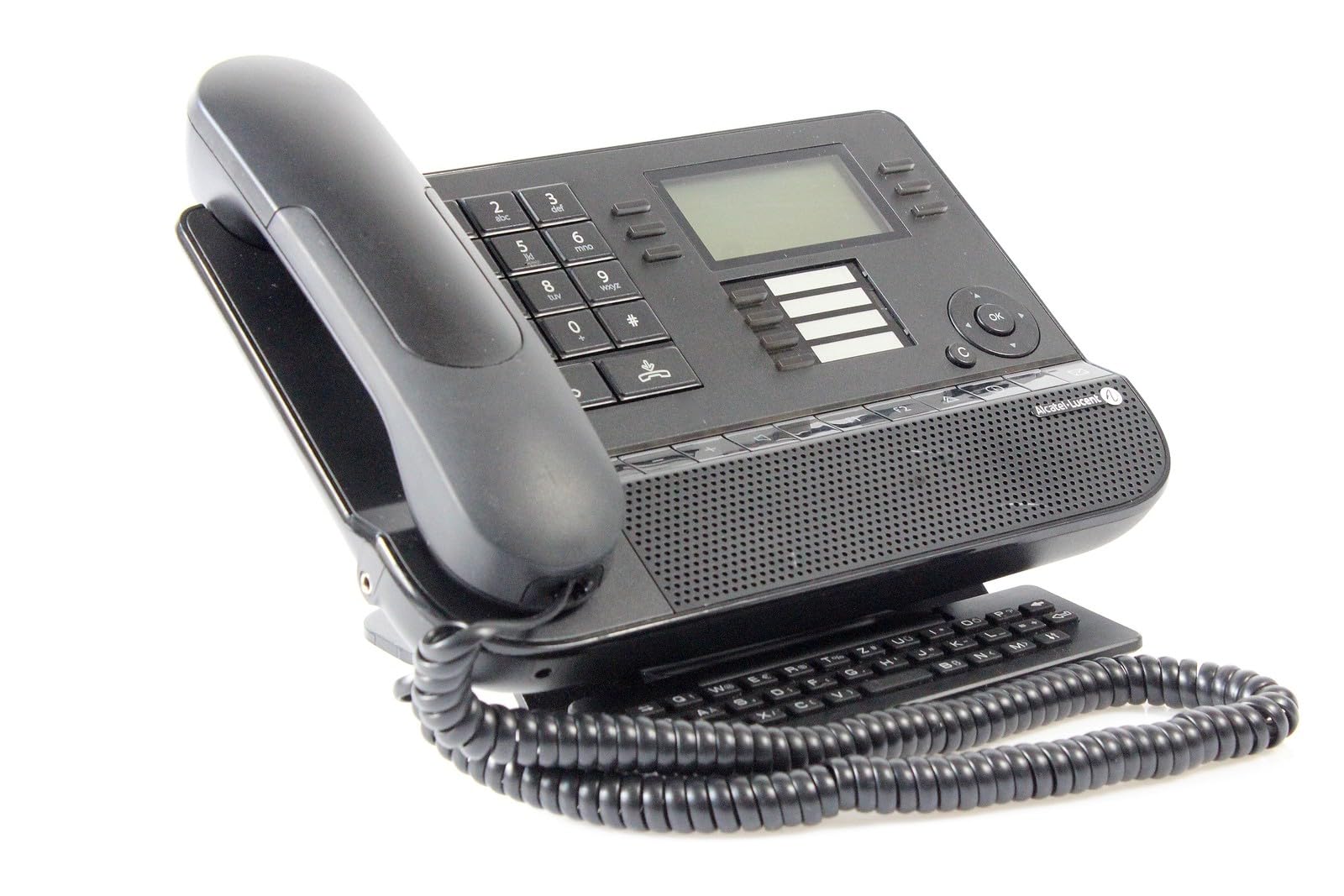
Image: The Alcatel-Lucent Premium DeskPhone 8029, showing the main unit, handset, and adjustable desk stand.
Product Overview
The Alcatel-Lucent Premium DeskPhone 8029 is a robust digital wired telephone designed for efficient communication. It features a clear monochrome display and a user-friendly interface.
Key Features:
- Wired telephone connectivity for stable communication
- 64 x 128 pixel monochrome display with white backlight for clear visibility
- Single keypad dialer for straightforward number entry
- Caller ID functionality to identify incoming calls
- Digital answering system type for message management
- Durable plastic construction for longevity
Physical Components:
- Display Screen: Shows call information, menus, and status indicators.
- Keypad: Standard numeric keys (0-9), asterisk (*), and pound (#) for dialing, along with function keys.
- Navigation Keys: Used for browsing menus and adjusting settings on the display.
- Function Keys: Programmable or dedicated keys for common features like hold, transfer, and conference.
- Handset: Ergonomically designed for comfortable audio communication.
- Speakerphone: Integrated for hands-free communication.
- Ports: Ethernet port for network connection, handset port, and power port (if external power supply is used).
Setup
Step 1: Attach the Desk Stand
Align the tabs on the desk stand with the corresponding slots on the bottom of the phone unit. Gently push the stand until it securely clicks into place.
Step 2: Connect the Handset
Plug one end of the coiled handset cord into the port on the handset and the other end into the designated handset port on the side or back of the phone unit.
Step 3: Connect to Network and Power
Connect one end of an Ethernet cable to your network wall jack or switch, and the other end to the 'LAN' port located on the back of the phone.
If your network infrastructure does not provide Power over Ethernet (PoE), connect the power adapter (if included) to the power port on the phone and then to an electrical outlet. The phone will power on automatically.
Image: A representation of the Alcatel-Lucent Premium DeskPhone 8029, illustrating the connection points for the handset, network, and power cables.
Basic Operation
Making a Call
- Pick up the handset or press the speakerphone button to activate the dial tone.
- Dial the desired phone number using the keypad.
- The call will connect automatically once the number is dialed.
Receiving a Call
- When the phone rings, pick up the handset or press the speakerphone button to answer the incoming call.
Adjusting Volume
Use the dedicated volume control buttons (typically located on the side of the handset or on the phone unit) to adjust the call volume during a conversation or the ringer volume when idle.
Using Caller ID
For incoming calls, the caller's number or name (if available and configured by your service provider) will be displayed on the screen before you answer.
Maintenance
Cleaning the Phone
- Use a soft, dry, or slightly damp cloth to clean the phone's surface.
- Do not use abrasive cleaners, solvents, or strong chemical agents, as these can damage the finish and internal components.
- Avoid spraying liquids directly onto the phone.
General Care
- Keep the phone away from excessive heat, direct sunlight, and high moisture environments.
- Do not attempt to disassemble the phone, as this will void the warranty and may cause damage.
- Ensure all cables are securely connected but not strained.
Troubleshooting
No Dial Tone
- Check if the handset cord is securely connected to both the handset and the phone unit.
- Verify that the Ethernet cable is properly connected to the 'LAN' port and the network source.
- Ensure the phone is receiving power, either via Power over Ethernet (PoE) or the external power adapter.
Display is Blank
- Confirm all power connections as described in the 'Setup' section.
- If the issue persists after checking power, contact technical support.
Cannot Hear or Be Heard During a Call
- Adjust the volume using the dedicated volume buttons on the phone or handset.
- Ensure the handset cord is fully plugged into both the handset and the phone unit.
- If using speakerphone, ensure the microphone is not obstructed and the speakerphone function is active.
Specifications
| Feature | Detail |
|---|---|
| Model Number | 3MG27103DE |
| Dimensions (H x W x D) | 252 x 200 x 204 mm |
| Weight | 1.34 kg (approximately 2.95 lbs) |
| Display | 64 x 128 pixels, monochrome, white backlight |
| Phone Type | Wired |
| Material | Plastic |
| Dialer Type | Single Keypad |
| Answering System Type | Digital |
| Caller ID | Yes |
| Manufacturer | Alcatel |
Note: Specifications are subject to change without notice.
Warranty and Support
Warranty Information
This product comes with a standard manufacturer's warranty. Please refer to the warranty card or documentation included with your purchase for specific terms, conditions, and duration. Keep your proof of purchase for any warranty claims.
Technical Support
For technical assistance, troubleshooting beyond this manual, or further inquiries, please contact your service provider or the authorized Alcatel-Lucent support channel. Contact information can typically be found on the manufacturer's website or in your service agreement.


