
Important Safety Information
Read all instructions carefully before installation or servicing. Failure to follow these instructions could result in property damage, personal injury, or death. This motor operates on 115V electrical power. Only qualified personnel should perform installation and maintenance. Disconnect all power to the furnace before beginning any work.
- DANGER: Risk of electric shock. Disconnect power before servicing.
- WARNING: Moving parts. Keep hands and loose clothing clear of the motor and fan assembly during operation.
- CAUTION: Hot surfaces. The motor may become hot during operation. Allow to cool before handling.
Product Overview
This document provides instructions for the installation, operation, and maintenance of the ICP Heil Tempstar Emerson 3/4 HP 115V Furnace Blower Motor, model K55HXFFA-7697 (also known as 1011404 or HQ1011404EM). This motor is designed for use in compatible ICP, Heil, and Tempstar furnace units.
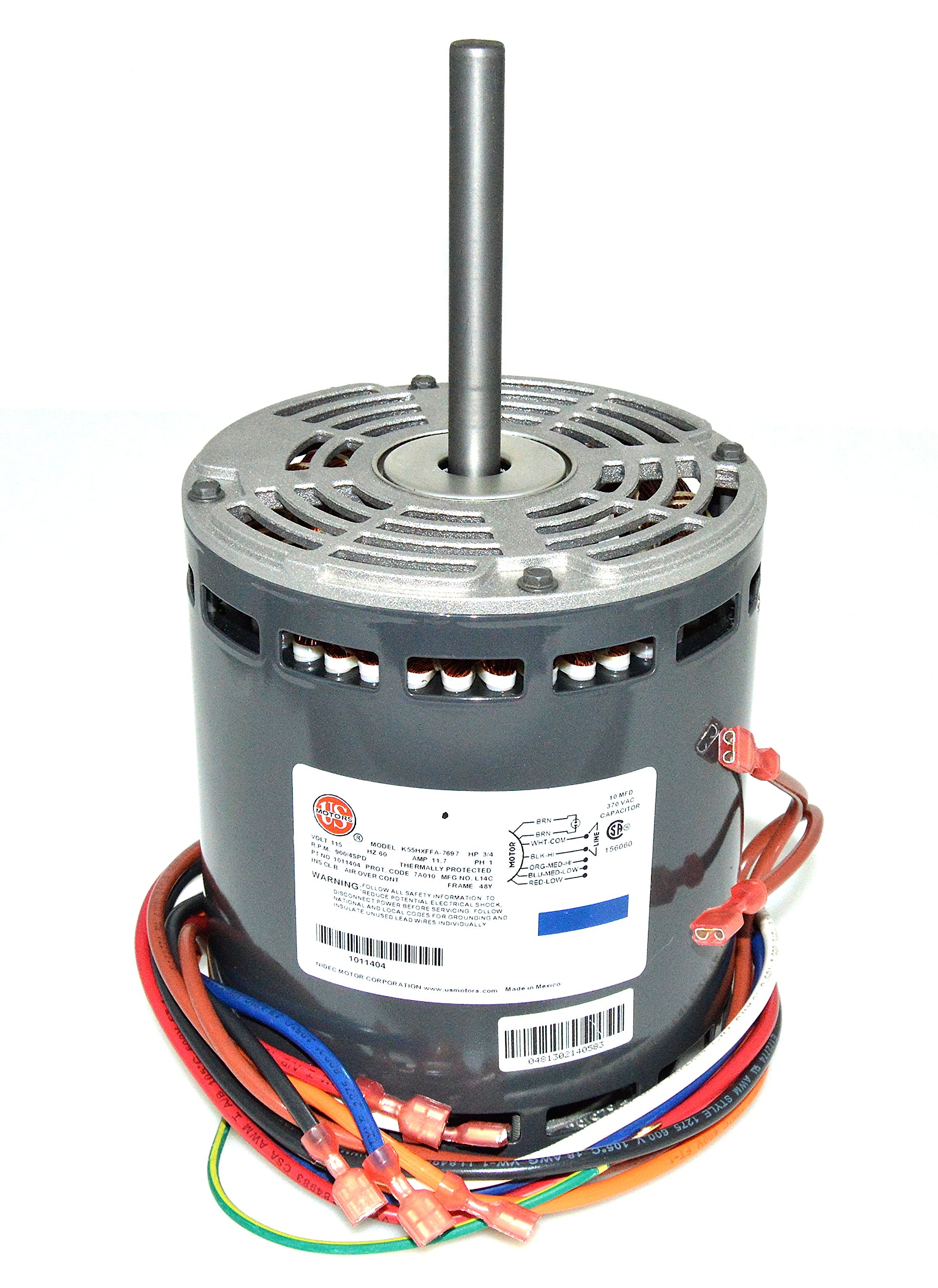
Image: The ICP Heil Tempstar Emerson Furnace Blower Motor, model K55HXFFA-7697. This image displays the motor's main body, shaft, and electrical connections, providing a visual reference for the product.
Specifications
| Feature | Specification |
|---|---|
| Model Number | K55HXFFA-7697 / 1011404 / HQ1011404EM |
| Horsepower (HP) | 3/4 HP (0.75 HP) |
| Voltage | 115V |
| Revolutions Per Minute (RPM) | 900 RPM |
| Diameter | 5 5/8 inches (Frame 48Y) |
| Shaft Length | 4 inches |
| UPC | 751109532168 |
Installation and Setup
Professional installation is highly recommended for this component. Ensure all safety precautions are followed before proceeding.
- Disconnect Power: Locate the main power switch for your furnace and turn it off. Verify power is disconnected using a voltage tester.
- Access Blower Compartment: Open the furnace access panel to expose the blower motor assembly.
- Identify and Disconnect Wiring: Carefully label and disconnect all electrical wiring connected to the old blower motor and its capacitor. Take photos for reference if needed.
- Remove Old Motor: Unmount the old blower motor from its housing. This typically involves removing bolts or clamps.
- Install New Capacitor: It is strongly recommended to replace the motor's run capacitor when installing a new motor. Old capacitors can weaken over time and negatively affect the new motor's performance and lifespan. Connect the new capacitor according to the wiring diagram.
- Mount New Motor: Secure the new K55HXFFA-7697 motor into the blower housing. Ensure it is properly aligned and fastened.
- Connect Wiring: Reconnect all electrical wiring to the new motor and capacitor, following the labels or photos taken earlier. Double-check all connections for security.
- Secure Access Panel: Close and secure the furnace access panel.
- Restore Power: Turn the main power switch for the furnace back on.
- Test Operation: Initiate a heating or cooling cycle to ensure the new blower motor operates correctly and quietly.
Note: Refer to your specific furnace model's service manual for detailed wiring diagrams and component locations.
Operation
The K55HXFFA-7697 blower motor is an integral component of your furnace's air circulation system. Once properly installed, it operates automatically in conjunction with your furnace's control board to move air through your HVAC system. It is a 4-speed motor, and its speed is typically controlled by the furnace's internal logic based on heating or cooling demands.
No direct user interaction is required for the motor's operation beyond the normal use of your thermostat to control the furnace.
Maintenance
Proper maintenance ensures the longevity and efficient operation of your blower motor. While the K55HXFFA-7697 is a robust component, periodic checks are beneficial.
- Annual Inspection: Have a qualified HVAC technician inspect the motor and blower assembly annually.
- Clean Blower Wheel: Over time, dust and debris can accumulate on the blower wheel, reducing airflow and putting strain on the motor. Ensure the blower wheel is cleaned as part of routine furnace maintenance.
- Check Wiring: Periodically inspect electrical connections for any signs of wear, corrosion, or looseness.
- Listen for Unusual Noises: Any new or unusual noises (e.g., grinding, squealing, rattling) could indicate a problem with the motor or blower assembly and should be investigated by a professional.
Troubleshooting
If your furnace blower motor is not functioning as expected, consider the following common issues. Always disconnect power before inspecting any internal components.
| Problem | Possible Cause | Solution |
|---|---|---|
| Motor does not start or hums but doesn't spin. | Faulty run capacitor, seized motor bearings, incorrect wiring. | Check/replace capacitor. Inspect motor for obstructions. Verify wiring. Professional service recommended. |
| Motor runs but airflow is weak. | Dirty air filter, dirty blower wheel, ductwork obstruction. | Replace air filter. Clean blower wheel. Check ductwork. |
| Motor makes loud noises (grinding, squealing). | Worn motor bearings, loose blower wheel, foreign object in blower. | Inspect for obstructions. Professional service for bearing replacement or blower wheel adjustment. |
| Motor overheats and shuts off. | Restricted airflow, prolonged operation, internal motor fault. | Check for airflow obstructions. Ensure proper ventilation. Professional diagnosis for internal faults. |
If troubleshooting steps do not resolve the issue, contact a qualified HVAC technician for further assistance.
Warranty and Support
For warranty information regarding your ICP Heil Tempstar Emerson Furnace Blower Motor K55HXFFA-7697, please refer to the documentation provided at the point of purchase or contact your authorized dealer or the manufacturer directly. Warranty terms typically cover defects in materials and workmanship under normal use.
For technical support or service inquiries, please contact an authorized ICP, Heil, or Tempstar service provider.