
Skechers SR1042
Skechers Analog-Digital Watch SR1042 El Segundo Black User Manual
Model: SR1042
1. Product Overview
This manual provides instructions for the Skechers Analog-Digital Watch, model SR1042. This watch combines traditional analog time display with digital functionalities, offering versatility for daily use.

Figure 1: Front view of the Skechers Analog-Digital Watch SR1042.
Key Features:
- Analog and Digital Displays: Provides time in both formats.
- Durable Construction: Features a lightweight polycarbonate case and a black polyurethane band.
- Water Resistance: Rated 5ATM (50 meters/165 feet), suitable for short periods of recreational swimming and showering. Not recommended for diving or snorkeling.
- Multiple Functions: Includes chronograph (stopwatch), alarm, hourly chime, calendar, dual time, and EL backlight.
2. Components and Controls
Familiarize yourself with the watch's buttons and display areas.
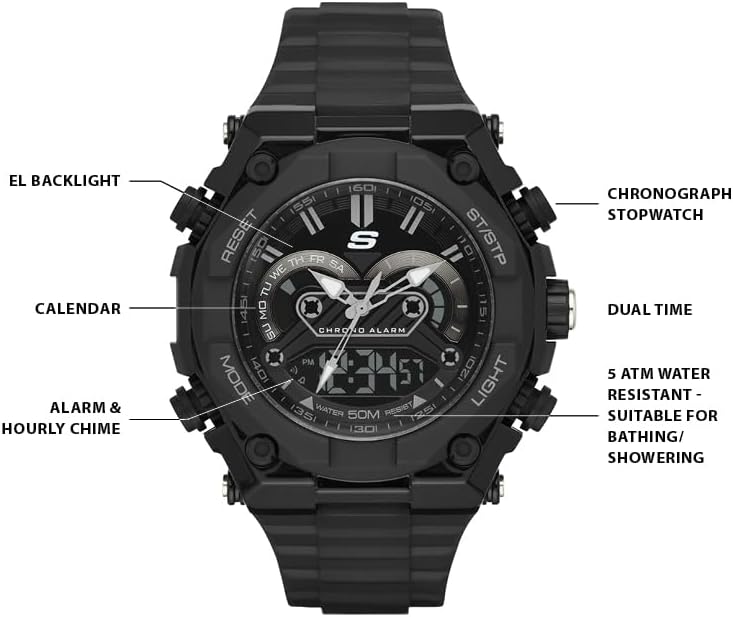
Figure 2: Labeled diagram of watch functions.
- MODE Button: Cycles through different modes (Timekeeping, Alarm, Stopwatch, Dual Time).
- RESET Button: Used for resetting values or selecting options in setting modes.
- ST/STP Button: Starts and stops the stopwatch, or adjusts values in setting modes.
- LIGHT Button: Activates the EL backlight for illumination.
- Crown: Used for setting the analog time.
3. Initial Setup and Time Adjustment
3.1 Setting Digital Time and Date
- In Timekeeping Mode, press the MODE button repeatedly until the digital display shows the time.
- Press and hold the RESET button until the seconds begin to flash, indicating setting mode.
- Press the MODE button to cycle through the settings: Seconds → Hour → Minute → Year → Month → Day.
- Use the ST/STP button to adjust the flashing value.
- Once all settings are correct, press the RESET button to exit setting mode.
3.2 Setting Analog Time
- Pull the crown out to the first position.
- Rotate the crown to adjust the analog hands to the correct time.
- Push the crown back in to its normal position to start the analog movement.
4. Operating Instructions
4.1 Alarm Function
- From Timekeeping Mode, press the MODE button until 'AL' or 'ALARM' appears on the digital display.
- Press and hold the RESET button until the alarm hour flashes.
- Use the ST/STP button to adjust the hour. Press MODE to switch to minutes, then use ST/STP to adjust.
- Press RESET to confirm and exit.
- To activate/deactivate the alarm or hourly chime, press ST/STP in Alarm Mode. Indicators will show if they are active.
4.2 Chronograph (Stopwatch)
- From Timekeeping Mode, press the MODE button until 'ST' or 'STOPWATCH' appears.
- Press the ST/STP button to start the stopwatch.
- Press ST/STP again to stop it.
- Press the RESET button to clear the stopwatch to zero.
4.3 EL Backlight
Press the LIGHT button to illuminate the digital display for a few seconds in low-light conditions.
4.4 Dual Time
This feature allows you to keep track of a second time zone.
- From Timekeeping Mode, press the MODE button until 'DT' or 'DUAL TIME' appears.
- Press and hold the RESET button until the hour flashes.
- Use the ST/STP button to adjust the hour. Press MODE to switch to minutes, then use ST/STP to adjust.
- Press RESET to confirm and exit.
5. Maintenance
5.1 Water Resistance
The watch is water resistant to 50 meters (5 ATM). This means it is suitable for everyday use and can withstand splashes, rain, and short periods of recreational swimming or showering. It is not designed for diving, snorkeling, or high-pressure water activities.
5.2 Cleaning
To clean your watch, wipe it with a soft, damp cloth. Avoid using harsh chemicals or abrasive materials, as these can damage the watch's finish or components.
5.3 Battery Replacement
The watch requires 1 product-specific battery (included). When the display dims or functions become erratic, it may be time for a battery replacement. It is recommended to have the battery replaced by a qualified watch technician to ensure proper sealing and water resistance.
6. Troubleshooting
- Digital display is blank or dim: The battery may be low or depleted. Replace the battery.
- Analog hands are not moving or are incorrect: Check if the crown is pushed in completely. If the issue persists, the battery may need replacement or the movement may require service.
- Buttons are unresponsive: Ensure the watch is not in a locked mode (if applicable, though not a feature of this model). If unresponsive, a battery issue or internal malfunction may be present.
- Water inside the watch: If moisture appears inside the watch, immediately take it to a professional for inspection and repair to prevent further damage.
7. Specifications
| Feature | Detail |
|---|---|
| Model Number | SR1042 |
| Case Material | Plastic |
| Band Material | Polyurethane |
| Case Size | 50mm |
| Band Size | 22mm |
| Water Resistance | 5 ATM (50 meters / 165 feet) |
| Display Type | Analog-Digital |
| Battery | 1 Product Specific battery (included) |
| Product Dimensions | 4 x 3.1 x 3.1 inches |
| Item Weight | 6.07 ounces |

Figure 3: Men's Watch Case Size Guide.
8. Warranty and Support
For warranty information or technical support, please refer to the official Skechers website or contact their customer service. Keep your proof of purchase for any warranty claims.
Video: Overview of the Skechers Men's El Segundo Analog-Digital Watch (Model: SR1042).
Related Documents - SR1042
 |
Skechers Uhren: Bedienungsanleitung und Garantieinformationen Umfassende Anleitung zur Bedienung und Pflege von Skechers Uhren, einschließlich detaillierter Schritte für Zeiteinstellung, Alarmfunktionen, Stoppuhr und Garantieinformationen. |
 |
Skechers ウォッチ取扱説明書:モデル別操作ガイド Skechers製腕時計の操作方法、設定、機能に関する詳細な取扱説明書。様々なモデルに対応した使い方ガイドをご覧ください。 |
 |
Skechers Kids Shoe Fit Guide - Find Your Child's Perfect Size Accurate Skechers kids' shoe size chart for infants, toddlers, and big kids. Includes USA, UK, and EU sizing to help you find the correct fit. |
 |
Guía de Usuario y Garantía de Relojes Skechers Instrucciones detalladas para el ajuste, uso y mantenimiento de diversos modelos de relojes Skechers, junto con información sobre la garantía internacional. |
 |
Skechers Watch Instructions and Warranty Information Comprehensive guide detailing the operation, settings, and warranty information for various Skechers watch models, including analog, digital, and analog-digital types. |
 |
Guide d'utilisation et d'entretien des montres Skechers Ce document fournit des instructions détaillées pour l'utilisation, le réglage et l'entretien de divers modèles de montres Skechers, y compris les montres analogiques et numériques, avec des informations sur les fonctions telles que le chronomètre, l'alarme et la date. Il inclut également les détails de la garantie internationale limitée. |
Ask a question about this manual
Ask about setup, troubleshooting, compatibility, parts, safety, or missing instructions. Manuals+ will review the question and use this page’s manual context to help answer it.