
1. Introduction
This manual provides essential instructions for the safe and efficient use of your Pioneer X-CM35BT Micro Hi-Fi System. Please read this manual thoroughly before operating the unit and retain it for future reference. The Pioneer X-CM35BT is a versatile micro Hi-Fi system designed for audio playback from various sources, including CD, FM/AM radio, Bluetooth, and USB. It features a compact design with 2 x 15 watts output power and includes a remote control for convenient operation.
2. Safety Information
Observe the following safety precautions to prevent electric shock, fire, or damage to the unit:
- Power Source: Connect the unit only to an AC outlet that matches the voltage indicated on the unit's rear panel (220-240 V~, 50/60 Hz).
- Ventilation: Ensure adequate ventilation. Do not block ventilation openings.
- Water and Moisture: Do not expose the unit to rain or moisture. Do not place objects filled with liquids, such as vases, on the unit.
- Heat: Keep the unit away from heat sources such as radiators, heat registers, stoves, or other apparatus (including amplifiers) that produce heat.
- Cleaning: Unplug the unit from the wall outlet before cleaning. Use a dry cloth only.
- Servicing: Do not attempt to service the unit yourself. Refer all servicing to qualified service personnel.
- Speaker Impedance: Ensure speakers connected have an impedance of 8 Ω. Connecting speakers with lower impedance may damage the amplifier.
- Class 1 Laser Product: This product contains a laser. Do not open the casing or attempt to repair it yourself.
3. Package Contents
Verify that all items are present in the package:
- Pioneer X-CM35BT Micro Hi-Fi System (Main Unit)
- Speakers (2 units)
- Remote Control (with 2 AAA batteries)
- FM Antenna
- AM Loop Antenna
- Power Cord
- Speaker Cables
4. Setup
4.1 Unpacking and Placement
Carefully remove all components from the packaging. Place the main unit and speakers on a stable, flat surface. Ensure there is sufficient space around the unit for proper ventilation.
4.2 Connecting the Speakers
Connect the supplied speaker cables to the speaker terminals on the rear of the main unit and to the corresponding terminals on the speakers. Ensure correct polarity (+ to + and - to -). The speaker impedance must be 8 Ω.
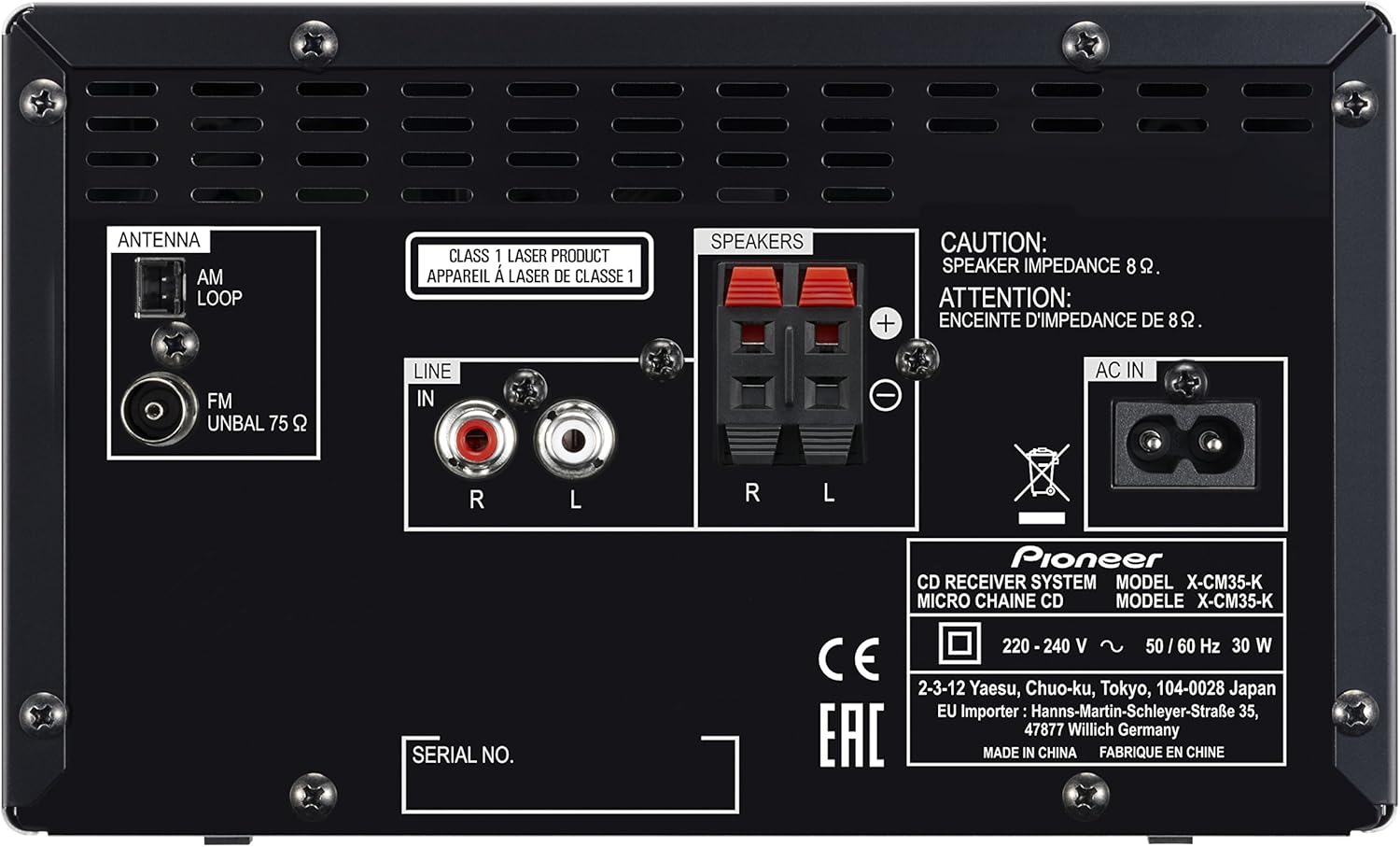
Figure 1: Rear panel connections. Note the speaker terminals labeled R and L, with red (+) and black (-) connectors.
4.3 Connecting the Antennas
- FM Antenna: Connect the FM antenna to the "FM UNBAL 75 Ω" terminal. Extend the wire for optimal reception.
- AM Loop Antenna: Assemble the AM loop antenna and connect its wires to the "AM LOOP" terminals. Position the antenna for best AM reception.
Refer to Figure 1 for the location of the antenna connections.
4.4 Connecting External Devices (Line In)
To connect an external audio device (e.g., a portable music player) using RCA cables, plug the cables into the "LINE IN" R (red) and L (white) jacks on the rear panel. Select the "LINE IN" source on the unit to listen to audio from the connected device.
Refer to Figure 1 for the location of the LINE IN jacks.
4.5 Power Connection
After all other connections are made, connect the power cord to the "AC IN" socket on the rear panel of the main unit, then plug the other end into a wall outlet. The unit operates on 220-240 V~, 50/60 Hz.
Refer to Figure 1 for the location of the AC IN socket.
5. Operation
5.1 Basic Controls
- Power On/Off: Press the Power button on the unit or remote control.
- Volume Adjustment: Use the Volume knob on the unit or the Volume +/- buttons on the remote control.
- Source Selection: Press the Function/Source button on the unit or the dedicated source buttons (CD, TUNER, USB, BLUETOOTH, LINE IN) on the remote control to switch between input sources.
5.2 CD Playback
- Press the CD button to select the CD source.
- Press the Open/Close button to open the CD tray.
- Place a CD (audio CD, CD-R/RW with MP3/WMA files) on the tray with the label side up.
- Press the Open/Close button again to close the tray. Playback will start automatically or after pressing the Play button.
- Use the Skip buttons to navigate between tracks and the Play/Pause button to control playback.
5.3 Radio Operation (FM/AM)
- Press the TUNER button to select the FM or AM band.
- Use the Tuning buttons to manually tune to a station or press and hold to auto-scan for the next available station.
- To store a preset, tune to the desired station, then press the Memory button, and select a preset number using the Tuning buttons. Press Memory again to confirm.
- To recall a preset, use the Preset buttons.
5.4 Bluetooth Connection
The X-CM35BT supports wireless audio streaming via Bluetooth and NFC.
- Pairing via Bluetooth:
- Press the BLUETOOTH button on the unit or remote. The display will show "PAIRING".
- Enable Bluetooth on your smartphone, tablet, or computer and search for available devices.
- Select "Pioneer X-CM35BT" from the list. Once connected, the display will indicate a successful connection.
- Pairing via NFC (Near Field Communication):
- Ensure NFC is enabled on your compatible smartphone or tablet.
- Touch the NFC detection area on your device to the NFC logo on the Pioneer unit.
- Follow the on-screen prompts on your device to complete the connection.
5.5 USB Playback
Connect a USB storage device containing MP3 or WMA audio files to the USB port on the front of the unit. Press the USB button to select the USB source. The unit will automatically detect and play compatible files. Use the navigation buttons to browse folders and tracks.
Note: Some USB devices or file structures may not be fully compatible. Ensure file names are simple and avoid special characters for best compatibility.
5.6 Pioneer Wireless Streaming App
Download the free Pioneer Wireless Streaming App to enhance your audio experience. This app allows for additional sound effects and control options from your smartphone or tablet.
6. Maintenance
- Cleaning the Unit: Wipe the unit with a soft, dry cloth. For stubborn stains, dampen the cloth with a mild detergent solution and wipe gently, then dry thoroughly. Do not use abrasive cleaners, alcohol, benzene, or thinners, as these can damage the finish.
- CD Lens Care: Avoid touching the CD lens. If the lens is dirty, use a commercially available CD lens cleaner.
- Ventilation: Regularly check that the ventilation openings are not blocked by dust or debris.
7. Troubleshooting
If you experience problems with your unit, refer to the following table for possible solutions.
| Problem | Possible Cause | Solution |
|---|---|---|
| No power | Power cord not connected securely. | Check power cord connection to the unit and wall outlet. |
| No sound | Volume is too low; incorrect source selected; speaker cables disconnected. | Increase volume; select correct input source; check speaker cable connections. |
| CD does not play | CD inserted incorrectly; CD is dirty or scratched; unsupported disc format. | Insert CD with label side up; clean or replace CD; ensure disc is an audio CD or CD-R/RW with MP3/WMA. |
| Poor radio reception | Antenna not connected or poorly positioned. | Connect and adjust the FM/AM antennas for better reception. |
| Bluetooth pairing fails | Bluetooth device too far; Bluetooth not enabled on device; unit not in pairing mode. | Move device closer; enable Bluetooth; ensure unit is in pairing mode. |
| USB playback issues | Unsupported file format; USB device not recognized; corrupted files. | Ensure files are MP3/WMA; try a different USB device; reformat USB drive if persistent issues occur. |
8. Specifications
| Model | X-CM35-K |
| Power Output | 2 x 15 W (RMS, 8 Ω) |
| Total Wattage | 30 W |
| Supported Audio Formats | MP3, WMA (via CD-R/RW, USB) |
| Connectivity | USB, Audio Input (RCA), FM/AM Antenna, Headphone Output, Speaker Terminals, Bluetooth, NFC |
| Radio Bands | FM/AM |
| Power Supply | AC 220-240 V~, 50/60 Hz |
| Power Consumption | 30 W |
| Dimensions (W x H x D) | Main Unit: Approximately 200 x 123 x 257 mm |
| Weight | Approximately 6.3 kg |
| Speaker Impedance | 8 Ω |
| Included Batteries | 2 x AAA (for remote control) |
Note: Specifications are subject to change without notice.
9. Warranty & Support
Pioneer products are designed and manufactured to the highest quality standards. For information regarding your product's warranty, please refer to the warranty card included in the original packaging or visit the official Pioneer website for your region. For technical support, service, or inquiries, please contact your local Pioneer dealer or authorized service center. Keep your purchase receipt as proof of purchase for warranty claims.
Pioneer Website: www.pioneer-audiovisual.eu