
1. Product Overview
The YONGNUO YN622C II is a high-performance ETTL wireless flash trigger transceiver designed for Canon cameras. It supports various flash modes including ETTL, Manual, and Multi, along with high-speed sync up to 1/8000s. This device facilitates wireless remote control of multiple flashes, offering enhanced flexibility for photographers.

Figure 1: YONGNUO YN622C II Wireless ETTL Flash Trigger Transceivers.
Key Features:
- Supports YN622 and YN560-RX communication modes.
- Equipped with a quick lock design for secure attachment.
- USB port for firmware upgrades.
- High-Speed Sync (HSS) up to 1/8000s.
- Supports ETTL, Manual (M), and Multi flash modes.
- AF assist beam emitter (AF Lamp) for low-light focusing.
- PC port for triggering strobe flashes.
- Supports 1st and 2nd curtain sync.
- Remote control range of up to 100 meters.
- 7 wireless channels and A/B/C three groups for multi-flash setups.
- Settings saved automatically.
2. Components and Controls
The YN622C II transceiver features a compact design with intuitive controls for ease of use.

Figure 2: Front view of the YN622C II transceiver, highlighting controls.
- CH SET Buttons (C1, C2, C3): Used to select the wireless channel.
- GP SET Buttons (A, B, C): Used to select the flash group.
- Test Button: Fires a test flash.
- Mode Switch (622 / 560-RX / OFF): Selects communication mode or powers off the device.
- Hot Shoe Mount: For attaching to a camera or flash.
- PC Sync Port: For wired connection to studio strobes or other flashes.
- USB Port: For firmware updates.
- Battery Compartment: Houses the AA batteries.

Figure 3: Side view of the YN622C II transceiver with PC sync port.
3. Setup
3.1. Battery Installation
- Locate the battery compartment cover on the underside of the transceiver.
- Slide the cover open.
- Insert two AA batteries, ensuring correct polarity.
- Close the battery compartment cover securely.

Figure 4: Battery compartment with batteries inserted.
3.2. Attaching to Camera and Flash
- Mount one YN622C II transceiver onto your Canon camera's hot shoe. Secure it using the quick lock mechanism. This unit will act as the transmitter.
- Mount your ETTL compatible flash onto another YN622C II transceiver's hot shoe. Secure it. This unit will act as the receiver.
- Alternatively, for studio strobes, connect the receiver transceiver to the strobe's PC sync port using a PC sync cable.

Figure 5: YN622C II mounted on a camera.
3.3. Setting Channels and Groups
Ensure both the transmitter and receiver transceivers are set to the same channel and group for proper communication.
- Use the CH SET buttons (C1, C2, C3) to select one of the 7 available channels.
- Use the GP SET buttons (A, B, C) to assign the flash to one of the three groups.
4. Operating Modes
The YN622C II supports various flash modes to suit different photographic needs.
4.1. ETTL Mode
In ETTL (Evaluative Through-The-Lens) mode, the flash output is automatically determined by the camera's metering system. This mode is ideal for quick and convenient flash photography.
- When using C's series DSLR cameras with an external flash control menu, you can remotely change flash modes and parameters (e.g., TTL ratio) directly from the camera menu.
- Compatible ETTL flashes include Canon 600EX (RT), 580EX II, 430EX II, 320EX, 270EX II, and Yongnuo YN600EX-RT, YN-568EX II, YN-565EX II C, YN-468 II C, YN-467 II C.
- Note: For flashes like 430EX, 550EX, and 580EX, remote control via the camera menu is not supported; parameters must be set manually on the flash.
4.2. Manual (M) Mode
Manual mode allows you to set the flash power output manually. This provides precise control over lighting for consistent results.
- The YN622C II can be used as a receiver with transmitters such as YN-560TX, RF-603 II, or RF-605C in manual mode.
4.3. Multi Mode (Stroboscopic Flash)
Multi mode fires the flash multiple times during a single exposure, creating stroboscopic effects.
4.4. High-Speed Sync (HSS)
High-Speed Sync allows the flash to synchronize with shutter speeds faster than the camera's native sync speed, up to 1/8000s. This is useful for overpowering ambient light or using wide apertures in bright conditions.
4.5. Communication Modes
- YN622 Mode: Standard communication mode for YN622C and YN622C-TX devices.
- YN560-RX Mode: Allows the YN622C II to receive trigger signals from YN560-TX, RF605 (603 mode), and RF603 (II) series products.
5. Operating Instructions
5.1. Basic Wireless Flash Triggering
- Ensure batteries are installed in all transceivers and flashes.
- Attach one YN622C II to your camera's hot shoe (transmitter).
- Attach your flash to another YN622C II (receiver) or connect the receiver to a studio strobe via PC sync cable.
- Power on both the camera, flash, and transceivers.
- Set both the transmitter and receiver(s) to the same channel and group.
- Select your desired flash mode (ETTL, M, Multi) on your camera or flash.
- Press the camera's shutter button to trigger the flash wirelessly. You can also press the Test button on the transceiver to fire a test flash.
5.2. Using with YN622C-TX Controller
For advanced control and a dedicated interface, the YN622C II transceivers can be used with the YONGNUO YN622C-TX E-TTL Wireless Flash Controller.
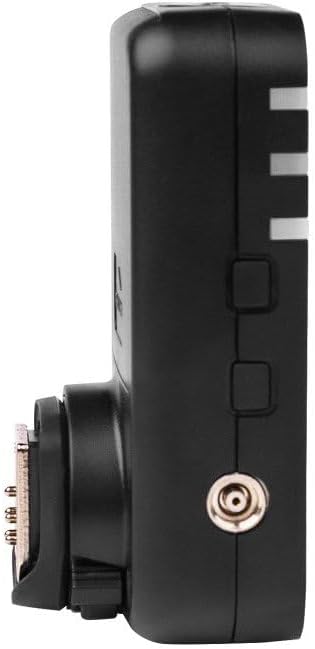
Figure 6: YONGNUO YN622C-TX E-TTL Wireless Flash Controller.
- Mount the YN622C-TX controller onto your camera's hot shoe.
- Set the YN622C II transceivers (acting as receivers) to YN622 communication mode.
- The YN622C-TX allows for remote adjustment of flash power, zoom, and mode for individual groups directly from its LCD screen.
6. Maintenance
- Keep the device dry. Do not handle with wet hands.
- Clean the contacts regularly with a soft, dry cloth to ensure reliable connection.
- Remove batteries if the device will not be used for an extended period to prevent leakage.
- Avoid strong impacts or dropping the device.
- Store in a cool, dry place away from direct sunlight.
7. Troubleshooting
- Flash not firing:
- Check if both transmitter and receiver are powered on.
- Verify that batteries are correctly installed and have sufficient charge.
- Ensure both units are set to the same channel and group.
- Confirm the flash is properly mounted on the receiver or connected via PC sync.
- Check camera and flash settings for compatibility and proper mode selection.
- Inconsistent flash exposure in ETTL mode:
- Ensure the flash is ETTL compatible and correctly set to ETTL mode.
- Allow the camera sufficient time to compute exposure before fully depressing the shutter button.
- Check for obstructions between the transmitter and receiver that might interfere with the signal.
- High-Speed Sync not working:
- Confirm that both your camera and flash support HSS.
- Ensure HSS is enabled in your camera's flash control menu or on the flash unit.
- Firmware update issues:
- Use the correct USB cable and ensure a stable connection to your computer.
- Download the latest firmware from the official YONGNUO website.
- Follow the firmware update instructions precisely.
8. Specifications
| Feature | Specification |
|---|---|
| Product Dimensions | 5.83 x 4.72 x 2.2 inches |
| Item Weight | 1.41 ounces |
| Item Model Number | YN-622C |
| Compatible Mountings | Canon |
| Flash Sync Speed | 1/8000s (High-Speed Sync) |
| Camera Flash Type | Slave |
| Wireless Channels | 7 |
| Wireless Groups | 3 (A/B/C) |
| Communication Mode | FSK 2.4GHz radio wireless transmission |
| Remote Control Distance | Up to 100 meters |
| Power Source | 2 x AA batteries |
9. What's in the Box

Figure 7: Package contents of the YN622C II.
- 2 x YN622C II transceivers
- 1 x Instruction Manual (in English and Chinese)
- 1 x Original Yongnuo Box
10. Warranty and Support
YONGNUO products typically come with a manufacturer's warranty. Please refer to the warranty card included in your product packaging for specific terms and conditions, including warranty period and coverage details.
For technical support, firmware updates, or service inquiries, please visit the official YONGNUO website or contact their customer service directly. Keep your purchase receipt as proof of purchase for warranty claims.


